sketchucation logo sketchucation
    • 登入
    Oops, your profile's looking a bit empty! To help us tailor your experience, please fill in key details like your SketchUp version, skill level, operating system, and more. Update and save your info on your profile page today!
    🔌 Smart Spline | Fluid way to handle splines for furniture design and complex structures. Download

    Joint Push Pull Classic (Old version) - v2.2a - 26 Apr 17

    已排程 已置頂 已鎖定 已移動 Plugins
    368 貼文 150 Posters 2.0m 瀏覽 150 Watching
    正在載入更多貼文
    • 從舊到新
    • 從新到舊
    • 最多點贊
    回覆
    • 在新貼文中回覆
    登入後回覆
    此主題已被刪除。只有擁有主題管理權限的使用者可以查看。
    • J 離線
      JaViXP
      最後由 編輯

      That sounds cool 👍

      I'll try to translate it into Spanish 😄

      "Giving up is way harder than trying"
      JaViXP's Rendering

      1 條回覆 最後回覆 回覆 引用 0
      • simon le bonS 離線
        simon le bon
        最後由 編輯

        Bonjour Fredo,

        "Please help!"
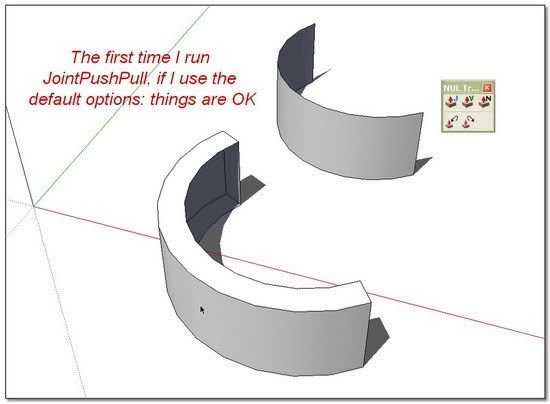
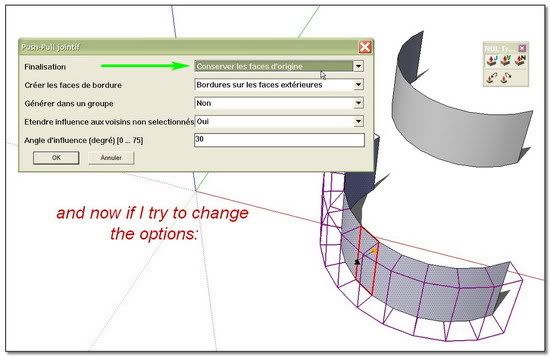
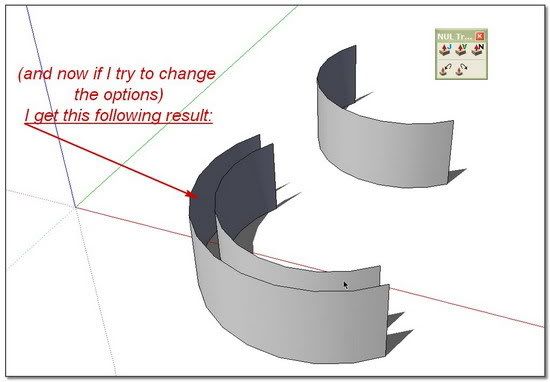
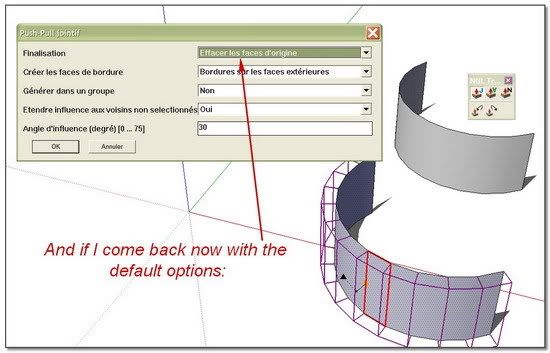
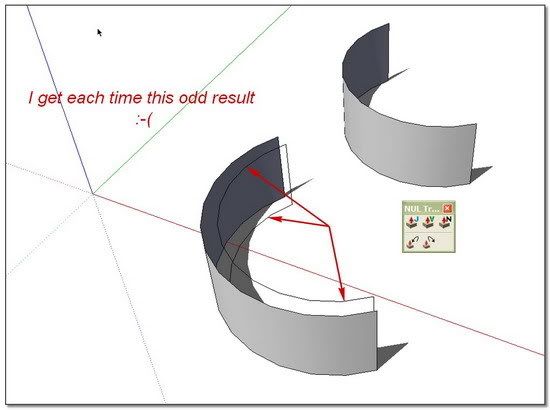
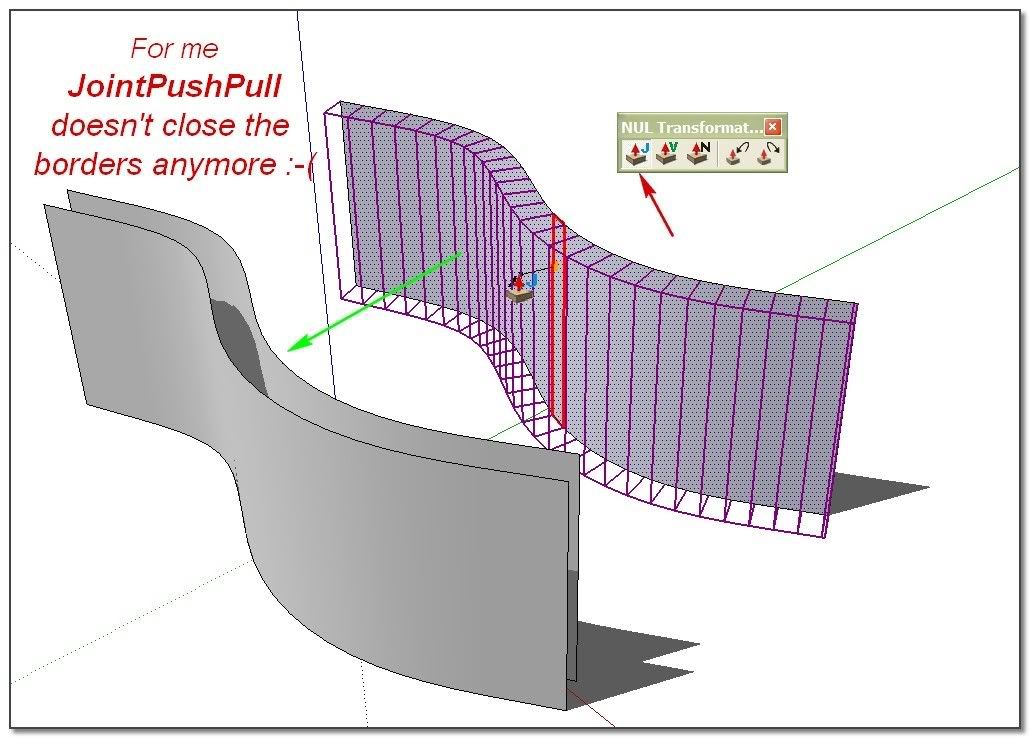
        I don't know why, JointPushPull doesn't close the borders anymore!!"Snarrgg" - - Even if I indicate in configuration menu "borders on external faces" (traduction~!). But it continues to close the sides when I indicate "Borders on all the faces"...
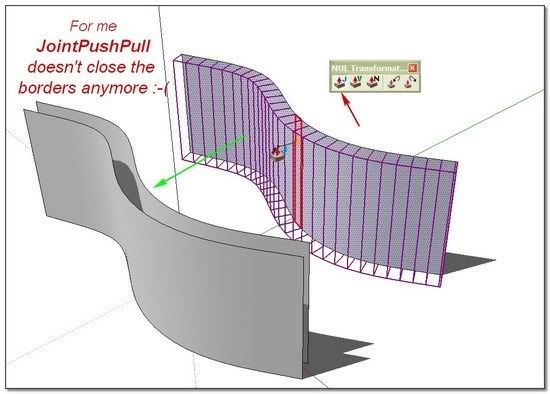
        http://i274.photobucket.com/albums/jj245/Spendauballet/SketchUp/JointPushPull550_001.jpg

        I don't think so because I had already made some tries but may be the version of LibTraductor.rb plays in this fail?
        The one given in the zip package is 13 732 bytes 20/01/2008
        and I use the recent one given with BezierSpline v121 : 19 331 bytes 07/07/2008

        Or may be it is a cause from one of the plugins I have recently installed ❓

        Please Fredo, what can you advise me. (I don't know nothing with ruby console, code etc..)

        --simon.

        1 條回覆 最後回覆 回覆 引用 0
        • fredo6F 離線
          fredo6
          最後由 編輯

          Simon,

          I don't think this is related to LibTraductor.
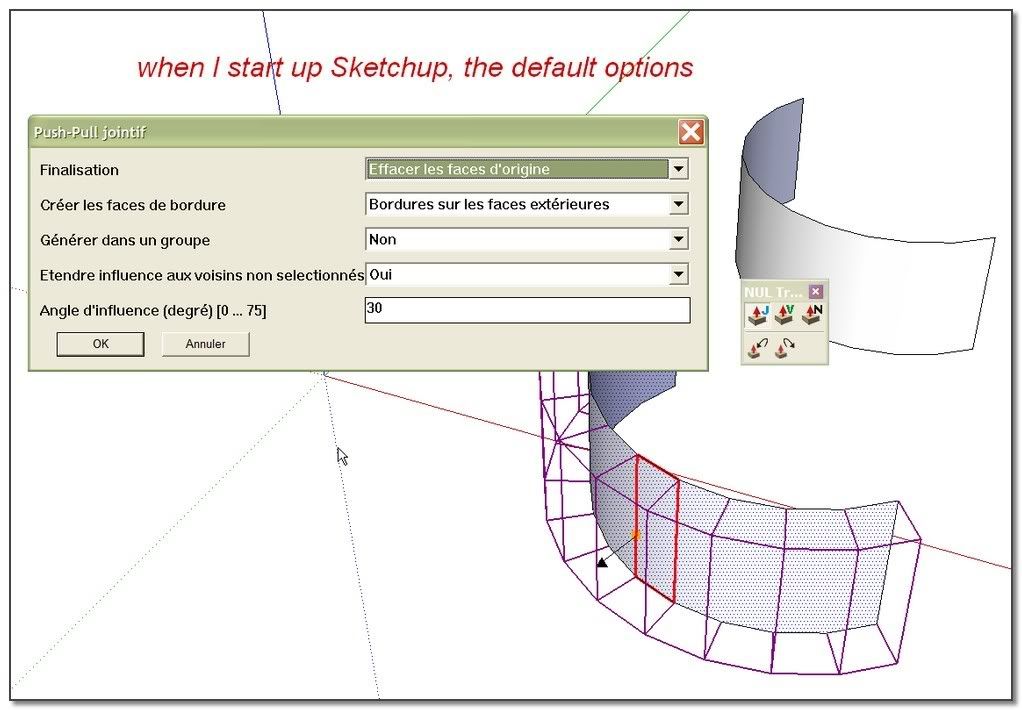
          Normally, when you start up Sketchup, the default option is always to create the border faces.
          Is this what you observe ?

          Fredo

          1 條回覆 最後回覆 回覆 引用 0
          • simon le bonS 離線
            simon le bon
            最後由 編輯

            Dear Fredo,
            Thanks for replying.
            JointPushPull is now a basic tool for me. To see it not working makes me nervous 💚
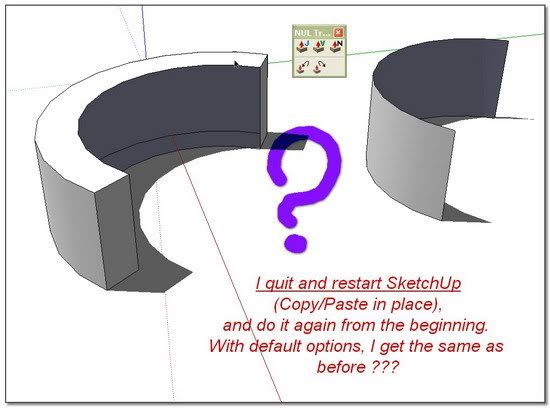
            Here is a more complete report:
            ( it is more easy to me to explain in pictures )
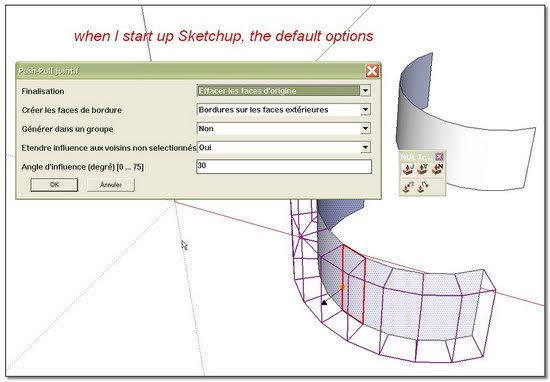
            http://i274.photobucket.com/albums/jj245/Spendauballet/SketchUp/JointPushPull550_002.jpg


            http://i274.photobucket.com/albums/jj245/Spendauballet/SketchUp/JointPushPull550_003.jpg


            http://i274.photobucket.com/albums/jj245/Spendauballet/SketchUp/JointPushPull550_004.jpg


            http://i274.photobucket.com/albums/jj245/Spendauballet/SketchUp/JointPushPull550_005.jpg


            http://i274.photobucket.com/albums/jj245/Spendauballet/SketchUp/JointPushPull550_006.jpg


            http://i274.photobucket.com/albums/jj245/Spendauballet/SketchUp/JointPushPull550_007.jpg


            http://i274.photobucket.com/albums/jj245/Spendauballet/SketchUp/JointPushPull550_008.jpg

            What more test can I do?

            --simon

            1 條回覆 最後回覆 回覆 引用 0
            • fredo6F 離線
              fredo6
              最後由 編輯

              Simon,

              Thanks.
              Although this seems strange, I'll check where the conflict could be.
              By the way, did you install LibFredo6 3.2a yet, or are you still running an earlier version?

              Fredo

              1 條回覆 最後回覆 回覆 引用 0
              • fredo6F 離線
                fredo6
                最後由 編輯

                Simon,

                This has nothing to do with HoverSelect, but with LibFredo. The bug is more subtle than that: it is actually related to how SU and dialog boxes handle accentued characters in drop down controls.

                It only exists in the French version of JPP, because of the text "Bordures sur les faces extérieures", which contains an accent.

                As a result, any call to the dialog box via TAB would make the Border option void.

                In any case, you can change all options using Function keys (F5 to toggle for Thickening, keep face, erase face) for instance, or via the Contextual menu. This works regardless of the above bug.

                Attached is a quick fix to JPP (just removed the accent), but the real fix is in LibFredo. I simply need more time to make it and validate, as this is now shared in all my plugins.

                Fredo

                PS: Thanks to advise is OK


                jointpushpull.rb

                1 條回覆 最後回覆 回覆 引用 0
                • simon le bonS 離線
                  simon le bon
                  最後由 編輯

                  Héy Héy Héy !!!!

                  Merci so much Fredo,

                  Tout est Ok maintenant 😆

                  http://i274.photobucket.com/albums/jj245/Spendauballet/SketchUp/JppIsBack.jpg

                  And some shame on me -1) Not to have thought to download LibFredo6 3.2a last version. 😳 I was v3.1

                  -2)I also hadn't thougth to remove from SU\Plugins the previous LibFredo Directories !!

                  http://i274.photobucket.com/albums/jj245/Spendauballet/generalPicts/libfredo.jpg

                  But at last it was not an unnecessary call to you because of this problem with accentuation..

                  PS: I had completely missed using Function keys and now I'm going to look at them better.

                  So much thanks for everything you do,
                  Simon.

                  1 條回覆 最後回覆 回覆 引用 0
                  • simon le bonS 離線
                    simon le bon
                    最後由 編輯

                    Cher Fredo,

                    I have finally found from where have coming the problem. In a sense it is reassuring because it's coming from you!!
                    I have searched over the last plugins I had installed, removing them one by one, to discover from where was coming the clash.

                    It's coming from two of them, and they are yours: ZLoader__FredoScale.rb and ZLoader__HoverSelect.rb

                    (And this can help: no problem with: ZLoader__OnSurface.rb >> JointPushPull works well)

                    I'm happy because i'm now sure you will find the hit...

                    😄 simon.

                    1 條回覆 最後回覆 回覆 引用 0
                    • M 離線
                      mpowell1234567890
                      最後由 編輯

                      Cool, I noticed the the jointpushpull.rb attachement on this forum dated August 2nd. It is the updated version vurses the older version on the 1st page of this forum?

                      @unknownuser said:

                      Simon,

                      This has nothing to do with HoverSelect, but with LibFredo. The bug is more subtle than that: it is actually related to how SU and dialog boxes handle accentued characters in drop down controls.

                      It only exists in the French version of JPP, because of the text "Bordures sur les faces extérieures", which contains an accent.

                      As a result, any call to the dialog box via TAB would make the Border option void.

                      In any case, you can change all options using Function keys (F5 to toggle for Thickening, keep face, erase face) for instance, or via the Contextual menu. This works regardless of the above bug.

                      Attached is a quick fix to JPP (just removed the accent), but the real fix is in LibFredo. I simply need more time to make it and validate, as this is now shared in all my plugins.

                      Fredo

                      PS: Thanks to advise is OK

                      1 條回覆 最後回覆 回覆 引用 0
                      • fredo6F 離線
                        fredo6
                        最後由 編輯

                        @mpowell1234567890 said:

                        Cool, I noticed the the jointpushpull.rb attachement on this forum dated August 2nd. It is the updated version vurses the older version on the 1st page of this forum?

                        It just fixes the problem signaled by Simon, which only deals with the French translation. There is no other change. So I am not sure you need to download it.
                        I'll publish soon an update to LibFredo6 to fix this bug.

                        Fredo

                        1 條回覆 最後回覆 回覆 引用 0
                        • M 離線
                          mpowell1234567890
                          最後由 編輯

                          @unknownuser said:

                          @mpowell1234567890 said:

                          Cool, I noticed the the jointpushpull.rb attachement on this forum dated August 2nd. It is the updated version vurses the older version on the 1st page of this forum?

                          It just fixes the problem signaled by Simon, which only deals with the French translation. There is no other change. So I am not sure you need to download it.
                          I'll publish soon an update to LibFredo6 to fix this bug.

                          Fredo

                          Cool, thanks. Just checking because last time I tried to use jointpshull.rb a while back, it kept creating bugsplats everytime I selected a surface to pull.

                          1 條回覆 最後回覆 回覆 引用 0
                          • fredo6F 離線
                            fredo6
                            最後由 編輯

                            Small updatepublished in the main thread, mainly:

                            • to put the menus into a submenu of the Tool menu
                            • to resolve the problem of Toolbar persistence on Mac
                              I did make these modifications earlier in April but forgot to update the main post.
                              see http://forums.sketchucation.com/viewtopic.php?f=180&t=6708&p=42783#p42783

                            Fred

                            1 條回覆 最後回覆 回覆 引用 0
                            • K 離線
                              kenkan2
                              最後由 編輯

                              i want to use it!!! But i can't download the file......

                              1 條回覆 最後回覆 回覆 引用 0
                              • Z 離線
                                zzrbjfu
                                最後由 編輯

                                Thanks for sharing!

                                1 條回覆 最後回覆 回覆 引用 0
                                • R 離線
                                  remus
                                  最後由 編輯

                                  Try this: http://forums.sketchucation.com/download/file.php?id=32319 kenkan.

                                  http://remusrendering.wordpress.com/

                                  1 條回覆 最後回覆 回覆 引用 0
                                  • B 離線
                                    burgerlord
                                    最後由 編輯

                                    thanks fredo for the plugin! XD

                                    nature sings in the ears of the world.. be GREEN!

                                    1 條回覆 最後回覆 回覆 引用 0
                                    • W 離線
                                      wooditbegood
                                      最後由 編輯

                                      I am a newbie so please say if this is in wrong place etc.

                                      I downloaded the great looking joint push pull tool for the first time today and it crashes SketchUp Pro 7.1 when I try to use it. I have a Mac G4 1.25MHz. The files seem to be in the Plugin folder correctly.

                                      I have only tried the simplest push pull with a simple rectangle or circle in an otherwise empty model. With any of the tools used to extend a face, when I push enter or context click done, the dialogue box fills with ||||||||||| and then crashes.

                                      Is this a known bug or am I doing something wrong?

                                      Any answers welcome. Thanks very much, Paul

                                      1 條回覆 最後回覆 回覆 引用 0
                                      • fredo6F 離線
                                        fredo6
                                        最後由 編輯

                                        @wooditbegood said:

                                        I have only tried the simplest push pull with a simple rectangle or circle in an otherwise empty model. With any of the tools used to extend a face, when I push enter or context click done, the dialogue box fills with ||||||||||| and then crashes.

                                        Is this a known bug or am I doing something wrong?

                                        Any answers welcome. Thanks very much, Paul

                                        I don't remember crashes have been reported on 7.1 specifically. So I have a few questions to try figuring out where it come from:

                                        1. Do you have some of my other plugins installed, in particular those using LibFredo6?

                                        2. Is the crash a bugsplat (SU exits) or a freeze

                                        3. Is the crash systematic, and for any type of face selection, or does it happen occasionally?

                                        4. Does it happen when you use PushPull by Vector or Normal PushPull?

                                        5. which exact version of SU 7.1 do you have?

                                        6. Maybe, could you post the simple model so that I have a look. However, as I don't have a Mac, I can only check on Windows if this comes from the SU 7.1 release.

                                        Thanks

                                        Fredo

                                        1 條回覆 最後回覆 回覆 引用 0
                                        • W 離線
                                          wooditbegood
                                          最後由 編輯

                                          Fredo,

                                          Many thanks for the speedy reply.

                                          Before answering your questions, just to say that your most excellent plug-in works fine as long as I am editing inside a group, but it does crash if I work in the general scene and try to use any of the three tools to pushpull.

                                          1. I have no other of your plug-ins installed.

                                          2. SU exits immediately after I push enter.

                                          3. Not being SUper proficient, what different types of faces are there to push pull?

                                          4. Happens with either V or N.

                                          5. SU 7.1.5803

                                          6. Hopefully attached below

                                          Paul


                                          JointPushPull Test SU 7.1.skp

                                          1 條回覆 最後回覆 回覆 引用 0
                                          • fredo6F 離線
                                            fredo6
                                            最後由 編輯

                                            @wooditbegood said:

                                            Before answering your questions, just to say that your most excellent plug-in works fine as long as I am editing inside a group, but it does crash if I work in the general scene and try to use any of the three tools to pushpull.

                                            In the model you attached, all geometry is within a group. So you have to be inside the group to do any Push Pull, because the script requires to select faces first. I played with JPP and got no crash (wth SU 7.1.4871, but on Windows XP).
                                            I exploded the group to see if there was an issue, but had no 'success' (I mean no crash).

                                            Could you then describe precisely what is the sequence of actions you do from the model you posted.

                                            Fredo

                                            1 條回覆 最後回覆 回覆 引用 0
                                            • 1
                                            • 2
                                            • 15
                                            • 16
                                            • 17
                                            • 18
                                            • 19
                                            • 19 / 19
                                            • 第一個貼文
                                              最後的貼文
                                            Buy SketchPlus
                                            Buy SUbD
                                            Buy WrapR
                                            Buy eBook
                                            Buy Modelur
                                            Buy Vertex Tools
                                            Buy SketchCuisine
                                            Buy FormFonts

                                            Advertisement