Jumping dwg lines
-
When I import an Autocad 2004 dwg architectural plan, anything that's nested within a block has jagged jumpy edges. See the walls and insulation on the attached jpg.
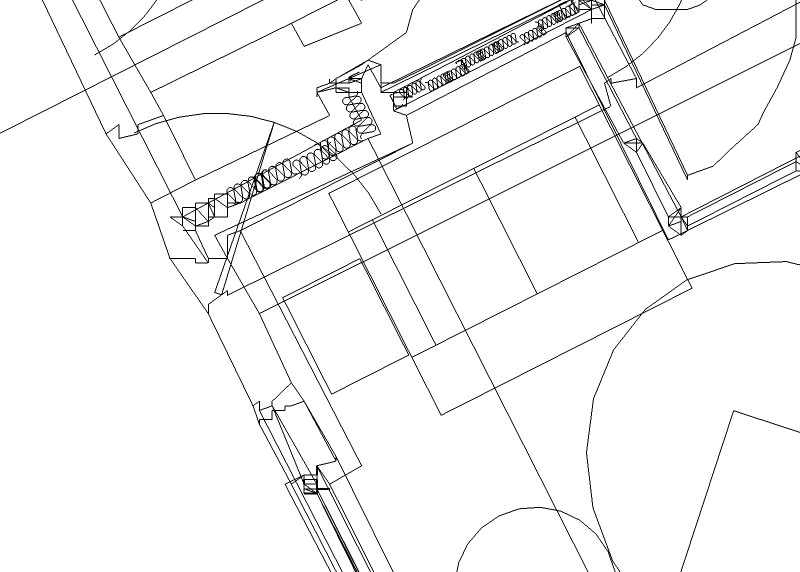
-
I have had this problem, I think it can be caused by not having all your lines drawn on zero in Autocad.
-
Recently I have had a few help request emails at Solosplace regarding this. I have been able to solve this by either opening the offending .dwg in Revit and then export it again or to use Deep Exploration CAD version and convert it to .skb.
-
It seems to go away if I explode blocks in Autocad before importing into SU.
-
Gaius clued me in on this one, and I think Jon is on track. As always in landscape architectural projects, base dwg's are usually geo-referenced from a benchmark sometimes kilometers away. Once exported, I get quirky SU performance.
I learned to track the project coordinates so that I could georeference using the model info "location", basically assigning said coordinates to the SU origin. Once near the origin, the model behaves nicely!
Which begs the question: Why the observed behavior when located far from the origin? Why is it rectified when exported from Revit per Pete's suggestion? Help, SU gurus.
-
Just wondering if there are any further fixes to this problem. Just got some DWG's giving me hell.
-
Landie, the fix is in the file itself. SU cannot handle extremely large geometry (speaking of miles or even hundreds of miles). If the dwg block is referenced somewhere abroad, you get this issue.
- make sure to import the cad geometry NOT preserving drawing origin first of all.
- also the blocks should not have their drawing origin (this is the component axis in SU) very far
- the cad file should not contain any far-away stray geometry (this is often used to mark the origin)
These are the typical cases when a CAD import behaves this way. I also had this but I received things in separate files so I had to import them keeping the drawing origin (so that they are correctly aligned relative to each other) but then I moved everything to the origin (use Move and type [0,0,0] or [0;0;0] on a non-English system and hit Enter).
I was still screwed as the pieces came in as components whose origin now as I moved everything was somewhere in Slovenia (yes, our UTM origin is there) so I had to explode each and right after re-implode them (but it was some 10 pieces altogether).
So all in all, this is not something SU specific but ratehr how a cad file is prepared.
-
Quote oecodesignator:
Which begs the question: Why the observed behavior when located far from the origin? Why is it rectified when exported from Revit per Pete's suggestion? Help, SU gurus.I don't claim to be a guru or even a spokesman for the program. From my observations and reading, I have come to the conclusion that, in the interest of making Sketchup a tool for Everyman, it was intentionally simplified in multiple areas including this one, or, more likely-- it is a side effect of the simplification of the program. Keep in mind that Sketchup utilizes OpenGL as its display engine, and OpenGL itself employs minimalist methodology. It is all about conservation of machine resources.
EDIT:
I suspect that porting it through Revit reset the origins/axes of the offending geometry -
You can use my Axes Tools plugin to reset the origin of all components to the boundingbox corner.
When I import DWGs I usually need to clean it up, partly due to issues like this: origin in model or components far away from the geometry. So I always import into a fresh new file, and run my Axis plugin and do some other cleanup, then copy into main model.
-
Now--ThomThom--he's a guru. Check his glasses

-
Thanks. Really big help. Problem solved
-
@mitcorb said:
I suspect that porting it through Revit reset the origins/axes of the offending geometry
So it does. Revit, although it doesn't use OpenGL, is almost as bad at large coordinates as SU. When Solo imported the DWG file and then re-exported the view, the origin was set at the Revit model origin, not the one in the DWG.
Anssi





Hello! It looks like you're interested in this conversation, but you don't have an account yet.
Getting fed up of having to scroll through the same posts each visit? When you register for an account, you'll always come back to exactly where you were before, and choose to be notified of new replies (either via email, or push notification). You'll also be able to save bookmarks and upvote posts to show your appreciation to other community members.
With your input, this post could be even better 💗
Register Login


Advertisement