Gravel
-
Hi,
I need to create gravel for a scene I'm almost finished with, just showing a bench with an arbour and surrounding plants.
I've tried to simply use a gravel texture and render in KT with bump mapping but because I the camera position needs to be reasonably close up it looks very unrealistic and flat. I'm thinking i'll need to create the gravel from scratch in 3d and then use instancing?
Are there any other ways?
Any help greatly appreciate! -
Since Kerkythea currently does not support displacement maps, instancing would be the ideal way I guess. You can achieve a similar effect straight in SU with Didier's Component Spray Tool as well but as I understand, instancing in Kerky would result in faster rendering as well.
-
Hi
Textures are often best just left alone. If you get a good photo of some gravel, taken at a similar angle to your SU scene, you can just create a ground plane in SU and paste the image onto it. Alternatively insert the image in photoshop/GIMP.
-
A halfway measure would be to use a gravel texture, but throw in enough 3D bits...especially around the edges, where a texture would ordinarily appear completely flat. I've used that here with larger pebbles in this water feature. It looks reasonable even from a fairly low angle.
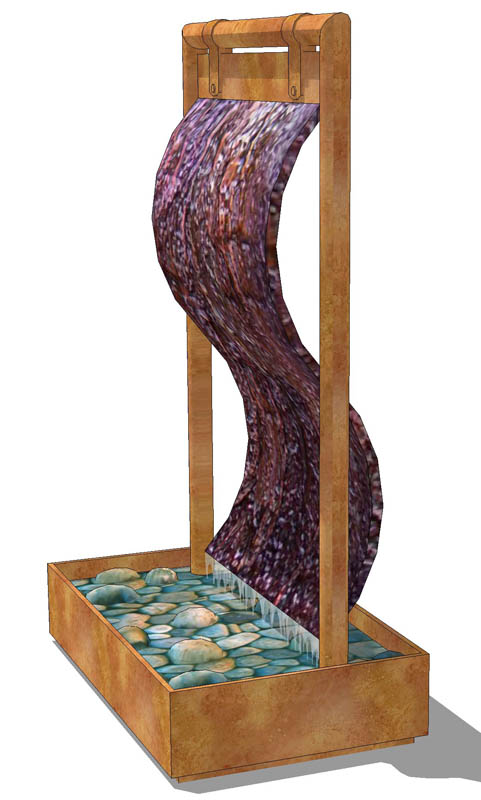
-
Thanks folks. Managed it with instancing in the end, though struggled to make the first pebble.


Hello! It looks like you're interested in this conversation, but you don't have an account yet.
Getting fed up of having to scroll through the same posts each visit? When you register for an account, you'll always come back to exactly where you were before, and choose to be notified of new replies (either via email, or push notification). You'll also be able to save bookmarks and upvote posts to show your appreciation to other community members.
With your input, this post could be even better 💗
Register Login


Advertisement