[Plugin] LordOfTheToolbars - v4.2a - 21 Oct 26




-
NEW RELEASE: LordOfTheToolbars v4.1a - 20 Oct 26
Requirements
- LibFredo6: v16.3a or above
- Sketchup version: SU2017 and above
LordOfTheToolbars 4.1a is a maintenance release including:
- Compatibility SU2027
- Removal of notifications
- Bug fixing
Home Page of LordOfTheToolbars for information and Download.
LordOfTheToolbars 4.1a: Error starting up plugin (creating menus and icons)
undefined methodstartup' for F6_LordOfTheToolbars:Module [in Lib6Core.rb6 - #block in effective_load_part2(): line 1140]Save the Earth, it's the only planet with chocolate.
-
NEW RELEASE: LordOfTheToolbars v4.2a - 21 Oct 26
Requirements
- LibFredo6: v16.3b or above
- Sketchup version: SU2017 and above
LordOfTheToolbars 4.2a is a maintenance release including:
- fix to the plugin, as v4.1a did not work.
- Compatibility SU2027
- Removal of notifications
- Bug fixing
Home Page of LordOfTheToolbars for information and Download.
-
@juju
It should be fixed in LOTT v42.a. Sorry for the inconvenience. -
Does this mean it works now?
-
@fredo6 Thank you for the effort you put into your extensions and maintaining them, it is appreciated.
The Muzwalls loading error seems to be resolved, that error message no longer pops up. Unfortunately the custom toolbars with the MuzWalls items doesn't work, buttons greyed out while the actual MuzWalls toolbars are fine and functional.
The toolbar editing problem, where items are not added once the toolbar was checked to appear on screen, still persists. It doesn't update any custom toolbar additions or omissions once the toolbar was selected to appear on screen. The only work-around is to delete the toolbar and recreate it from fresh.
Save the Earth, it's the only planet with chocolate.
-
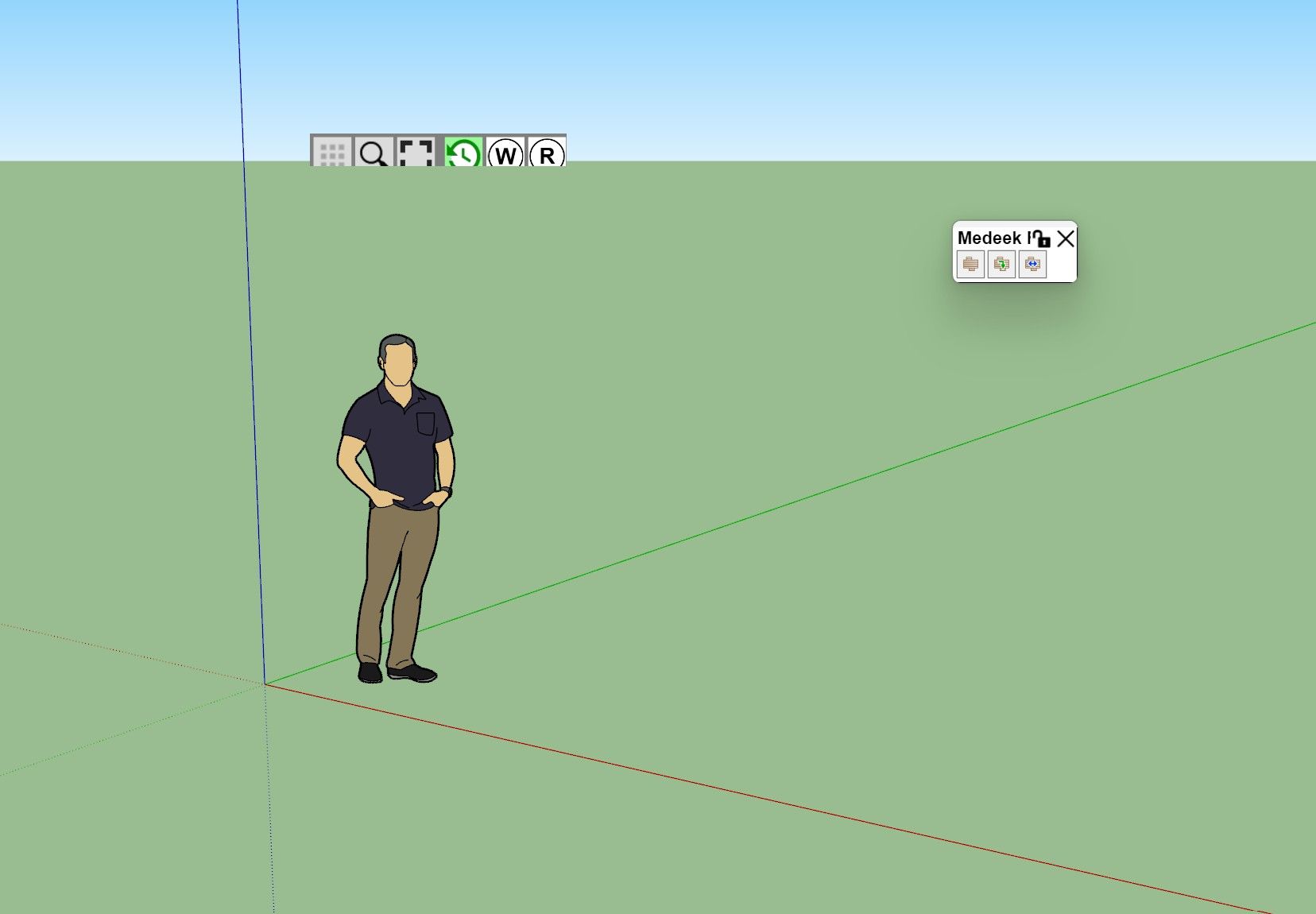
Curious, any idea why my pallets would look like this in 2017 make? Out of support thing?
-
@LinearGraphs
Which scale factor do you use on your monitor?What happen if you close the vignette stripe and reopen it (via the menu Tools > Fredo6 Collection > LordOfTheToolbars?
-
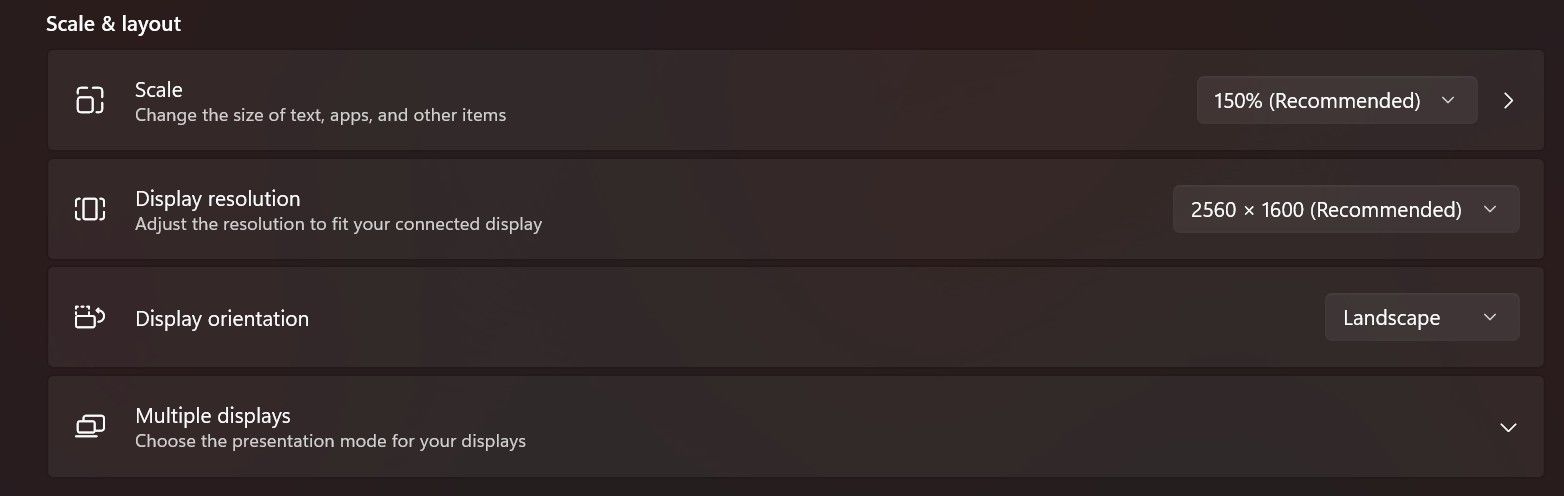
Toggling visibility has no effect. Ive actually reset and all and all my pallets and setting and started from scratch as well. This is a fresh install of the latest version.
-
Did you use 150% before, with the previous version of LibFredo6 and SU2017?
It may be a bug I introduced in LibFredo or LOTT, because SU2017 is the only version that does compute size in physical pixels and not in logical pixels.
However, on my laptop, SU2017 behaves well, but my scale is 125%

-
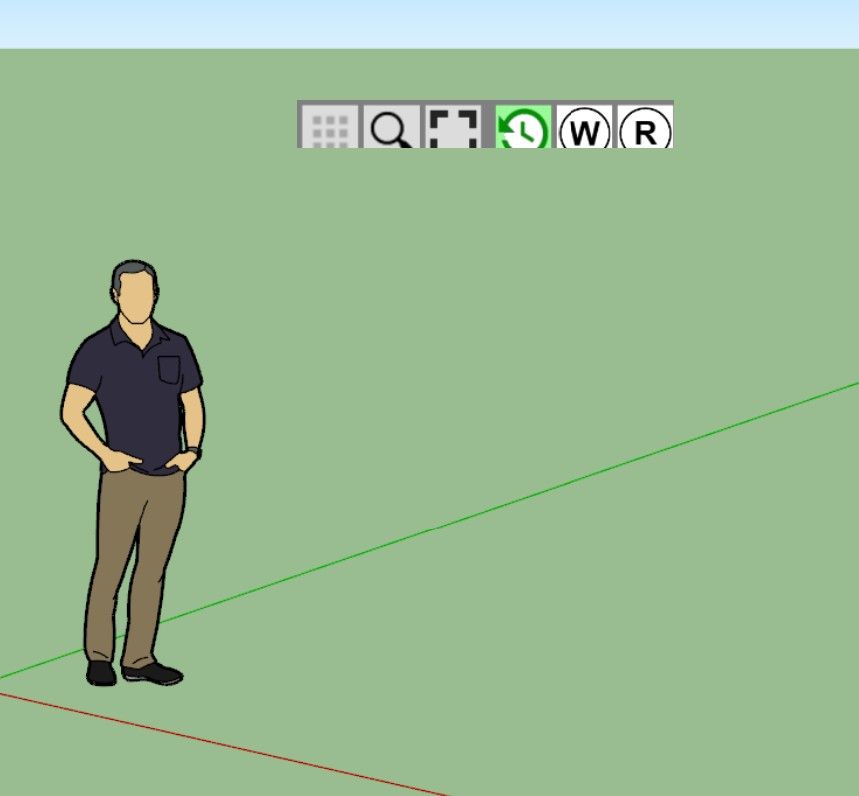
I used to only use external monitors, but now im using the laptop screen. Tried all scale settings, no dice.
-
This is an issue with SU2017, which as far as I remember does not support well external monitors with different resolutions as the main computer screen.
Could you go to Window > LibFredo6 Settings... > Default Parameters
At the top of the dialog box, check the first line and set the factor to 1.5

No guarantee it works, but worth trying.
-
juju said:
@fredo6 Thank you for the effort you put into your extensions and maintaining them, it is appreciated.
The Muzwalls loading error seems to be resolved, that error message no longer pops up. Unfortunately the custom toolbars with the MuzWalls items doesn't work, buttons greyed out while the actual MuzWalls toolbars are fine and functional.
The toolbar editing problem, where items are not added once the toolbar was checked to appear on screen, still persists. It doesn't update any custom toolbar additions or omissions once the toolbar was selected to appear on screen. The only work-around is to delete the toolbar and recreate it from fresh.
@fredo6 Any ideas on this yet?
-
Did you solve the problem of size of the Vignette Stripe?
For Muzwalls, I think this is due to the late loading of the plugin. So, LOTT cannot catch them at startup.
For custom toolbars, I can check, but I think you have to restart Sketchup to see the changes.
-
Unfortunately, no. No dice. Still clipped.
-
@fredo6
Is there no way to reset it? Mind you, this is happening on the laptop display with no external monitors connected. -
For Muzwalls, I think this is due to the late loading of the plugin. So, LOTT cannot catch them at startup.
Is there no load delay option that can be done? Or perhaps advise for MuzWalls authors how to get it to load faster and checking of licensing? There are other extensions that also have to load and check licensing that do seem to load fine.
For custom toolbars, I can check, but I think you have to restart Sketchup to see the changes.
I've tried restarting inbetween, it doesn't make a difference, changes do not reflect once the custom toolbar was actualised (ticked) to show on screen, even if you switch it off and switch it back on later.
-
Custom toolbars cannot be updated once on screen. This is because toolbars in Sketchup are not editable. I think LOTT can just add new icons.
Normally, at next restart, the custom toolbars should show as designed.For Muzwalls, I have to check what is the real issue.
-
In SU26 + latest LOTT I can't move the nether palettes, nor rosette (hope I call them right). unlock - lock, nothing helps. LOTT stuff stuck in the middle of viewport and cause lots of troubles
-
luckily Claude fixed it on my end:
Here’s a bug report you can send to Fredo6. It’s written in his terms, so he can go straight to the code:Subject: LOTT palettes can’t be dragged in SketchUp 2026 (Windows): body_move_start fires, but body_move_perform is never called
Environment
SketchUp 2026, version 26.2.243, Windows (Qt build), display scaling 100%, two monitors (the second is to the left of the main one, so it has negative x)
Lord of the Toolbars 4.2a (21 Oct 26), LibFredo6 16.3b (21 Oct 26)Symptoms
Floating palettes (Traductor::ChromiumWdlg, mini-title style) can’t be dragged, either by the mini title bar or by an empty area of the body.
Because they can’t be moved, the stored position stays wherever the palette first opened (the centre of the screen). So every new session the palette comes back in the centre.What I traced (by wrapping the ChromiumWdlg methods at runtime)
On mouse down over MINITITLE__div_text or THE_WDLG_BODY:
mini_title_event("onMouseDown") → body_move_apply → body_move_start returns true, and @body_moving = true
@body_move_initial_mouse_pos and @body_move_initial_dialog_pos are set correctly
While dragging, the page keeps sending events, about 60 per drag:
mini_title_event("onMouseDrag", "", "MINITITLE__div_text", "x,y,0")
mini_title_event("wposition", …) → notify_size_position
body_move_perform is never called. No true_set_position or set_position either, so the window never moves. No exceptions are raised.
On onMouseUp, body_move_stop is not called either, so @body_moving stays true after the release.
Calling wdlg.set_position or true_set_position from Ruby moves the window fine, including to negative x on the second monitor. So the move itself works; only the drag path never triggers it.Lock state inconsistency
After unlocking with Manager#palette_lock_from_icon, Manager#palette_locked?(sym) returns false and the palette hash has :locked => false. But ChromiumWdlg#body_move_locked? on the same palette still returns true.
body_move_set_locked(false) didn’t change that.
So the window-level lock flag isn’t synced with the palette’s :locked setting.
The lock icon also sits right at the end of the thin mini title bar, so it’s easy to lock a palette by accident while trying to drag it.Two position records
LOTT’s own palette data (:left/:top, in LibFredo6_LOTT_SU2026.dat) and the HtmlDialog geometry vault (LibFredo6_HtmlDialog_SU2026_RT100.dat, xleft/ytop) hold different values for the same palette.
Example for the same palette:
LOTT data: -301, 13
vault: -216, 663
actual window: -187, 663
SketchUp’s own WebCommonDialog_LOTT_* entry in PrivatePreferences.json has yet another value.
It’s worth checking which one wins on restore.Workaround I’m using (proves the rest of the chain works)
A small patch prepended to Traductor::ChromiumWdlg:
body_move_start: if the palette isn’t locked according to Manager#palette_locked?, it remembers GetCursorPos and @body_move_initial_dialog_pos.
mini_title_event("onMouseDrag"): it calls true_set_position(initial_dialog_pos + (GetCursorPos − initial_cursor)).
mini_title_event("onMouseUp"): it calls body_move_stop, sets @body_moving = false, then calls Manager#palette_register_position(sym, x, y) and store_position_by_sketchup_window.With this, palettes drag smoothly and the new position is stored in the LOTT data.
Side note: GetAsyncKeyState(VK_LBUTTON) reported the left button as not pressed during these drags. If the native move code polls the mouse button state, that would explain why it never moves.
Requested fixes
Call body_move_perform (or the equivalent window move) on onMouseDrag while @body_moving is set, and don’t rely on polling the mouse button state.
Call body_move_stop on onMouseUp so the move ends and the position is saved.
Keep ChromiumWdlg#body_move_locked? in sync with the palette’s :locked flag when it is locked or unlocked.
Optional: move the lock icon away from the drag area, or ask for confirmation, to prevent accidental locking.It’s in English since that’s what he uses. If it’s for his forum thread, you could also attach LOTT_DragFix.rb from your Plugins folder as a working reference.
-
I am not sure I understand everything.
-
Can you move a palette interactively or not?
-
Do you want palettes to stay on a different monitor than the one where Sketchup is?
-
Was evrything working fine before you upgraded to LOTT v4.2 and LibFredo6 v16.3b?
-
You said that Claude fixed it (I don't know how, but why not). Do you still have the problem?
-




Hello! It looks like you're interested in this conversation, but you don't have an account yet.
Getting fed up of having to scroll through the same posts each visit? When you register for an account, you'll always come back to exactly where you were before, and choose to be notified of new replies (either via email, or push notification). You'll also be able to save bookmarks and upvote posts to show your appreciation to other community members.
With your input, this post could be even better 💗
Register Login


Advertisement