Fredo6 Lords of toolbar
-
Hi everyone,
Here is my problem.
I can't scroll down the master toolbar manager window anymore in Lords of toolbar.
As you can see, no more scrollbar.
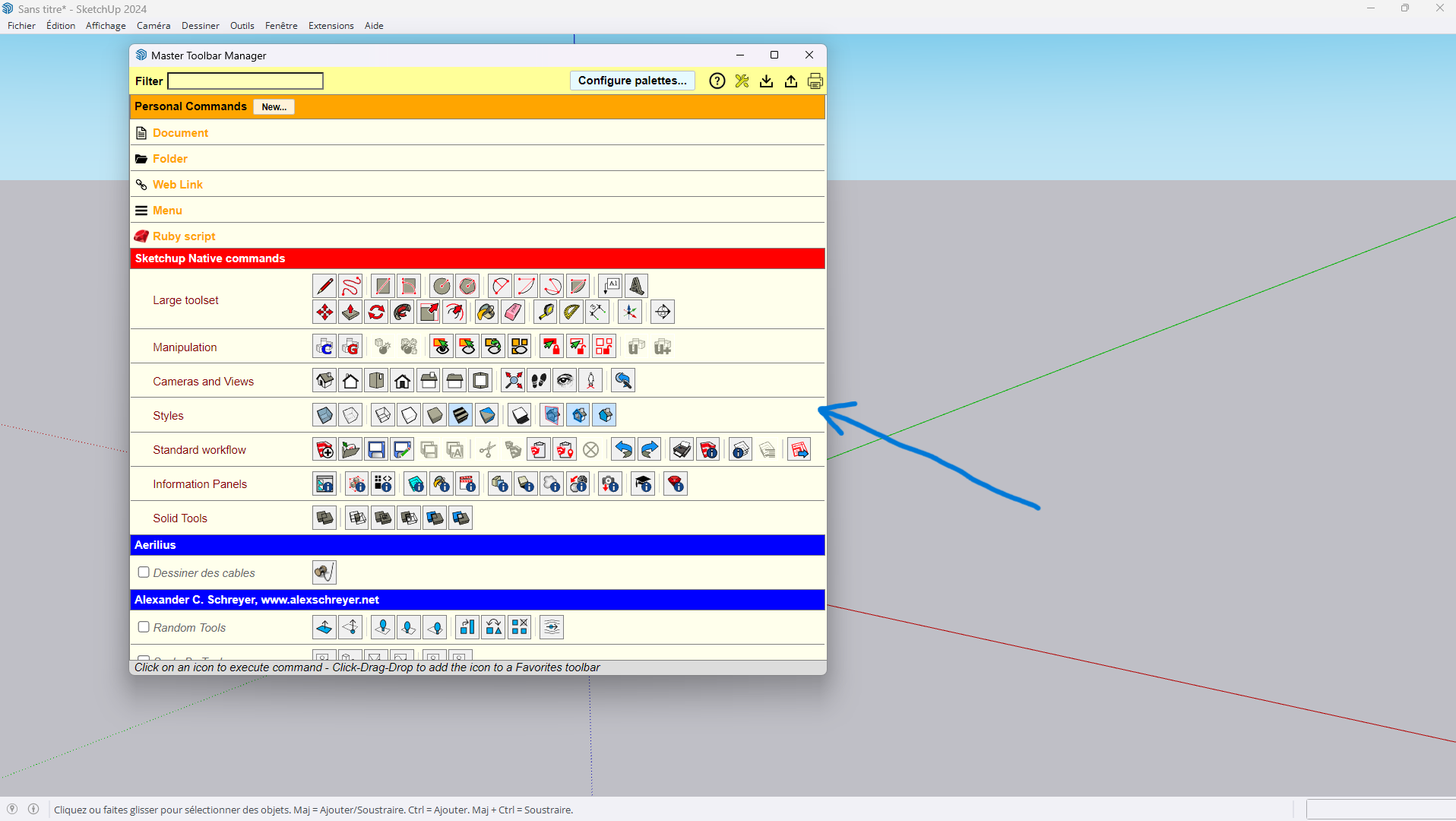
Even in full screen or not, problem is the same.
Windows, SU2024
I have approximatly same configuration at work and it works well.I really do not understand what's happening.
Is anybody can help me?
Thank you guys.
-
If you click your middle mouse button down does it allow you to scroll?
-
Thank you for your answer Rich but already tried and nothing.
I really do not understand because it works well at work.
Maybe a problem with my Nvidia graphic card or something like that. -
If I can not find any solution, is there any way to make custom toolbars ?
Aerilius: Toolbar Editor does not work and also the nativ one


Hello! It looks like you're interested in this conversation, but you don't have an account yet.
Getting fed up of having to scroll through the same posts each visit? When you register for an account, you'll always come back to exactly where you were before, and choose to be notified of new replies (either via email, or push notification). You'll also be able to save bookmarks and upvote posts to show your appreciation to other community members.
With your input, this post could be even better 💗
Register Login


Advertisement