Scenes not remembering that I turned off sections
-
I have a sketchup project with an flyover animation in it. At the end of the animation scenes I have 4 parallel elevation scenes (north, south, east, and west) that are not a part of the animation. When I created theses last 4 scenes I turned of all section planes and section cuts and updated each of the 4 scenes. The problem is that when I recall these scenes I have to again turn off all section planes or I cannot see the building. None of the elevation scenes remember that I turned off the sections.
-
Sounds like you didn't update the style before updating the scenes. Section display is a style setting. If you change anything related to sections you must update the style or create a new one in order for the change to be remembered. If you've made a change to the style and haven't update it, the thumbnail for the style will show the curved arrows.
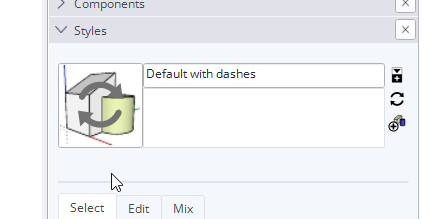
If you don't update the style before creating or updating a scene you should get this warning.
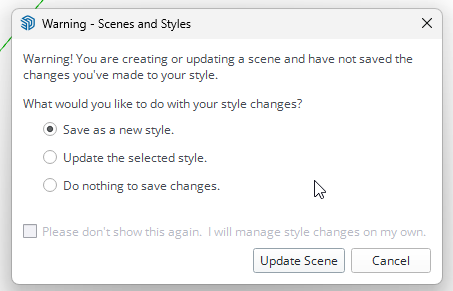
When you get it you need to make a decision. Either save as a new style or update the selected style. Don't just choose Create a new style every time you get it because you may wind up with a bunch of identical styles which makes file management harder. But if you choose to Update the selected style the change will be applied to all of the other scenes that use the style.
If you aren't seeing this warning then at some point you must have selected the Do nothing option and ticked the box to prevent this warning from showing up. You should re-enable the warning since it appears you aren't managing the style changes on your own.
-
Nailed it. Thank you!

Hello! It looks like you're interested in this conversation, but you don't have an account yet.
Getting fed up of having to scroll through the same posts each visit? When you register for an account, you'll always come back to exactly where you were before, and choose to be notified of new replies (either via email, or push notification). You'll also be able to save bookmarks and upvote posts to show your appreciation to other community members.
With your input, this post could be even better 💗
Register Login


Advertisement