Problem flowify
-
hello everyone i'm a beginner in 3d modeling i'm trying to use flowify to create a cushion sofa model...but i don't understand why i keep making mistakes with the plugin...can anyone help me?
-
Can you save your model in SU 2017 for a more large audience ?
Sur I can use the very cool free Pconplanner for that but...
-
No problem...
-
I believe that you must have your surface made with these 4 curves!

Tig has a cool one for that!
Extrude Tool and take the first one
(pick Profil 1, rail 1, rail 2, profil 2 ) -
As your object to project is very heavy that can take several minutes to do!

Object to project must be an only one object and not an object of objects![attachment=0:2lby85ww]<!-- ia0 -->flowify.jpg<!-- ia0 -->[/attachment:2lby85ww]
-
so i downloaded and installed extrude tools..i just don't understand very well what i have to do to my solid with that tools...should i select the figure? make it new with that tools? I don't understand...
-
It's for make your target surface!
You must draw first 4 separated curves (but connected by their extremities)
Call the first TIG Extrude Tool
Click the left Profile 1 (the red one above)
Click one Rail 1 ( up green curve) 2
Click second Rail 2 ( bottom green curve )
Click the right Profile 2 ( red curve again)Like this you can create any surface defined (here 4 ) by 3 or 4 curves (Coons Surfaces)
(in case of 3 curves click twice on the Rail)You can now apply your Flowify with confidence!

-
I'm sorry...but I can't...I try and try...can you tell me where am I going wrong?I create the curve..but all I get with the extrude edges by rail plugin is that...help
-
Your 4 curves are maybe not welded themselve?
And your drawing is curious ! It's a canoe ?
I have just keept your 2 Profiles and draw any 2 other rails...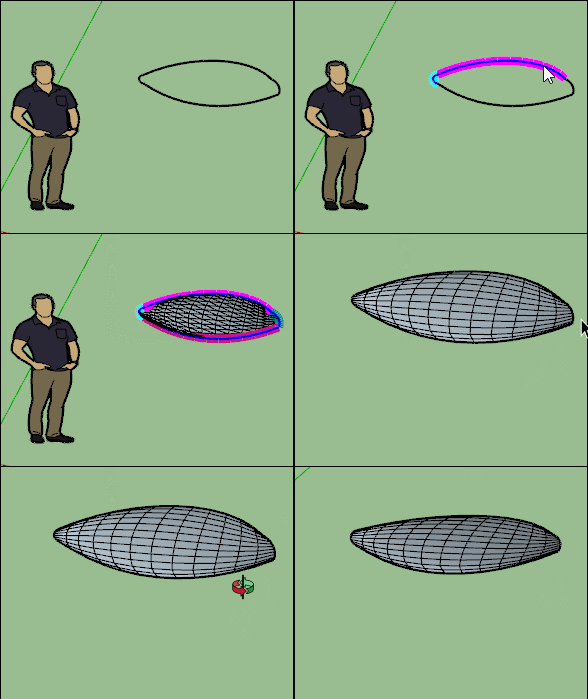
-
not a canoe heheh...so if I make curves at random the plugin works...the shapes come to me...but when I try to do it with the empty profile I drew of the sofa...it can't do it... I don't understand where I went wrong in creating that specific profile...
-
it's not version 2017!
-
-
Yes it's that!
You must redraw your curves for have 4 curves welded!
Use the Fredo Bezier plugin for have automatically 4 curves welded!
https://sketchucation.com/pluginstore?pln=BezierSplineIn another case you can use the recurve plugin for weld curves selected!
https://sketchucation.com/pluginstore?pln=recurve -
but
Diggsey: Recurve v1.5
it doesn't seem to work on sketchup pro 2022...it is installed but I can't find it in the control panel... -
It's a contextual menu on the right Click when something is selected!

Hello! It looks like you're interested in this conversation, but you don't have an account yet.
Getting fed up of having to scroll through the same posts each visit? When you register for an account, you'll always come back to exactly where you were before, and choose to be notified of new replies (either via email, or push notification). You'll also be able to save bookmarks and upvote posts to show your appreciation to other community members.
With your input, this post could be even better 💗
Register Login


Advertisement