Template splash screen
-
In previous editions SketchUp would open with the last template used. Now you have to click a template choice splash screen each time. Is there a way to bypass that screen? And what is the significance of the heart under the template thumbnail? Is it just telling me that it was the last template I used? Thanks!
-
You can choose to skip the Welcome Windowin Preferences. Untick the Show Welcome Window box.
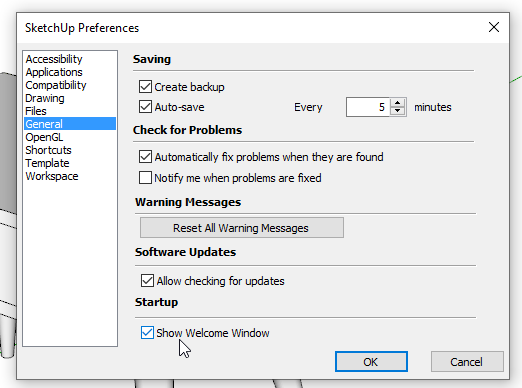
The Welcome window shows not only a variety of available templates but also thumbnails for recent versions which can be useful if you want to open an existing file.As for the hear, that indicates your chosen Default template. If you opt to skip the Welcome window your default template will open.
By the way, please update your profile. It says you're using Sketchup 2016.
-
Thank you! You are always so helpful.


Hello! It looks like you're interested in this conversation, but you don't have an account yet.
Getting fed up of having to scroll through the same posts each visit? When you register for an account, you'll always come back to exactly where you were before, and choose to be notified of new replies (either via email, or push notification). You'll also be able to save bookmarks and upvote posts to show your appreciation to other community members.
With your input, this post could be even better 💗
Register Login


Advertisement