Another WIP-MatchPhoto Example
-
Hi All, just recently I showed a small interior staircase project here which I created completely with SketchUp's MatchPhoto tool for lack of any plan documents.
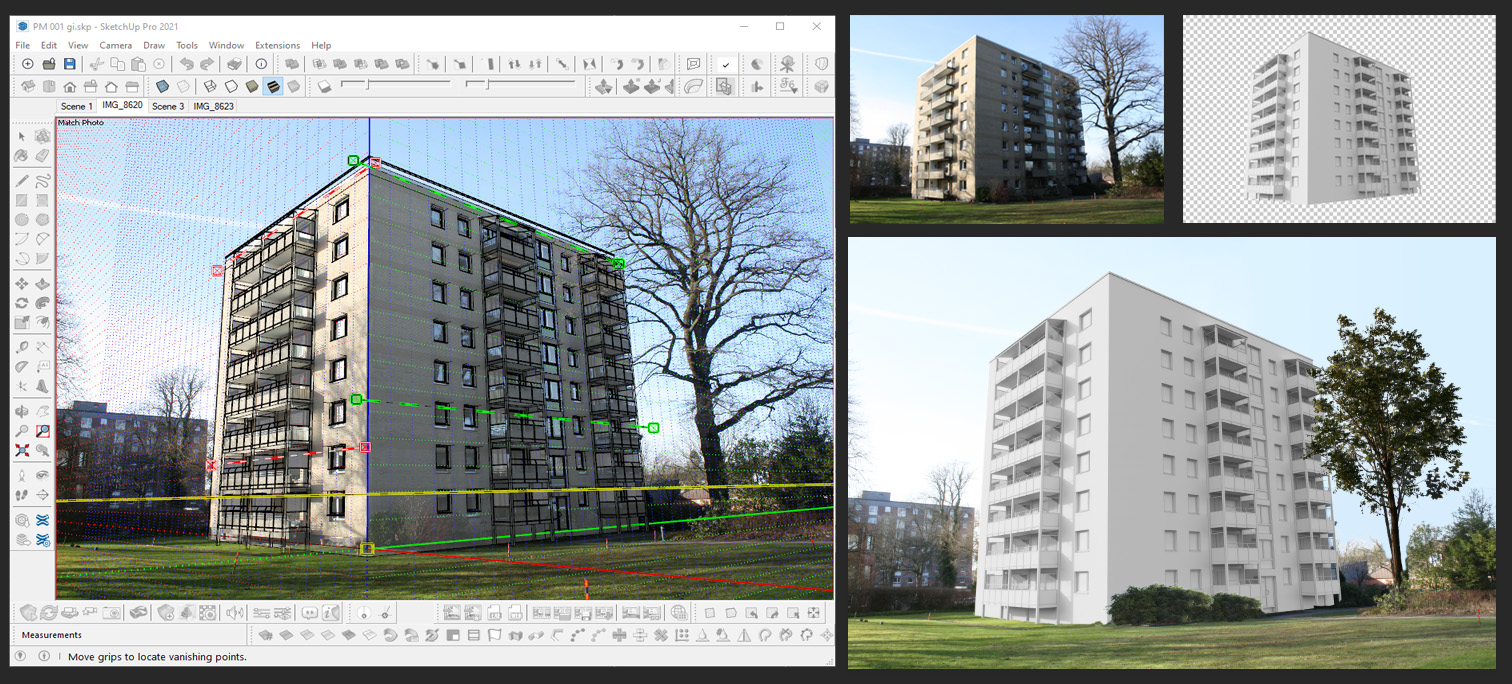
https://sketchucation.com/forums/viewtopic.php?f=333&t=73390#p667893For this new wip-exterior renovation project (facade and balconies) I use MatchPhoto again although this time all blueprints are available . This method I use very often and achieve mainly 2 advantages: One advantage is that the customer will see his lateron rendered project in it´s "real-life" environment and another advantage is that I save myself the trouble of modeling a fake environment which I do neither well nor willingly

 and I change this effort for a much lower effort within Photoshop.
Perhaps a small but helpful (Enscape-)workflow detail - I always adjust the Enscap-render output resolution to exactly the width-to-height ratio of the photo I used within MatchPhoto. In addition and thanks to Julia Eneroth´s Viewport Resizer
 plugin, I also reduce the SkUp viewport to exactly this width-height ratio. So I make sure that all image components (photo, render...) always fit perfectly on each other without any annoying scalings within Photoshop, everything is simple copy - paste in place then.
[SketchUp Pro 2021 / Enscape / Photoshop]
https://extensions.sketchup.com/extension/e1f1acbf-6ad0-4cbb-9836-0e200c59d25b/eneroth-viewport-resizer

Hello! It looks like you're interested in this conversation, but you don't have an account yet.
Getting fed up of having to scroll through the same posts each visit? When you register for an account, you'll always come back to exactly where you were before, and choose to be notified of new replies (either via email, or push notification). You'll also be able to save bookmarks and upvote posts to show your appreciation to other community members.
With your input, this post could be even better 💗
Register Login


Advertisement