Problem with BezierSpline Curves on Macbook Pro
-
Problem with BezierSpline Curves.mov
I installed Frodo's BezierSpline Curves and find some of them work and some don't. A short movie outlining the problem is attached. I tried switching styles, but the same thing happens no matter which style I use.
I'm on a 2011 Macbook Pro running Sierra 10.12.6, using Sketchup Make 2017.
Thanks in advance for any suggestions.
-
@spdbl said:
[attachment=0:33o7k5l2]<!-- ia0 -->Problem with BezierSpline Curves.mov<!-- ia0 -->[/attachment:33o7k5l2]
I installed Frodo's BezierSpline Curves and find some of them work and some don't. A short movie outlining the problem is attached. I tried switching styles, but the same thing happens no matter which style I use.
I'm on a 2011 Macbook Pro running Sierra 10.12.6, using Sketchup Make 2017.
Thanks in advance for any suggestions.
Clear. Could you please open the Ruby Console while trying Polyline Arc Corner or Uniform B-Spline.
Normally, for these tow curves, you are prompted for a parameter, and obviously the dialog box does not show up.
Fredo
-
@fredo6 said:
@spdbl said:
[attachment=0:2ukfzxoj]<!-- ia0 -->Problem with BezierSpline Curves.mov<!-- ia0 -->[/attachment:2ukfzxoj]
I installed Frodo's BezierSpline Curves and find some of them work and some don't. A short movie outlining the problem is attached. I tried switching styles, but the same thing happens no matter which style I use.
I'm on a 2011 Macbook Pro running Sierra 10.12.6, using Sketchup Make 2017.
Thanks in advance for any suggestions.
Clear. Could you please open the Ruby Console while trying Polyline Arc Corner or Uniform B-Spline.
Normally, for these tow curves, you are prompted for a parameter, and obviously the dialog box does not show up.
Fredo
Thanks for your reply, Fredo. My apologies for calling you Frodo - too much Tolkien.
I tried again with the Ruby console open, and a short video is attached. I am heading for the country, and will be offline for a few days, but will check out the forum when I get back.
Thanks again,
Jim
text from ruby dialogue below:
true
Error: #<NameError: uninitialized constant BZ__BSplineU::Traductor>
/Users/jamessrobertson/Library/Application Support/SketchUp 2017/SketchUp/Plugins/bezierspline/BZ__BSplineU.rb:73:inbz_ask_extras' /Users/jamessrobertson/Library/Application Support/SketchUp 2017/SketchUp/Plugins/bezierspline/bezierspline_main.rb:2058:incall'
/Users/jamessrobertson/Library/Application Support/SketchUp 2017/SketchUp/Plugins/bezierspline/bezierspline_main.rb:2058:incall_ask_extras' /Users/jamessrobertson/Library/Application Support/SketchUp 2017/SketchUp/Plugins/bezierspline/bezierspline_main.rb:508:inactivate'
/Users/jamessrobertson/Library/Application Support/SketchUp 2017/SketchUp/Plugins/bezierspline/bezierspline_main.rb:2063:inselect_tool' /Users/jamessrobertson/Library/Application Support/SketchUp 2017/SketchUp/Plugins/bezierspline/bezierspline_main.rb:2063:inmenu_creation_tool'
/Users/jamessrobertson/Library/Application Support/SketchUp 2017/SketchUp/Plugins/bezierspline/bezierspline_main.rb:2452:inblock (2 levels) in load_all_menus' SketchUp:1:incall'
Error: #<NoMethodError: undefined method>' for nil:NilClass> /Users/jamessrobertson/Library/Application Support/SketchUp 2017/SketchUp/Plugins/bezierspline/BZ__BSplineU.rb:112:incurve' -
@spbdl,
Oop! For got one file in the packaging.
Maybe, the best is that you install LibFredo6.
Otherwise, just wait for me to publish an update to BezierSpline
Fredo
-
@fredo6 said:
@spbdl,
Oop! For got one file in the packaging.
Maybe, the best is that you install LibFredo6.
Otherwise, just wait for me to publish an update to BezierSpline
Fredo
Hello again,
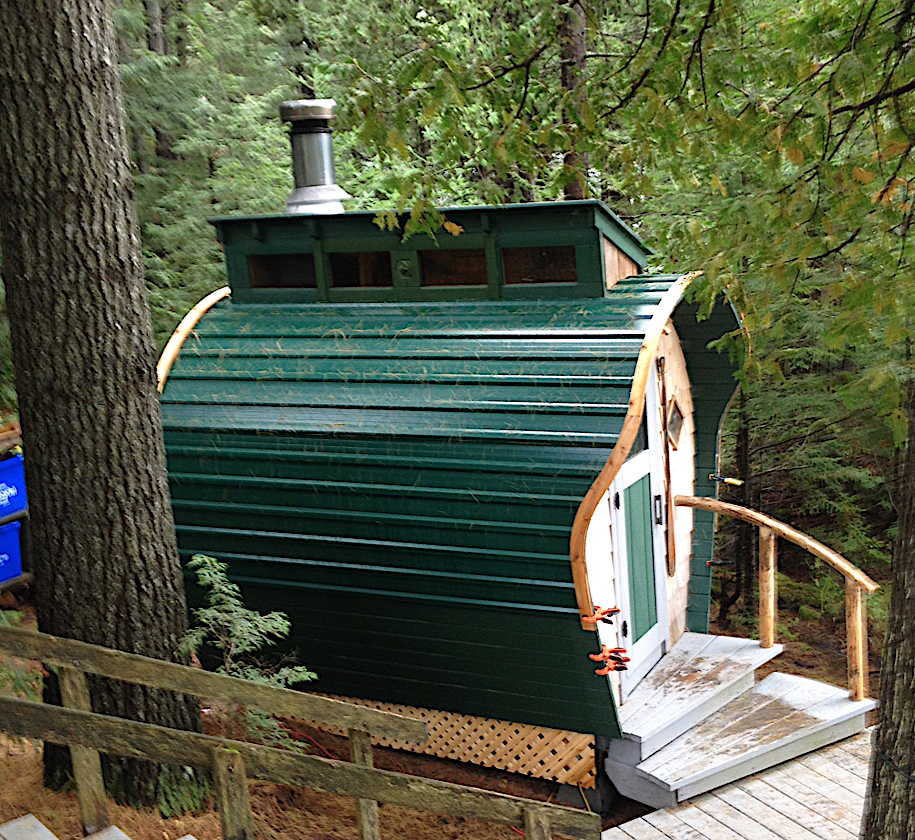
I installed the library and everything is working as it should. thanks again. I was using it to draw out the parts to laminate the curved mouldings for this sauna project, and it came in very handy.
-
YES! Thank you!

Hello! It looks like you're interested in this conversation, but you don't have an account yet.
Getting fed up of having to scroll through the same posts each visit? When you register for an account, you'll always come back to exactly where you were before, and choose to be notified of new replies (either via email, or push notification). You'll also be able to save bookmarks and upvote posts to show your appreciation to other community members.
With your input, this post could be even better 💗
Register Login


Advertisement