Vray isn't using GPU, don't know why.
-
My PC Specs:
AMD Ryzen 1700 (8 core 16 thread)
32GB RAM
GTX 1070 8GB
1TB W.D. Black
Windows 10 Home.I'm using Sketchup trial (I have a bought copy as well of 2017), and bought copy of vray.
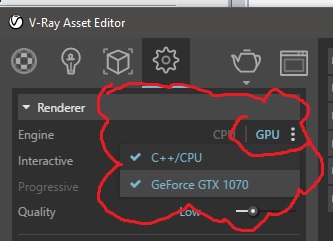
I've been told to set vray in the options to use the gpu, I have set it, it shows in the vray render option (I have cpu or gpu 1070).
When I actually render and I watch task manager my CPU completely maxes out, my ram completely maxes out yet the gpu has taken a florida vacation. Its not doing anything idles around 9% if that.
I see people are saying that VRAY-RT is better for GPU rendering, I have read some unconfirmed information that vray-rt is now integrated with vray in the latest 2017 version so there isn't any more vray rt.
Is there some sort of global settings file I can tell vray to specifically use:
x cpu usage
y gpu usage
z gpu vram
and set max ram allowed consumption.Or is there something else I should be doing?
-
Are you using the latest version V Ray 3.6? ifso your answer is can be found here:
https://www.youtube.com/watch?v=HZ_FeuG9WSEyou need to go to your settings tab and pick the GPU button then click on the 3 dots and look to see if your graphic card is showing up there , you can then pick its on or off. when on a check will show up next to name.
Hello! It looks like you're interested in this conversation, but you don't have an account yet.
Getting fed up of having to scroll through the same posts each visit? When you register for an account, you'll always come back to exactly where you were before, and choose to be notified of new replies (either via email, or push notification). You'll also be able to save bookmarks and upvote posts to show your appreciation to other community members.
With your input, this post could be even better 💗
Register Login


Advertisement