DC multiple different OnClick movements
-
Hi guys,
I've been using DC for my arch projects for long. Nowadays just so I can manipulate some elements of my projects with the onclick function.
I can easily animate a component and that is very handy for showing off some of my stuff to clients or even simply test if some special details are working right.
However I have the need to animate a component in 2 different ways and can't figure out how.
Let's say I have a 1m cube. I want to onClick on it:
1 - once and move it .5m to on the Y axis;
2 - Click twice and move it 1mSo far so good. I can do this and revert to the initial position with: AnimateSlow("Movement",0,.5,1) and then set postion with Y=100*Movement
However I cannot:
3 - Click the third time and rotate it on the Z axis.
4 - Click the forth time and it rotates back on the Z axis.
5 - Click a fifth time and it's back at where it started.Is there a easy way to do 3, 4 and then 5?
If there is a hard way I also don't mind...

Thanks in advance,
João
-
this is probably the clearest and most simple, rather than use a load of conditional statements
source: Jack de Moel
https://forums.sketchup.com/t/multiple-dynamic-components-w-n-a-dynamic-component/48035/6
I made a cube as required based on his technique
-
Thank you very much Philip!
I will try and give you feedback.
-
Philip,
Here's a simple result (click gif):

You were very helpful! Thank you very much!
-
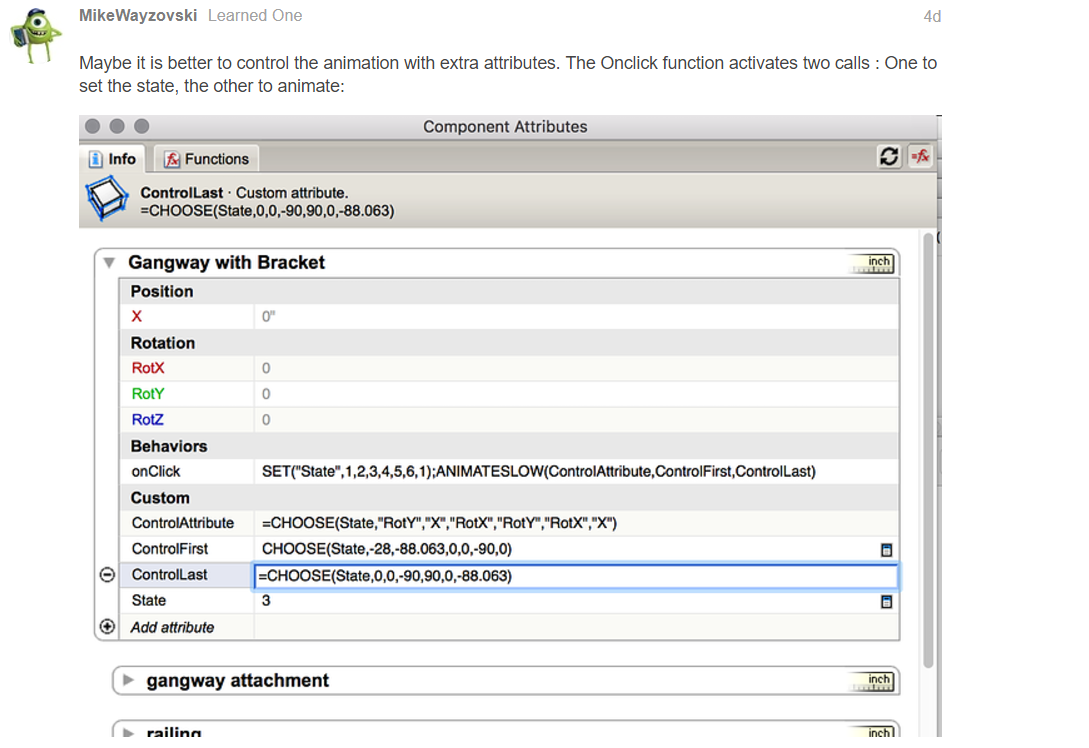
Philip, I tried the solution you posted above, but ended up using 2 AnimateSlow on a single onClick. I didn't know one could use the semicolon to have double results from one onClick function:


Hello! It looks like you're interested in this conversation, but you don't have an account yet.
Getting fed up of having to scroll through the same posts each visit? When you register for an account, you'll always come back to exactly where you were before, and choose to be notified of new replies (either via email, or push notification). You'll also be able to save bookmarks and upvote posts to show your appreciation to other community members.
With your input, this post could be even better 💗
Register Login


Advertisement