Geo-location Imagery & Terrain
-
I'm surprised this hasn't been brought up before but I can't find anything. So here goes...
Sketchup's new geo-location imagery and topography is of such a low quality that it is essentially unusable now. The first image below is from an old model using 2015 Pro. The second image is the same location in 2017 Pro.
It's zoomed in as far as it can and I don't see any other options in the geo-location menu. Are there other setting somewhere or another way to import better quality images and topo info?
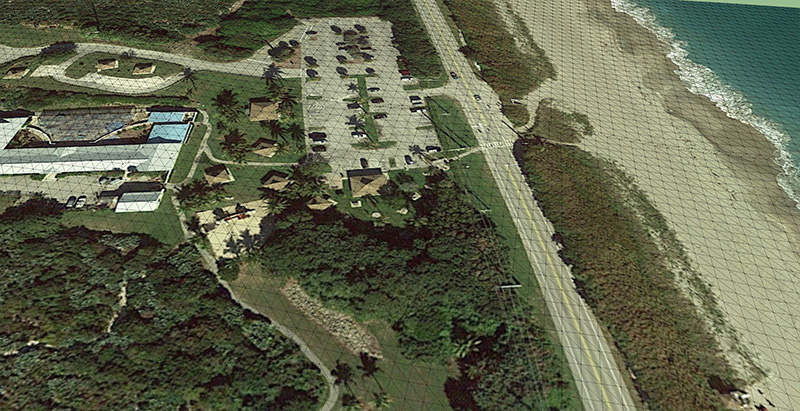
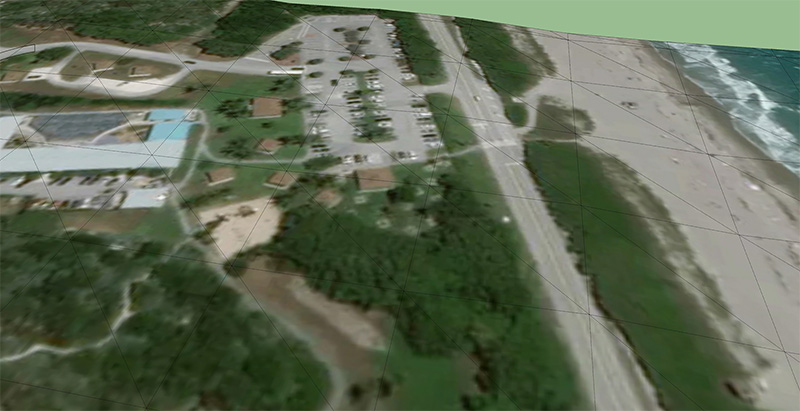
Thanks in advance
-
-
There are other discussions about this. It's complete crap - email Trimble and voice your concerns.
-
Thanks for the link. Guess I wasn't using the right search terms.
Crap indeed. I tried the revit importer-to-revit-to-sketchup work around and it bloated my model from 11mb to 76mb. Since I didn't have time to experiment with other options I had power through it.
I told the higher-ups until I find another route, models requiring heavy terrain work will either have poor accuracy or will require a topo survey. Since topo's are rarely handed out with requests for proposals it looks like we're going with poor accuracy.

Hello! It looks like you're interested in this conversation, but you don't have an account yet.
Getting fed up of having to scroll through the same posts each visit? When you register for an account, you'll always come back to exactly where you were before, and choose to be notified of new replies (either via email, or push notification). You'll also be able to save bookmarks and upvote posts to show your appreciation to other community members.
With your input, this post could be even better 💗
Register Login


Advertisement