Importing Bulk Attribute Values from CSV
-
Hello All,
I have worked up the script below in an attempt to allow myself to input a large number of annoyingly long attributes from a CSV file into a Dynamic Component's attribute dictionary. Yes, yes, I read several places that this has been covered extensively and that TIG had written a few scripts to accomplish this. That was not really my experience and I had trouble finding this exact function. I used TIG's script as a starting point but the documentation on dictionaries seemed thin and not all that helpful.
I also understand that there are a number of extensions out there but I wanted to try and understand what was going on under the hood with dictionaries so I could possibly take advantage of them and hopefully help others do the same.
Here it is:
require 'sketchup.rb'
def set_attribute(key_in, value_in)
	model = Sketchup.active_model
	target_dictionary = model.attribute_dictionaries['dynamic_attributes']
	new_key = target_dictionary[key_in] = value_in
	#puts key_in
end

def load_attributes()

	list = []
	$option_string = "please select an attribute"
	model = Sketchup.active_model
	attrdicts = model.attribute_dictionaries
	attrdict = attrdicts["dynamic_attributes"]
	attrdict.each{|key,value|
		#puts "key; #{key} | value; #{value}"
		$option_string += "|#{key}"
	}
	list << $option_string

	prompts = ["What attribute would you like to input values for?"]
	defaults = ["_leny_options"]
	$input = UI.inputbox(prompts, defaults, list, "Select Attribute Target")
	#puts $input

	$att_string = ""
	csv=UI.openpanel("Choose CSV File...")
	lines=IO.readlines(csv)
	lines.each{|line|
		line.chomp!
		next if line.empty?
		new_line = line.gsub(",", " ") #replace commas
		new_line = new_line.gsub("  ", "") #replace double spaces
		new_line = new_line.gsub("   ", "") #replace double spaces (again)
		new_line = new_line.gsub("& ", "&") #replace double spaces (again)
		new_line = new_line.gsub("= ", "=") #replace double spaces (again)
		$att_string += new_line.to_s
	}
	#puts $att_string
	set_attribute('_wall_thickness_options',$att_string)
	#set_attribute($input,$att_string)
end

def report_attributes()
	model = Sketchup.active_model
	attrdicts = model.attribute_dictionaries
	attrdict = attrdicts["dynamic_attributes"]
	attrdict.each{|key,value|
		puts "key; #{key} | value; #{value}"
	}
end
Now for my dilemma...
You can see that I added a drop-down prompt for a user to select a particular key that is already in the model (I'm only focusing on the 'dynamic_attributes' library though there are others). Well, the input I get from the user prompt ends up adding a key to the dictionary like so...
If I wanted to overwrite the key _lenx_options for example, it comes in as a NEW key called ["_lenx_options"] which is not in fact setting the existing key but creating a new one.
How can I pass the input argument correctly to the set_attribute def?
Thanks for any help!
-
Perhaps if you would share a sample model containing the dynamic component and a sample .csv file.
-
Sure! Here is a simple wall DC that I wanted to bring in a large list of wall assemblies:
A basic wall dynamic component
and here is the list of assemblies I put together in a spreadsheet - you will see that I added the "&" separator and "=" value indicator right in the spreadsheet because I was being lazy about the string cleanup...
A list of assemblies for commercial construction
And for convenience, here is the ruby file too!
-
A few somewhat random comments...
Please enclose your Ruby code inside your own module.
Do not use 'global' variables [$xxx].
Using instance-variables [@xxx] will work within your module across its various methods...
Although as far as I can see the $xxx ones you've made are only used in one method anyway, so they are unnecessary.The various DC attributes belong to each component's definition - not to the model - UNLESS that entire model is itself a DC...
-
Thanks TIG... will do. Any idea about the problem I mentioned?
-
The DC dictionary attached to the model reports as this:
` Sketchup.active_model.attribute_dictionaries['dynamic_attributes'].each_pair{|k,v| puts "#{k} = #{v}" }_formatversion = 1.0
_has_movetool_behaviors = 0.0
_hasbehaviors = 1.0
_lastmodified = 2017-06-04 23:49
_lengthunits = INCHES
_lenx_label = LenX
_lenx_nominal = 766.4475123076386
_leny_access = LIST
_leny_formlabel = THICKNESS
_leny_label = LenY
_leny_nominal = 6.500000000000207
_leny_options = &--------------INTERIOR--------------=0&1.500 : 0.625 GWB | 0.875 METAL FRAMING=1.500&3.125 : 0.625 GWB | 2.500 METAL FRAMING=3.125&4.250 : 0.625 GWB | 3.625 METAL FRAMING=4.250&6.625 : 0.625 GWB | 6.000 METAL FRAMING=6.625&8.625 : 0.625 GWB | 8.000 METAL FRAMING=8.625&4.875 : 0.625 GWB | 3.625 METAL FRAMING | 0.625 GWB =4.875&7.250 : 0.625 GWB | 6.000 METAL FRAMING | 0.625 GWB =7.250&9.250 : 0.625 GWB | 8.000 METAL FRAMING | 0.625 GWB =9.250&5.250 : 0.625 GWB | 3.625 METAL FRAMING | 0.500 CBB | 0.500 TILE=5.250&7.625 : 0.625 GWB | 6.000 METAL FRAMING | 0.500 CBB | 0.500 TILE=7.625&9.625 : 0.625 GWB | 8.000 METAL FRAMING | 0.500 CBB | 0.500 TILE=9.625&6.125 : 0.625 GWB | 0.625 GWB | 3.625 METAL FRAMING | 0.625 GWB | 0.625 GWB =6.125&8.500 : 0.625 GWB | 0.625 GWB | 6.000 METAL FRAMING | 0.625 GWB | 0.625 GWB =8.500&10.500 : 0.625 GWB | 0.625 GWB | 8.000 METAL FRAMING | 0.625 GWB | 0.625 GWB =10.500&7.625 : 7.625 CMU =7.625&11.625 : 11.625 CMU =11.625&8.875 : 0.625 GWB | 7.625 CMU | 0.625 GWB =8.875&12.875 : 0.625 GWB | 11.625 CMU | 0.625 GWB =12.875&--------------EXTERIOR--------------=0&5.875 : 0.625 GWB | 3.625 METAL FRAMING | 0.625 FRGWB | 1.000 FIN=5.875&8.250 : 0.625 GWB | 6.000 METAL FRAMING | 0.625 FRGWB | 1.000 FIN=8.250&10.250 : 0.625 GWB | 8.000 METAL FRAMING | 0.625 FRGWB | 1.000 FIN=10.250&6.625 : 0.625 GWB | 3.625 METAL FRAMING | 0.750 PLYWOOD | 0.625 FRGWB | 1.000 FIN =6.625&9.000 : 0.625 GWB | 6.000 METAL FRAMING | 0.750 PLYWOOD | 0.625 FRGWB | 1.000 FIN =9.000&11.000 : 0.625 GWB | 8.000 METAL FRAMING | 0.750 PLYWOOD | 0.625 FRGWB | 1.000 FIN =11.000&9.500 : 0.625 GWB | 3.625 METAL FRAMING | 0.625 FRGWB | 1.000 AIR | 3.625 BRICK =9.500&11.875 : 0.625 GWB | 6.000 METAL FRAMING | 0.625 FRGWB | 1.000 AIR | 3.625 BRICK =11.875&13.875 : 0.625 GWB | 8.000 METAL FRAMING | 0.625 FRGWB | 1.000 AIR | 3.625 BRICK =13.875&9.875 : 0.625 GWB | 7.625 CMU | 0.625 FRGWB | 1.000 FIN=9.875&13.875 : 0.625 GWB | 11.625 CMU | 0.625 FRGWB | 1.000 FIN=13.875&13.500 : 0.625 GWB | 7.625 CMU | 0.625 FRGWB | 1.000 AIR | 3.625 BRICK =13.500&17.500 : 0.625 GWB | 11.625 CMU | 0.625 FRGWB | 1.000 AIR | 3.625 BRICK =17.500&13.875 : 0.625 GWB | 8.000 CMU | 0.625 FRGWB | 1.000 AIR | 3.625 BRICK =13.875&10.250 : 0.625 GWB | 8.000 TILT WALL | 0.625 FRGWB | 1.000 FIN=10.250&10.250 : 0.625 GWB | 8.000 TILT WALL | 0.625 FRGWB | 1.000 FIN=10.250&13.875 : 0.625 GWB | 8.000 TILT WALL | 0.625 FRGWB | 1.000 AIR | 3.625 BRICK =13.875&13.875 : 0.625 GWB | 8.000 TILT WALL | 0.625 FRGWB | 1.000 AIR | 3.625 BRICK =13.875
_leny_units = DEFAULT
_lenz_access = TEXTBOX
_lenz_formlabel = WALL_HEIGHT
_lenz_label = LenZ
_lenz_nominal = 120.0
_lenz_units = DEFAULT
_name = WALL_COMMERCIAL
_scaletool_formlabel = ScaleTool
_scaletool_label = ScaleTool
_scaletool_units = STRING
lenx = 174.3749999999994
leny = 7.625
lenz = 120
scaletool = 124`I assume that you don't want this block of text associated with one 'key' ??
You need to construct your CSV in a way that gives what you want.
When you read it to make 'lines' you can iterate each 'line', using chomp! to snip off the \n carriage-return.
You can then use split at ',' to access various key/value pairs ??At the moment I am unclear about what it is you want to end up with after running your code...
Perhaps trying a very simple version first will help ??? -
That key is actually EXACTLY what I want. I just had to do it by hard coding the $input argument in set_attribute($input,$att_string) to read "_leny_options" (a string) in order to get it to work. When I feed in $input from UI.inputbox it comes creates a separate new key called ["_leny_options"] with brackets and quotes around it. That is the problem - somehow I need to format $input so this does not happen.
The reason I want that key to be so long is because this is what I want the drop-down to look like:
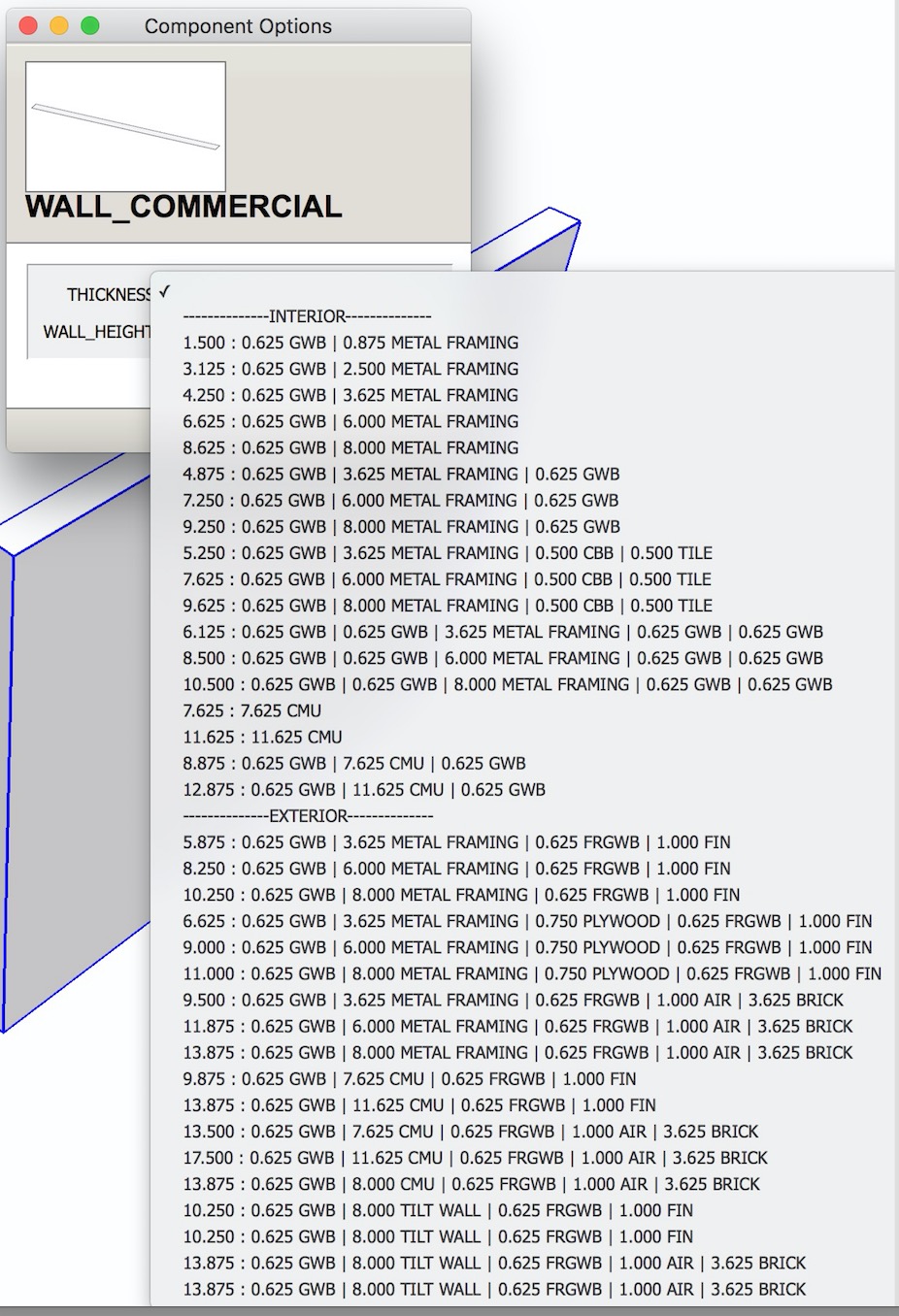
peripheral information...
drop-down attributes are stored in a &key1=value1&key2=value2&key3=value3... format in the dictionary
and
UI.inputbox will present a drop-down if given 4 arguments and the 3rd argument is a bar separated list.
-
I understand how a drop-down list is constructed for a DC.
Now I see beyond your complexity...How about this ?
def set_attribute(key_in=nil, value_in='') return unless key_in Sketchup.active_model.set_attribute("dynamic_attributes", key_in.to_s, value_in.to_s ) end -
Thanks TIG. I'll give that a try.
Of course you do... that info is for anyone else reading this thread and having a similar struggle as I did.
-
Alright @TIG, I re-wrote this script trying to comply with your suggestions and it worked! Thank you for your help!
Here is the updated script for your entertainment:
require 'sketchup.rb' module AttModuleTop module AttModuleBottom class<<self def list_att() model = Sketchup.active_model attrdicts = model.attribute_dictionaries attrdict = attrdicts["dynamic_attributes"] if(!attrdict) UI.messagebox("AttTools is intended for use within Dynamic Component Files only") else @prompts = ["What attribute to overwrite"] @defaults = [""] @list = [] @option_pairs = "" option_string = "select attribute to overwrite" attrdict.each{|key,value| @option_pairs += "key; #{key} | value; #{value}\n" option_string += "|#{key}" } @list << option_string end end def replace_att() list_att() new_prompt = "What should it be set to?" @prompts << new_prompt input = UI.inputbox(@prompts, @defaults, @list, "Select Attribute Target") set_result = Sketchup.active_model.set_attribute("dynamic_attributes", input[0], input[1] ) UI.messagebox('succesfully set ' + input[0] + ' to ' + set_result + '!') end def load_att() list_att() input = UI.inputbox(@prompts, @defaults, @list, "Select Attribute Target") att_string = "" csv=UI.openpanel("Choose CSV File...") lines=IO.readlines(csv) lines.each{|line| line.chomp! next if line.empty? new_line = line.gsub(",", " ") #replace commas new_line = new_line.gsub(" ", "") #replace double spaces new_line = new_line.gsub(" ", "") #replace double spaces (again) new_line = new_line.gsub("& ", "&") #replace double spaces (again) new_line = new_line.gsub("= ", "=") #replace double spaces (again) att_string += new_line.to_s } set_result = Sketchup.active_model.set_attribute("dynamic_attributes", input[0], att_string.to_s ) UI.messagebox('succesfully set ' + input[0] + ' to ' + set_result + '!', MB_MULTILINE) end def report_att() list_att() if(@option_pairs) UI.messagebox(@option_pairs, MB_MULTILINE) #puts @option_pairs end end end # end of class end # end of module AttModuleBottom end # end of module AttModuleTop # menus ############################################################## if( not file_loaded?("att_tools.rb") ) main_menu = UI.menu("Plugins").add_submenu("Att Tools") main_menu.add_item("Load Attributes") {(AttModuleTop;;AttModuleBottom;;load_att)} main_menu.add_item("Replace Attribute") {(AttModuleTop;;AttModuleBottom;;replace_att)} main_menu.add_item("Report Attributes") {(AttModuleTop;;AttModuleBottom;;report_att)} end file_loaded("att_tools.rb") -
BTW, the answer to the original question was that
input = UI.inputbox(@prompts, @defaults, @list, "Select Attribute Target")returns an array of values because typically the inputbox would present more than 1 option. In my case there was only one input or prompt so when I put input into
set_result = Sketchup.active_model.set_attribute("dynamic_attributes", input, att_string.to_s )I was actually sending in an array and thus setting a new key in the format ["whatever user put into inputbox"]. Even .to_s did not seem to help...
set_result = Sketchup.active_model.set_attribute("dynamic_attributes", input.to_s, att_string.to_s )The answer was to get the first item in the array like so:
set_result = Sketchup.active_model.set_attribute("dynamic_attributes", input[0], att_string.to_s )


Hello! It looks like you're interested in this conversation, but you don't have an account yet.
Getting fed up of having to scroll through the same posts each visit? When you register for an account, you'll always come back to exactly where you were before, and choose to be notified of new replies (either via email, or push notification). You'll also be able to save bookmarks and upvote posts to show your appreciation to other community members.
With your input, this post could be even better 💗
Register Login


Advertisement