Automatically adjust boundaries to predefined area
-
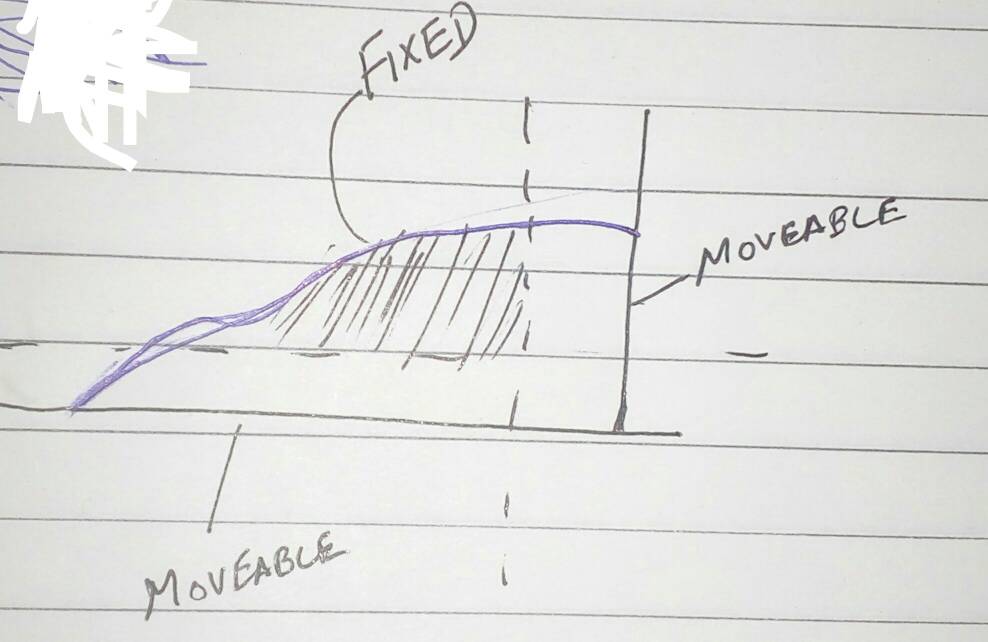
How can I make an enclosed pre specified area (say 1502 sqm.) in Sketchup in such a way that a curve remains fixed and if I move one line enclosing it then the other line moves automatically.?
-
I don't really understand your question, in particular the part about "a curve remains fixed". If it remains truly fixed, it will not reach the moved edges, and if it stretches to stay connected it is not "fixed".
If you are asking how to make the area larger without altering its shape, please take a look at the Scale tool. But if you are asking to have a second edge move in the y direction when you move a first edge in the x direction (ignoring the question above about the curve staying "fixed"), there is no built-in capability to do that in SketchUp. It would require an extension or perhaps a Dynamic Component to program this special behavior.

Hello! It looks like you're interested in this conversation, but you don't have an account yet.
Getting fed up of having to scroll through the same posts each visit? When you register for an account, you'll always come back to exactly where you were before, and choose to be notified of new replies (either via email, or push notification). You'll also be able to save bookmarks and upvote posts to show your appreciation to other community members.
With your input, this post could be even better 💗
Register Login


Advertisement