Clipping Masks
-
Hi,
I have a rug that's a circle I want to place it into Sketchup without any background Ive tried using paths from Photoshop but its not working is there anyway to do this in Sketchup i'm used to using Adobe products and i'm finding this frustrating any Sketchup. Any help would be much appreciated!
Cheers Nicola
-
The trick is to use the image as a texture on a circle. Since the image is necessarily rectangular, draw a rectangular face to apply the material too. Then import the image as a texture and apply it to the face. Use the circle tool to draw a circle that outlines the rug an remove the outer edges.
In this example, I borrowed an image of a 7 foot diameter rug. I drew a 7' square and extruded it a little to give it thickness. Then I used File>Import to import the image and applied it to the top face. A 7' circle drawn centered on the face and Push/Pull and there's a 7' diameter round rug. Make it a component and you're on to the next task.
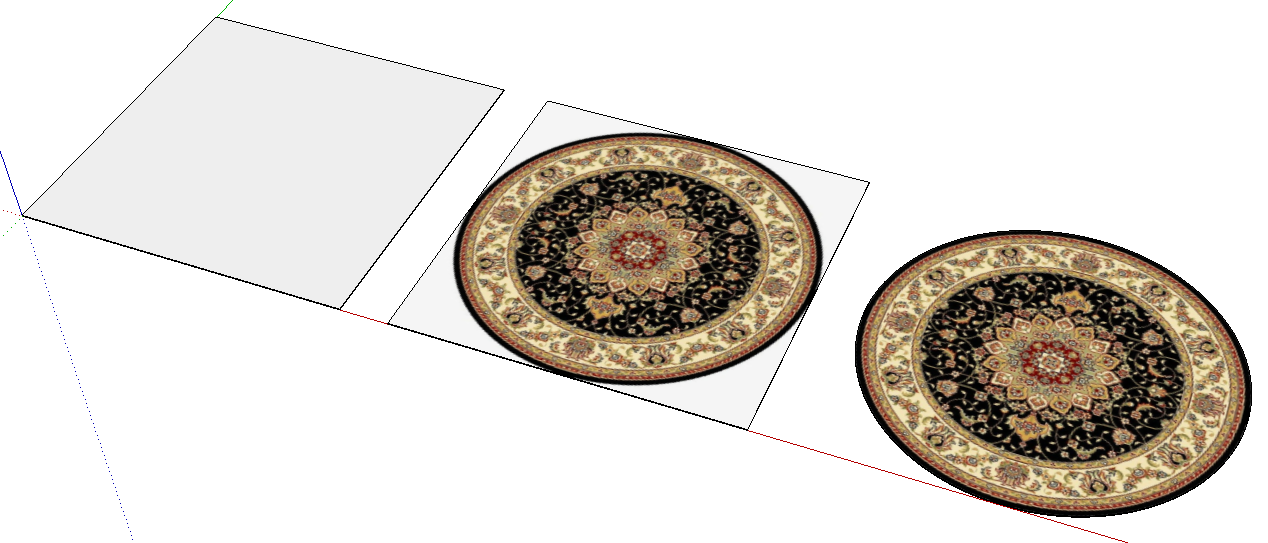
As an alternative, you could make the pixels outside of the rug area transparent and save the image as a PNG. Then use TIG's Image Trimmer extension to trim the edges. I think for a round rug, it's easy enough to use the first method but for more complex shapes, Image Trimmer can't be beat.
-
Excellent thanks for your help. I also figured I could get rid of the background with an alpha channel in photoshop, but your way easier. Thanks Nicola

Hello! It looks like you're interested in this conversation, but you don't have an account yet.
Getting fed up of having to scroll through the same posts each visit? When you register for an account, you'll always come back to exactly where you were before, and choose to be notified of new replies (either via email, or push notification). You'll also be able to save bookmarks and upvote posts to show your appreciation to other community members.
With your input, this post could be even better 💗
Register Login


Advertisement