Can't figure out how to separate faces
-
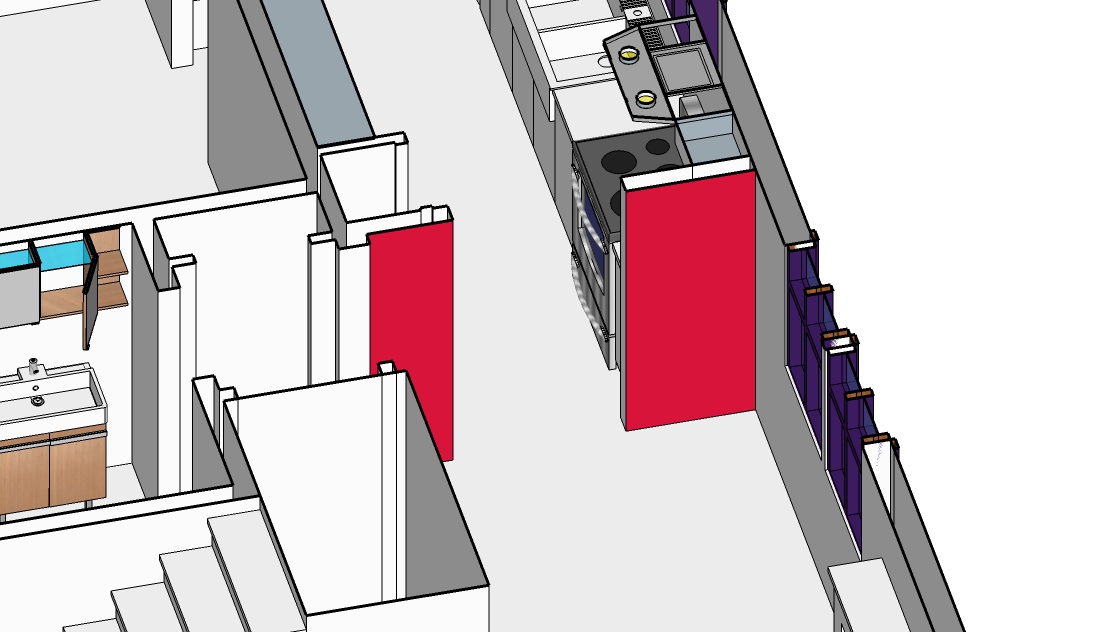
I can't select just one of these faces (in red) and I can't figure out how to separate them. Thanks in advance.
-
Right Click / Explode on the selection then re-select?
Maybe several times depending of some nested Groups/ Components levels!Maybe different if you made a Selection by Colors - but I presume you don't make that!

Or Just Double Click on your Group / Component for go inside for edit and select something?
PS Golden rule : post the skp file!
-
Hi AKR, hi folks.
It looks like you have a Section Plane in this model. These two red faces are then probably parts of a single face. If you select the Section Plane and either move it up or delete it or render it inactive, you will probably realize that.
If you really need to separate the two faces, you will need to divide the face in two by adding an edge somewhere.
As Pilou posted, the skp file would help a lot in helping you.
Just ideas.
-
To expand on Jean's theory (which makes sense to me): maybe the two red faces are joined by a header above the doorway (so they are really parts of a single face) but that portion is not visible due to the section plane.


Hello! It looks like you're interested in this conversation, but you don't have an account yet.
Getting fed up of having to scroll through the same posts each visit? When you register for an account, you'll always come back to exactly where you were before, and choose to be notified of new replies (either via email, or push notification). You'll also be able to save bookmarks and upvote posts to show your appreciation to other community members.
With your input, this post could be even better 💗
Register Login


Advertisement