Viewport bug/glitch - extending faces?
-
Hey,
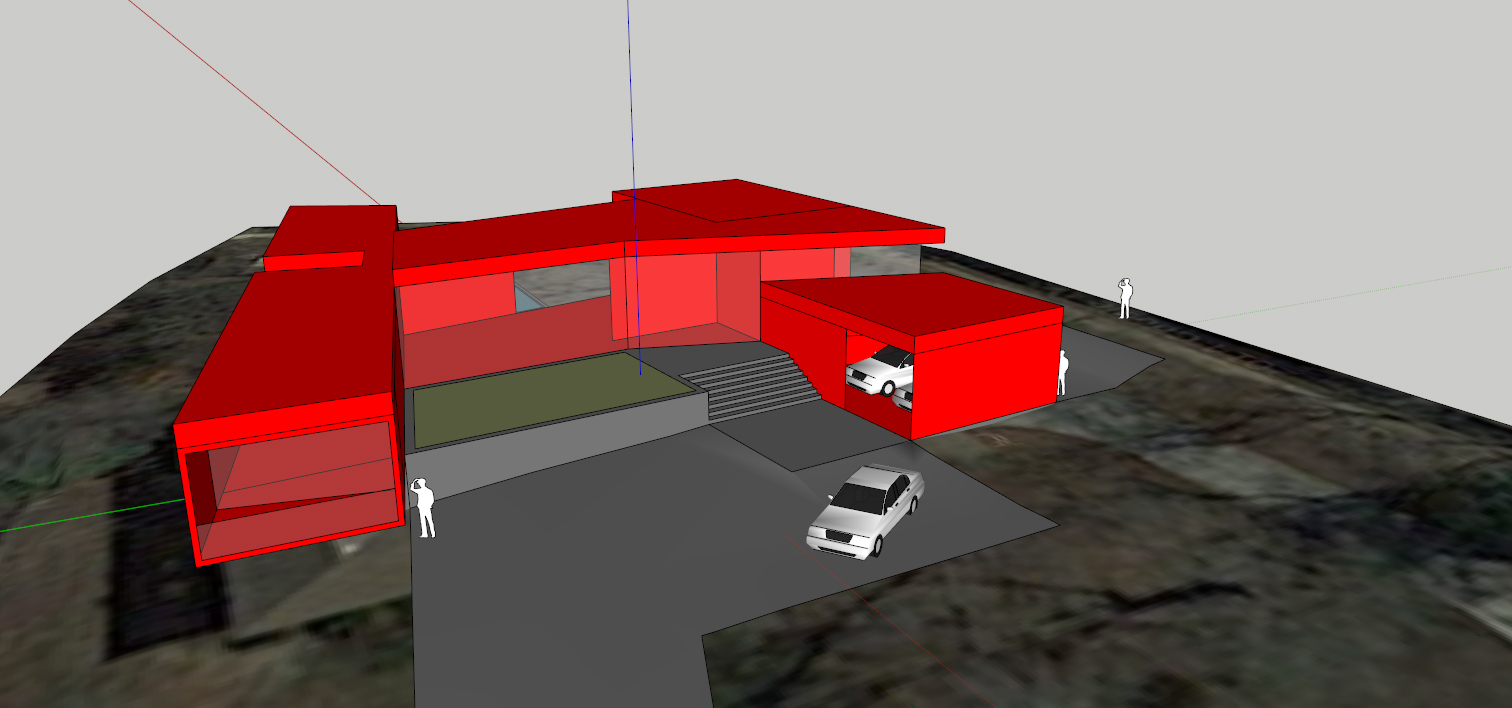
Been having an issue for a few days now where I'll start to see weird visual artifacts where faces will appear to extend out way past their actual edges, sometimes infinitely. See below:

and here's how it ought to look:

obviously it's happening in each instance of that component... and when I open the component for editing, it disappears. I can't select or interact w/ the apparently extending face at all.
It's possible this has something to do w/ my graphics card... an nVidia 560 GTX Ti. I've updated the drivers (released on Sep. 18, 2014) to no effect. This skp file has 3509 edges, 1102 faces, 25 component instances, 11 groups, 10 materials. All geometry is on Layer 0. I've run thomthom's CleanUp plugin, which also didn't solve the problem.
Any ideas? Thanks!
-
Does it change if you turn off Hard Ware Acceleration in Preferences>OpenGL? You'll probably need to quit and restart SketchUp after making the change.
-
I switched hardware acceleration off briefly and didn't notice the effect... but anyway, I started noticing a couple other weird graphical issues outside of SU, so I figured it was a graphics driver issue. I had already tried updating the driver, but this morning I did a full wipe and reinstall of it, and it seems to have worked. Thanks for your help, Dave.

Hello! It looks like you're interested in this conversation, but you don't have an account yet.
Getting fed up of having to scroll through the same posts each visit? When you register for an account, you'll always come back to exactly where you were before, and choose to be notified of new replies (either via email, or push notification). You'll also be able to save bookmarks and upvote posts to show your appreciation to other community members.
With your input, this post could be even better 💗
Register Login


Advertisement