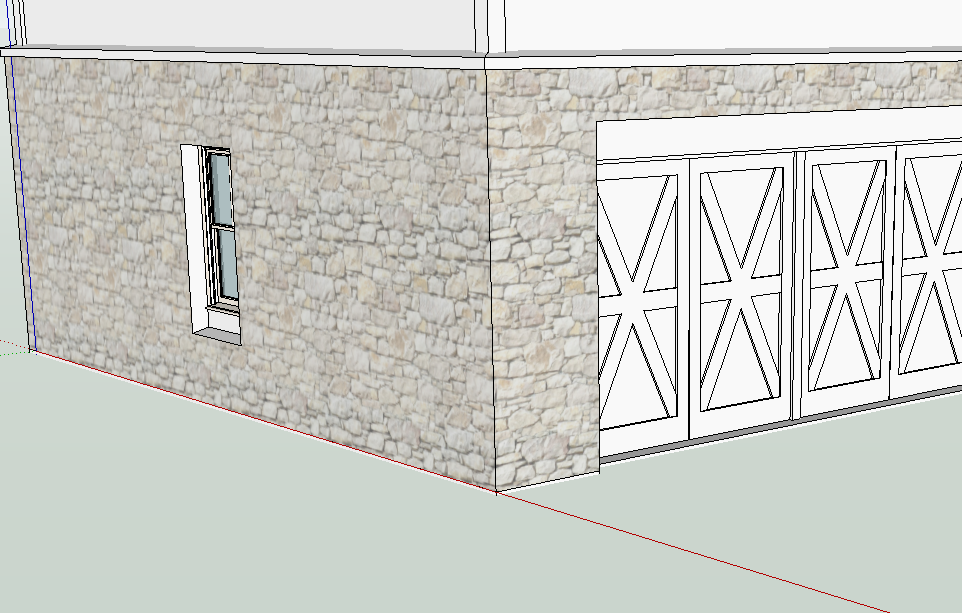
Ground plane not coplanar with edges on the x-y plane
-
Why does the ground plane not line up with an edge that is lined up with the axes? It looks lower than the edge. The distance varies with the distance of the view. If I view from below, it's the opposite--the ground plane looks higher than the edge.
Just wondering--I guess I don't use the ground plane much and perhaps this is how it has always been. I usually draw my surface in, but I was going to export a quick shot of this for comments and the site plan is in a separate file.
-
Just a guess but could it be that you moved the axes at some point? Hide the model so you have clear access to the origin. Right click on the origin and see if Reset is dark. If so, click it.
-
That's weird. Is it an OpenGL setting thing? I've never seen the axes not on the ground plane unless the axes have been moved, maybe inadvertently by the user.
-
Thanks Dave. That apparently isn't it. I guess it just the way it looks.
-
But when I look from underneath the line looks like it is below the ground plane.
-
Any chance you'd share the SKP with me privately? We can see what it looks like on another machine.


Hello! It looks like you're interested in this conversation, but you don't have an account yet.
Getting fed up of having to scroll through the same posts each visit? When you register for an account, you'll always come back to exactly where you were before, and choose to be notified of new replies (either via email, or push notification). You'll also be able to save bookmarks and upvote posts to show your appreciation to other community members.
With your input, this post could be even better 💗
Register Login


Advertisement