Space Navigator
-
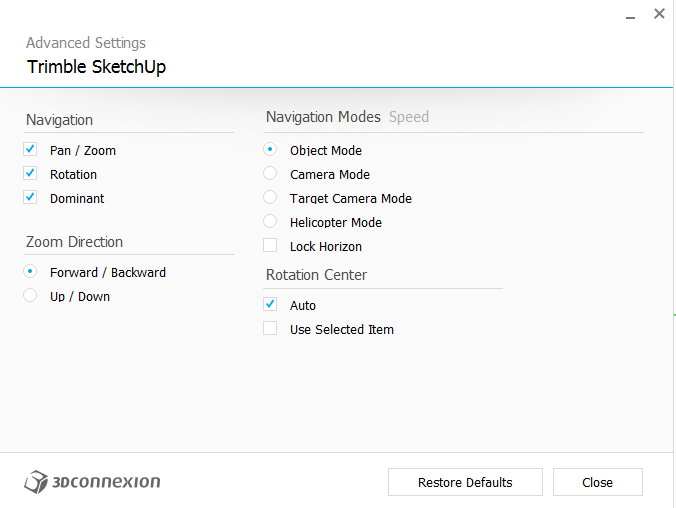 I've been using SN in SU for a bit, it's been really helpful. I'd read a few people's experience about it being really jumpy/overshooting, and I thought I must have superior eye-hand coordination ... until I switched from Parallel to Perspective. Then it became completely uncontrollable, flying through walls inadvertently etc. I often edit in Parallel, so this isn't a deal breaker, but I'm wondering if there's anything I can do? I saw some mentions of a 3dConnexions' extension, but I think that may be outdated. The only control interface I have is the 3dConnexions control panel in my system tray, which I currently have set up like this (actually I've unclicked "dominant" now):
 -
Well, I see now that "locking horizon" really helps control in Perspective mode, though I like the flexibility of an unlocked horizon in Parallel mode. Maybe I'll get used to it.
-
Hey Keithwins.
Try useing Camera mode with locked Horizon.
That's my favorite setting and really comfortable to work with.Greetings Erwin
-
How do you set the mode? (e.g.; camera mode)
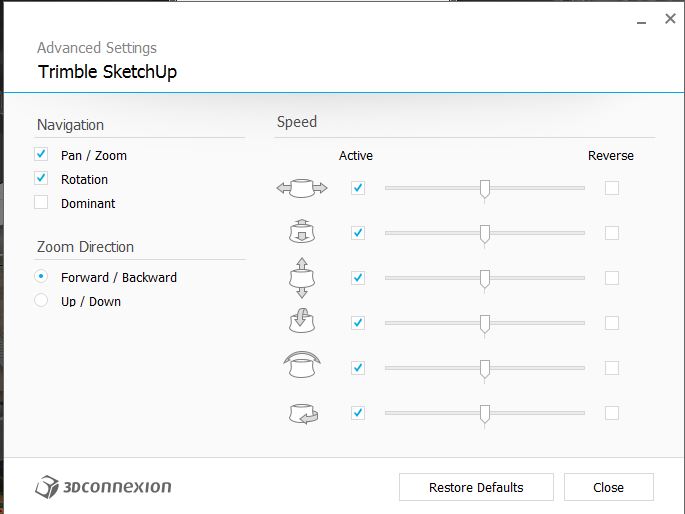
My Advanced Mode looks very different.
Latest driver: 3DxWare64_v10-1-0_r1774
-
You can have a look at this post in Krisidious review topic:
http://sketchucation.com/forums/viewtopic.php?f=72&t=57492&p=524617#p523929 -
Unfortunately that's for an earlier driver version.
The big thing is that the new version does not even have the choices for Navigation Modes in Advanced Settings!!


Hello! It looks like you're interested in this conversation, but you don't have an account yet.
Getting fed up of having to scroll through the same posts each visit? When you register for an account, you'll always come back to exactly where you were before, and choose to be notified of new replies (either via email, or push notification). You'll also be able to save bookmarks and upvote posts to show your appreciation to other community members.
With your input, this post could be even better 💗
Register Login


Advertisement