LayOut 2014: changes in transparent text fill ?
-
I always use Bullzip pdf printer to export pdf's from Layout. I can see no visual differences compared to the native pdf output from Layout except for a lesser quality of transparent background fills using Bullzip (sort of rasterized). The pdf's exported with Bullzip are sometimes only 1/8 in size compared to the native exported pdf's if images are embedded, otherwise it's maybe only 1/2 in size.
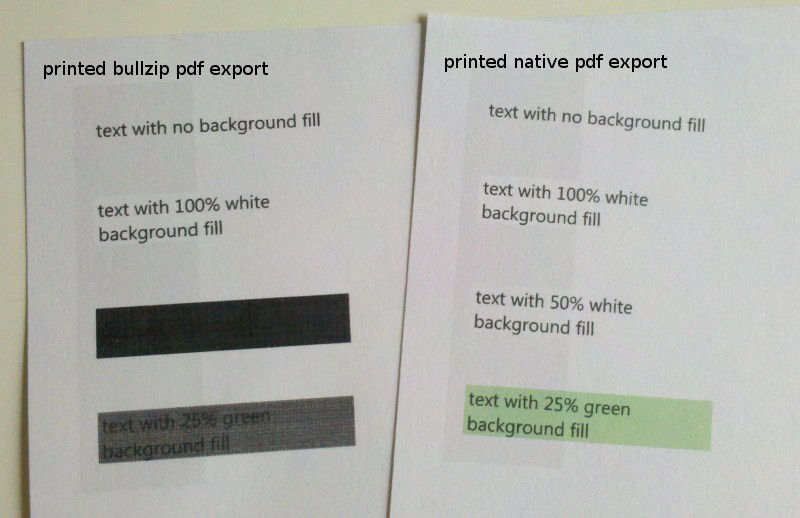
Recently, I noticed that if I export pdf's, the text that use a (semi) transparent fill, using Bullzip that background fill in the pdf looks as expected but when printed on paper its solid black, no matter what color. I tested two Canon printers.
So I guess, either LayOut 2014 or Bullzip have changed something that makes actually printing (semi)transparent fills go black.
Anyone else noticed this OR has a suggestion for a another good pdf printer? I would prefer to mail my clients 6Mb pdf files instead of a native exported 50Mb pdf file if there's no visual noticeable difference.
Max
Hello! It looks like you're interested in this conversation, but you don't have an account yet.
Getting fed up of having to scroll through the same posts each visit? When you register for an account, you'll always come back to exactly where you were before, and choose to be notified of new replies (either via email, or push notification). You'll also be able to save bookmarks and upvote posts to show your appreciation to other community members.
With your input, this post could be even better 💗
Register Login


Advertisement