Space Bar Problem
-
I am working wiyh SketchUp 2013 Make & I Find
when I have finished with the Push/Pull Tool
I press the Space Bar & I still have the P/P
Tool active. I then have to use the Select
option on the Large Toolbar. How do I fix this?
Also, how do I dock the Large Toolbar in the
vertical position with the tools double wide?
Thanks -
Your shortcut for the selection tool is still the space bar (see preferences)?
-
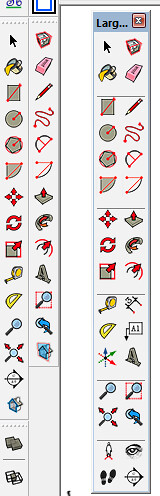
You can't dock the toolbars double wide in 2013.
-
Michael, instead of using the Large Toolset undocked, make two new custom toolbars and dock them side by side on the left as I've shown in the screen shot. The custom toolbars will take up less space than the Large Tools set because there's no spacers between groups of tools. You can also leave out tools you don't use. I left out the Dimension, Leader Text and Walkthrough tools because I don't need them in SU.



Hello! It looks like you're interested in this conversation, but you don't have an account yet.
Getting fed up of having to scroll through the same posts each visit? When you register for an account, you'll always come back to exactly where you were before, and choose to be notified of new replies (either via email, or push notification). You'll also be able to save bookmarks and upvote posts to show your appreciation to other community members.
With your input, this post could be even better 💗
Register Login


Advertisement