Turn off photo background in Match Photo
-
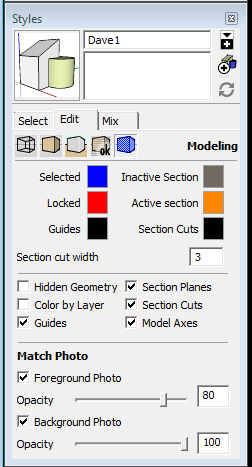
I used to be able to turn off the background or the model in this tool from the Match Photo dialog box. What happened to that feature? Is there another way to do it? I want to export the model with this view aligned to the background but without the background. This was very useful to me. Does anyone know how to do this?
-
It's under the Edit tab in Styles, now. Click on the blue cube icon and you'll find the needed controls. That change took place with SU8.

Hello! It looks like you're interested in this conversation, but you don't have an account yet.
Getting fed up of having to scroll through the same posts each visit? When you register for an account, you'll always come back to exactly where you were before, and choose to be notified of new replies (either via email, or push notification). You'll also be able to save bookmarks and upvote posts to show your appreciation to other community members.
With your input, this post could be even better 💗
Register Login


Advertisement