Model layers in Layout..?
-
Is there any way to select the model's layers for content, instead of just the view?
Secondary (slightly unrelated) question: is there a place where I can modify a group/object's position and size in a text box (something that it is always visible, like a regular setting... not like the bottom text-box copied from Sketchup)?
-
Create the scenes you need in SU with the appropriate layers turned on or off as needed. If you need to change what is visible in the viewport in LayOut, make the changes to the scene in SU and update the reference in LO.
-
@dave r said:
Create the scenes you need in SU with the appropriate layers turned on or off as needed. If you need to change what is visible in the viewport in LayOut, make the changes to the scene in SU and update the reference in LO.
Ah, that is going to be a problem. I am creating a rendered vehicle image (helicopter) to use in a game, with 64 different views. That's 8 directions, plus 8 rotor rotations. That would be 64 scenes.
 Probably better to start working on my custom render plugin I guess!
 -
So what does LayOut have to do with your project?
-
If I can select the layers in Layout, then I can create the 64 different views in Layout, then export to png.
-
I see. Well, unfortunately you can't select the SU layers in LO. You could export the PNGs in SU, though.
-
I already made a script to do just that. Running into problems with that, however.. seems like the scenes aren't being .. calibrated... properly.
-
Layout??? Script???
 It is unnecessary.
File>Export>Animations>Image set...Learn basic SU tools!!!
-
My model doesn't have any animation.. I think my Ruby script probably works better than your "basic" tools.

Edit: besides which .... "image set"? It doesn't exist. Are you pulling my leg?
-
@agamemnus said:
My model doesn't have any animation.. I think my Ruby script probably works better than your "basic" tools.
Edit: besides which .... "image set"? It doesn't exist. Are you pulling my leg?
Pulling your leg? Not at all.
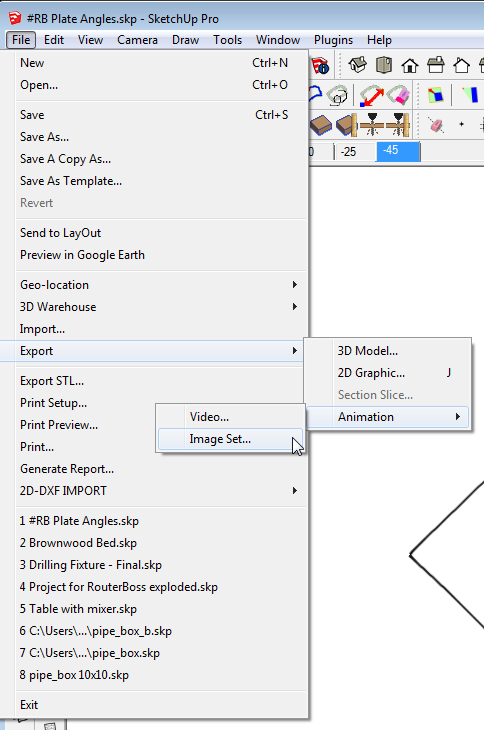
That's what it is called in SU2013. In previous versions you just choose Export>Animation and change the file type to JPG or PNG.This isn't about having an animation in your model. It's about exporting the 64 scenes you've got as images and doing them in a batch.
-
I see. That's an interesting trick, but it does not allow you to combine layer variations. Feeling yorik1984 needs to read more thoroughly before yelling at people.
-
You set up your layer variations in the various scenes.
-
Any scens can make uniq combination of layers. Every layer can be visible or invisible of any scens. Prepare scens before export. Do not reinvent the wheel.
Repeat@unknownuser said:
Learn basic SU tools!!!
-
@yorik1984 said:
Any scens can make uniq combination of layers. Every layer can be visible or invisible of any scens. Prepare scens before export. Do not reinvent the wheel.
Repeat@unknownuser said:
Learn basic SU tools!!!
And I repeat, you didn't read the post.
8 directions
8 rotor rotations
64 scenes for all the combinations..or making a script? Go make your 64 scenes. I'll make the script.
-
your script not work. It took a lot of time with 2.09. I can sutup all scenes for 1 hour.
If you need only once do this action. Irrational to write a script.
Value for modeling and scene differs considerably. Saving a few percent of the time is not worth what would be a month to write the program. -
It took me an hour to code, because I haven't coded in Ruby and the Sketchup API for a while. And, actually, I plan to use this sort of script for more than one model. Setting up 64 scenes would probably take me 2 hours, and it is very annoying to be doing the same repetitive work for that long, so it would take even more time. I guess it depends on if it takes you a month or an hour to make that script..
-
If you want to use more then one model - write script best way. I think you have only one model. Thzts why best way is make scenes manualy.


Hello! It looks like you're interested in this conversation, but you don't have an account yet.
Getting fed up of having to scroll through the same posts each visit? When you register for an account, you'll always come back to exactly where you were before, and choose to be notified of new replies (either via email, or push notification). You'll also be able to save bookmarks and upvote posts to show your appreciation to other community members.
With your input, this post could be even better 💗
Register Login


Advertisement