sketchucation logo sketchucation
    • Login
    Oops, your profile's looking a bit empty! To help us tailor your experience, please fill in key details like your SketchUp version, skill level, operating system, and more. Update and save your info on your profile page today!
    ⚠️ Important | Libfredo 15.8b introduces important bugfixes for Fredo's Extensions Update

    Push up the arc

    Scheduled Pinned Locked Moved Newbie Forum
    sketchup
    15 Posts 5 Posters 648 Views 5 Watching
    Loading More Posts
    • Oldest to Newest
    • Newest to Oldest
    • Most Votes
    Reply
    • Reply as topic
    Log in to reply
    This topic has been deleted. Only users with topic management privileges can see it.
    • S ShepherdS Offline
      S Shepherd
      last edited by

      Your arc in not in the component. You can select the curve, cut, enter the component and paste in place.

      SS

      1 Reply Last reply Reply Quote 0
      • I Offline
        ibog
        last edited by

        Thank you, Shepherd. I did undo arch, selected the component with doubleclick and tried again with pull-push. I see when I hover the arch and now in the component on both side, but I can not push it upwards. It will be a horisontal pushing.

        1 Reply Last reply Reply Quote 0
        • BoxB Offline
          Box
          last edited by

          The push/pull tool doesn't work on curved faces.

          1 Reply Last reply Reply Quote 0
          • I Offline
            ibog
            last edited by

            I don't understand. The tutorial http://www.youtube.com/watch?v=Kc0yunYvM7U
            Look it at minute 9'40"

            1 Reply Last reply Reply Quote 0
            • BoxB Offline
              Box
              last edited by

              Make sure the arc is drawn on the surface you want to push.

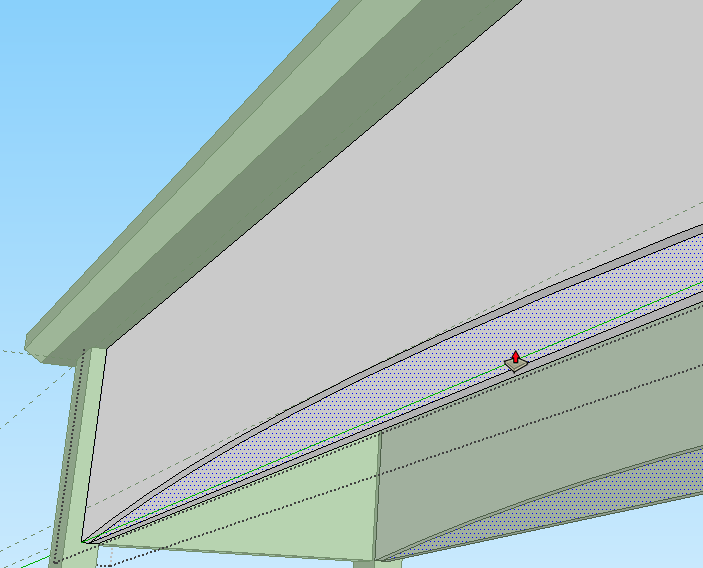
              In the model you uploaded the arc is outside the component and so you will never be able to push it as they do in the video.

              As Scott explained above, you need to draw the curve while in the editing context of the component.

              1 Reply Last reply Reply Quote 0
              • I Offline
                ibog
                last edited by

                Now I made the arch in the component. According to the tutorial I could push it up easily, but I can not.


                training4.skp

                1 Reply Last reply Reply Quote 0
                • BoxB Offline
                  Box
                  last edited by

                  works for me.


                  worked for me.skp

                  1 Reply Last reply Reply Quote 0
                  • Dave RD Offline
                    Dave R
                    last edited by

                    Screenshot - 8_15_2013 , 5_25_02 AM.PNG

                    This shouldn't be that hard.

                    Etaoin Shrdlu

                    %

                    (THERE'S NO PLACE LIKE)

                    G28 X0.0 Y0.0 Z0.0

                    M30

                    %

                    1 Reply Last reply Reply Quote 0
                    • BoxB Offline
                      Box
                      last edited by

                      You keep referring to "Pushing Up" the arc, are you wanting to make it more curved? When she moves the arc up and down in the video it is while she is creating the arc, not once she has clicked it to the guide.

                      1 Reply Last reply Reply Quote 0
                      • I Offline
                        ibog
                        last edited by

                        I had an older Sketchup, now the new is installed and it works! Thank you!

                        1 Reply Last reply Reply Quote 0
                        • BoxB Offline
                          Box
                          last edited by

                          The SU version shouldn't make any difference to that.

                          1 Reply Last reply Reply Quote 0
                          • S ShepherdS Offline
                            S Shepherd
                            last edited by

                            Use the push/pull tool "front to back" not up.
                            Also, If you hide or move the table top you can see that the legs and supports are not aligned in a few places.
                            This is a good time to learn to model precisely. In the model info box you change to a higher precision and also try unchecking the snap to length box.
                            This may help you model more accurately.

                            SS

                            1 Reply Last reply Reply Quote 0
                            • I Offline
                              ibog
                              last edited by

                              Thank you, Shepherd, I'll do so.

                              1 Reply Last reply Reply Quote 0
                              • pilouP Offline
                                pilou
                                last edited by

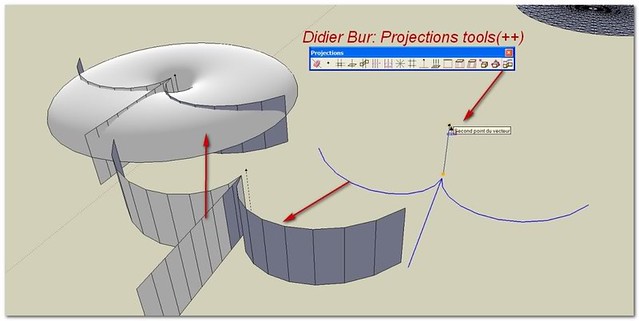
                                You have also the solution of the Didier Bur Projection Tool! πŸ˜‰

                                Last icon !

                                Image by the french guy Simon Lebon πŸ‘

                                http://farm7.static.flickr.com/6190/6106080887_5553d321ae_z.jpg

                                Frenchy Pilou
                                Is beautiful that please without concept!
                                My Little site :)

                                1 Reply Last reply Reply Quote 0
                                • 1 / 1
                                • First post
                                  Last post
                                Buy SketchPlus
                                Buy SUbD
                                Buy WrapR
                                Buy eBook
                                Buy Modelur
                                Buy Vertex Tools
                                Buy SketchCuisine
                                Buy FormFonts

                                Advertisement