Rendering Problem with shadow setting in Vray
-
hi friends,
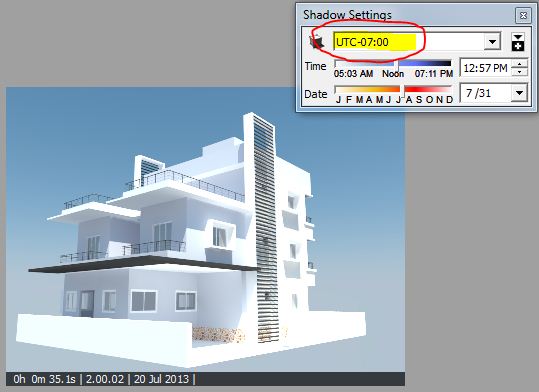
I rendered a model with default shadow setting. It looks good.
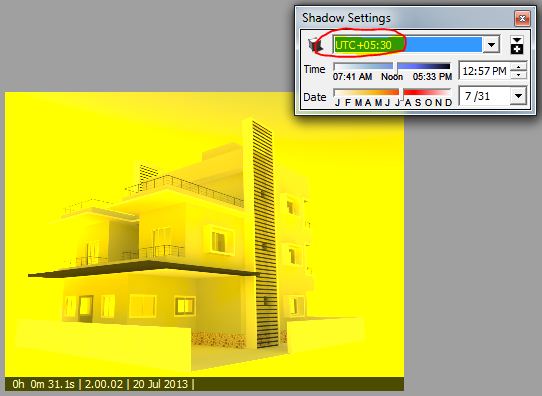
But when i change shadow setting to +5.30 UTC it look yellowish.
I attached both images.
Why this is happening? I tried changing date and time also. but output is not like the first one.
How i overcome this?regards,
-
????
Maybe your project is located near Tchernobyl ?

Well, i've never seen that...

Just a thing : Before playing with time zone in the shadows options, be sure that your project is well geo-located. For exemple, your project is located in London and you set your time zone on +12.00 UTC, if you render your scene at 12.00 (midday), the result will be 12.00 + 12.00 = 24.00 (midnight)...

-
@chon said:
????
Maybe your project is located near Tchernobyl ?
Well, i've never seen that...
Just a thing : Before playing with time zone in the shadows options, be sure that your project is well geo-located. For exemple, your project is located in London and you set your time zone on +12.00 UTC, if you render your scene at 12.00 (midday), the result will be 12.00 + 12.00 = 24.00 (midnight)...
Thanx Chon for ur reply.
i will check for the geo-location.
And by the way my project is located in India.


Hello! It looks like you're interested in this conversation, but you don't have an account yet.
Getting fed up of having to scroll through the same posts each visit? When you register for an account, you'll always come back to exactly where you were before, and choose to be notified of new replies (either via email, or push notification). You'll also be able to save bookmarks and upvote posts to show your appreciation to other community members.
With your input, this post could be even better 💗
Register Login


Advertisement