HELP! visible lines where groups meet
-
Hello everyone!
I am new to this forum and fairly new to Sketchup - and need help!
I have been group parts of my drawing to give me flexibility to move around and edit without affecting the neighbooring elements... and in order to be able to hide walls a.o. for light shadow etc when rendering.
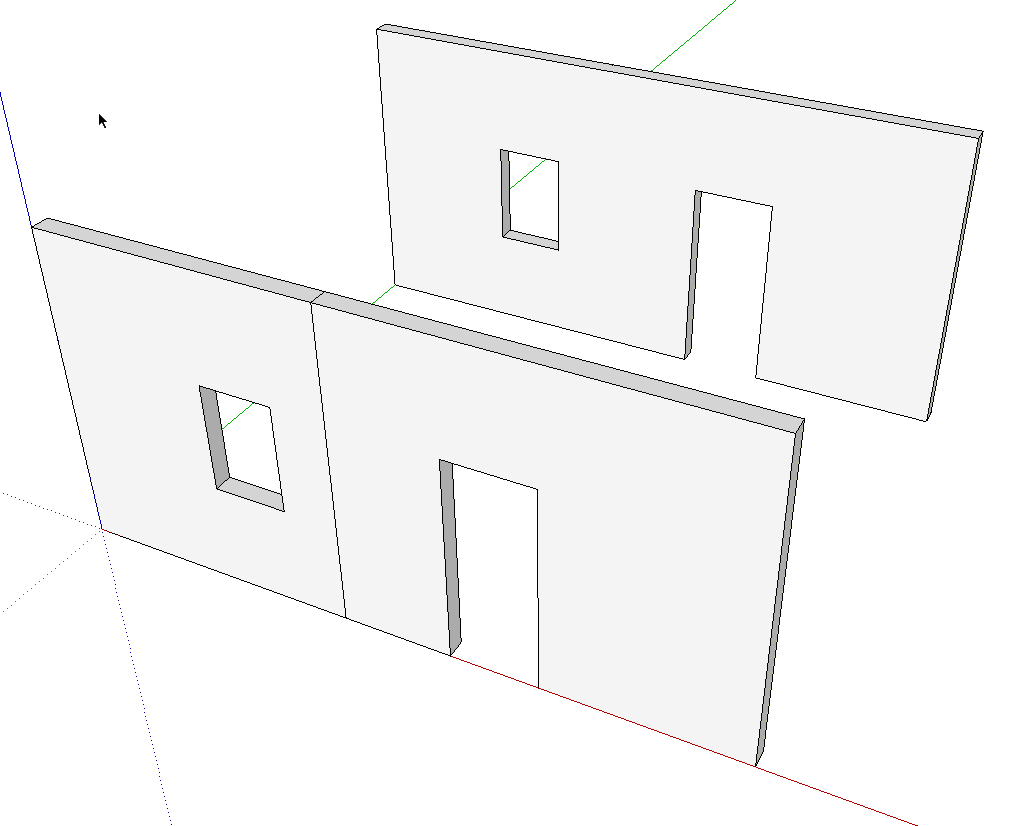
But... where the elements meet (i.e. two walls that are flush) there will be the line of the edges of the two groups/elements - doesn't bother me when i work, but obviously it doesn't look great with a line down a wall in the rendering... any way to turn these lines off? or any other easy way to make them invisible in the rendering?
I have tried to group elements so that these meeting mostly happens in corners or somewhere where there is a line anyway, but it hasn't always been possible... I guess the hard way is to explode everything and delete those lines one by one... but then i loose the flexibility of the working drawing...
Any help is much appreciated!
Kind regards,
Eva -
Welcome to SCF.
Open the groups for editing and get the Eraser tool. While holding Shift, click on the lines you want to hide. Repeat as needed on other groups.
Before in the foreground, after hiding in the back.
-
THANKS A MILLION!
great help - much appreciated!

Hello! It looks like you're interested in this conversation, but you don't have an account yet.
Getting fed up of having to scroll through the same posts each visit? When you register for an account, you'll always come back to exactly where you were before, and choose to be notified of new replies (either via email, or push notification). You'll also be able to save bookmarks and upvote posts to show your appreciation to other community members.
With your input, this post could be even better 💗
Register Login


Advertisement