Maxwell material issue
-
Hi,
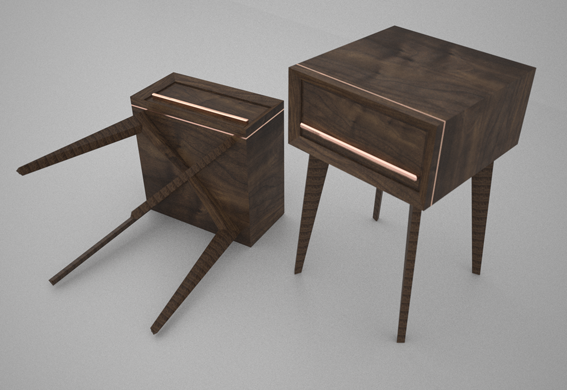
I am very new to Sketchup, but loving how much I can do with it and how quickly it is to pick up. I am a furniture designer maker and having problems with a walnut material downloaded from the maxwell site. All the faces look fine apart from the legs of my side table which are rendering with a striped effect! I have changed the material to oak and still get the same problem. The grain direction is correct in sketchup and looks fine in the sketchup modelling window. As soon as I open the maxwell render plugin it shows up stripey.
I have attached a quick render to demonstrate.
Any ideas?
Cheers
Matt
-
hi Idranon10, seems to be a texture scale problem... take a look to Jason Maranto'sexplanations about texture scaling in these threads
hope it can help to solve your problem
best
V -
Thanks for your help,
I have tried both threads, but with no luck. I also don't have the full Maxwell suite just the plugin which I think would give me much more freedom. I have removed all textures and materials purged the file and then started again with the materials. But still no luck!!! If I render each face individually they look fine, but as soon as I render the whole project I get my stripey legs back.
Thanks again, back to the drawing board.
Cheers
Matt

Hello! It looks like you're interested in this conversation, but you don't have an account yet.
Getting fed up of having to scroll through the same posts each visit? When you register for an account, you'll always come back to exactly where you were before, and choose to be notified of new replies (either via email, or push notification). You'll also be able to save bookmarks and upvote posts to show your appreciation to other community members.
With your input, this post could be even better 💗
Register Login


Advertisement