SU8 Paid Display Prob
-
I imported a 3D model from Datacad into SU8. The model has a 'sheen' to it. When I add to the model the new stuff displays OK.
What do I need to do to the imported model to remove the 'sheen'?
Screen clip attached.
Walter
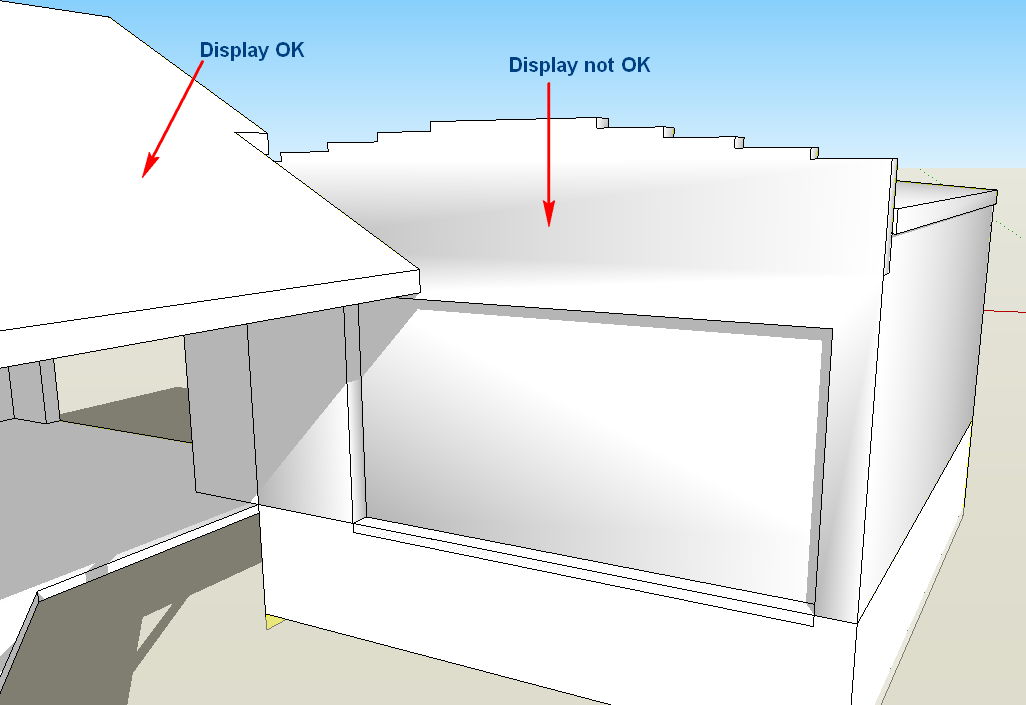
-
upload the .skp model with the bad shading..
-
Yeah, please supply the model. Looks like there's going to be a tiny line segment that has been smoothed. That is one reason that can happen.
-
triple click on the model once you're inside of the group or component. then use the soften edges menu bar to unsoften everything. You may also need to triple click the geometry and unhide everything.
-
-
Fixed in the manner I explained. also i purged all the excess stuff by running the purge unused command. from 2 megs to a few hundred kilobytes.
-
Thanks so much for your help.
Regards
Walter -
No problem... Our pleasure.
-
Hi Walter, hi folks.
I also unsoftened all edges in all the groups of your model and it looks good.
I spotted a few things that may cause problems at a later stage. See this SU file for ideas.
-
Thanks Jean
Walter




Hello! It looks like you're interested in this conversation, but you don't have an account yet.
Getting fed up of having to scroll through the same posts each visit? When you register for an account, you'll always come back to exactly where you were before, and choose to be notified of new replies (either via email, or push notification). You'll also be able to save bookmarks and upvote posts to show your appreciation to other community members.
With your input, this post could be even better 💗
Register Login


Advertisement