sketchucation logo sketchucation
    • Login
    Oops, your profile's looking a bit empty! To help us tailor your experience, please fill in key details like your SketchUp version, skill level, operating system, and more. Update and save your info on your profile page today!
    โš ๏ธ Update | Sketchucation Tools 5.0.8 released with licensing improvements and bugfixes Download

    Offset and split?

    Scheduled Pinned Locked Moved SketchUp Discussions
    sketchup
    17 Posts 9 Posters 949 Views 9 Watching
    Loading More Posts
    • Oldest to Newest
    • Newest to Oldest
    • Most Votes
    Reply
    • Reply as topic
    Log in to reply
    This topic has been deleted. Only users with topic management privileges can see it.
    • C
      cuttingedge
      last edited by

      Following TIG's Christmas gift which is the smart offset which is great, Have I been missing something or is it one duh moment for me?

      Is there such plugin to offset a surface and will automatically divide it into quads. I know there is a split donut or split sausage to do that after offset operation. but I wonder if there is one that does that in one shot (which is quite common in other 3d apps)

      cuttingedge

      1 Reply Last reply
      Reply Quote 0
      • Chris FullmerC
        Chris Fullmer
        last edited by

        SU doesn't natively work in quads. But do you have a screen shot of what that function should look like?

        Lately you've been tan, suspicious for the winter.
        All my Plugins I've written

        1 Reply Last reply
        Reply Quote 0
        • cottyC
          cotty
          last edited by

          I need this very often and for me splitdonut and splitsausage works well because I can decide wheter I need the subdivision or not.
          Alternatively you can move the inner face a little bit up with forcing autofold and move it back afterwards, but this is also an extra step.

          my SketchUp gallery

          1 Reply Last reply
          Reply Quote 0
          • C
            cuttingedge
            last edited by

            Thanks for your quick reply Chris. Here's what I mean. It is called inset in 3dsmax I believe.
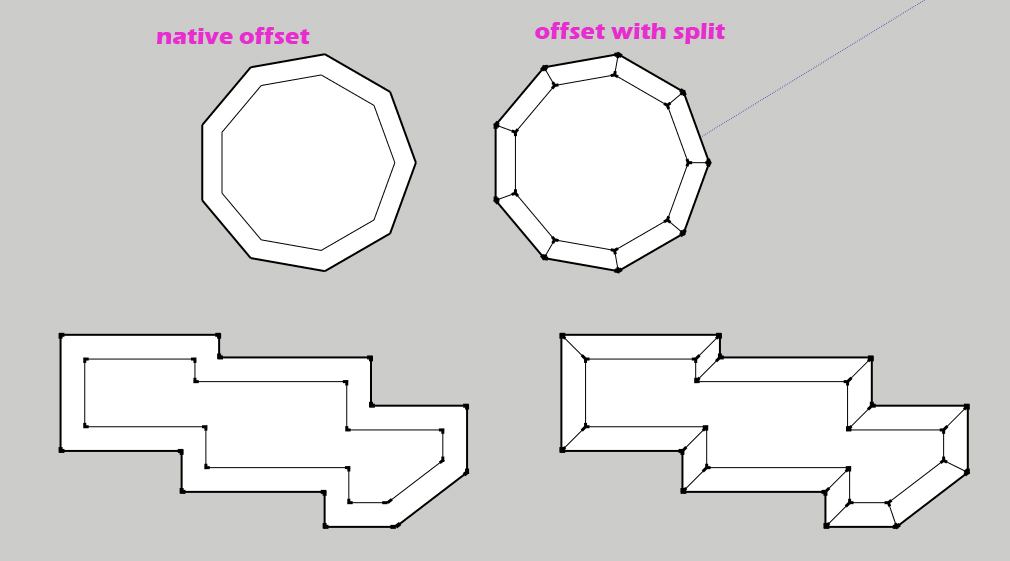

            offset-with-split or inset

            1 Reply Last reply
            Reply Quote 0
            • R
              rv1974
              last edited by

              Fredo's joint-push-pull already does it (temporally make a prism and offset it's all sides except
              the cap)

              1 Reply Last reply
              Reply Quote 0
              • C
                cuttingedge
                last edited by

                @cotty said:

                I need this very often and for me splitdonut and splitsausage works well because I can decide wheter I need the subdivision or not.
                Alternatively you can move the inner face a little bit up with forcing autofold and move it back afterwards, but this is also an extra step.

                Yes that's how we do it normally but as you said we use this very
                too often that one click could save us time, much so in finding the tiny floating toolbars like split tools. ๐Ÿ˜‰ It is very common in other 3d aps so I thought it should not be too complicated(but i may be wrong)

                It would be good if it function like the native (only with the splits)where you can drag or input value and wont execute till you hit enter.

                1 Reply Last reply
                Reply Quote 0
                • cottyC
                  cotty
                  last edited by

                  Maybe TIG can combine his splittools with his new smart offset tool...

                  my SketchUp gallery

                  1 Reply Last reply
                  Reply Quote 0
                  • panixiaP
                    panixia
                    last edited by

                    use extrude edges by offset from tig extrusion tools.. choose the option wich keeps the inner segments et voila.. i use it a lot to do exactly what you say here..

                    1 Reply Last reply
                    Reply Quote 0
                    • C
                      cuttingedge
                      last edited by

                      @panixia said:

                      use extrude edges by offset from tig extrusion tools.. choose the option wich keeps the inner segments et voila.. i use it a lot to do exactly what you say here..

                      I dont know exactly how you do it? Tried extrude edges by offset but doesnt work with closed edges. Gives me unpredictable and messy result with fairly simple geometry.

                      1 Reply Last reply
                      Reply Quote 0
                      • panixiaP
                        panixia
                        last edited by

                        you are right! never noticed that.. maybe because i usually do this with open polylines..
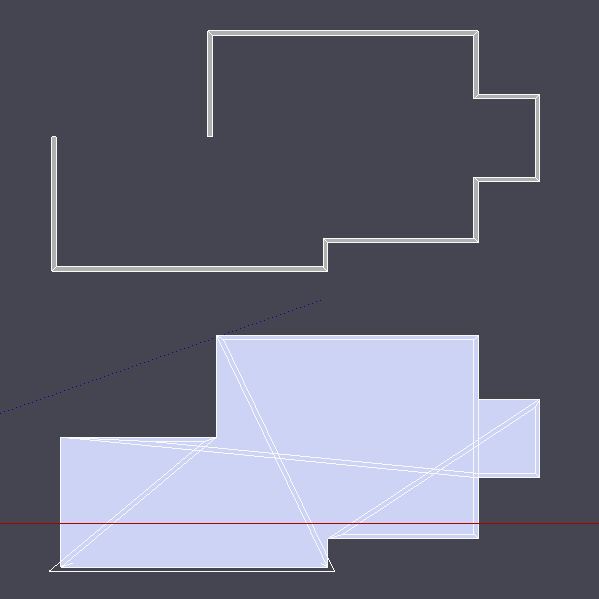

                        example offest.JPG

                        1 Reply Last reply
                        Reply Quote 0
                        • cottyC
                          cotty
                          last edited by

                          @cuttingedge said:

                          @panixia said:

                          use extrude edges by offset from tig extrusion tools.. choose the option wich keeps the inner segments et voila.. i use it a lot to do exactly what you say here..

                          I dont know exactly how you do it? Tried extrude edges by offset but doesnt work with closed edges. Gives me unpredictable and messy result with fairly simple geometry.

                          +1

                          There are no options for EEbO?

                          Edit: Ok, they are there for not closed edges!...
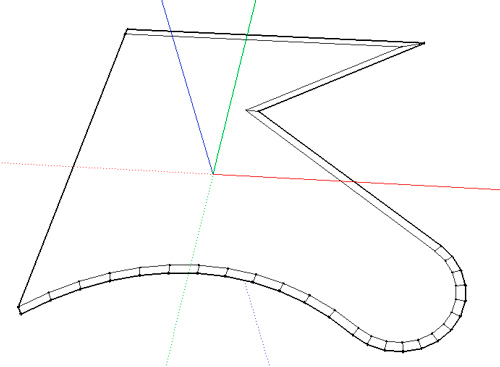
                          eebo.jpg

                          my SketchUp gallery

                          1 Reply Last reply
                          Reply Quote 0
                          • soloS
                            solo
                            last edited by

                            This would make a very useful tool is available, if bundled with TIG's robust offset tool it would be brilliant

                            http://www.solos-art.com

                            If you see a toilet in your dreams do not use it.

                            1 Reply Last reply
                            Reply Quote 0
                            • pilouP
                              pilou
                              last edited by

                              Yes and with the Curviloft you can make several spaces ๐Ÿ˜‰
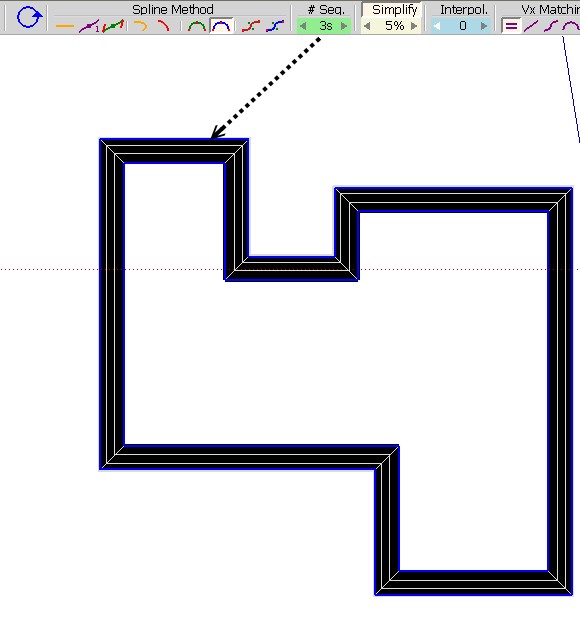
                              curvi3.jpg

                              Frenchy Pilou
                              Is beautiful that please without concept!
                              My Little site :)

                              1 Reply Last reply
                              Reply Quote 0
                              • srxS
                                srx
                                last edited by

                                Curviloft should be integrated in SketchUp 9.

                                www.saurus.rs

                                1 Reply Last reply
                                Reply Quote 0
                                • Jean LemireJ
                                  Jean Lemire
                                  last edited by

                                  Hi cuttingedge, hi folks.

                                  See this SU file for ideas if you want to practice with SU's native tools.


                                  Offset and split.skp

                                  Jean (Johnny) Lemire from Repentigny, Quebec, Canada.

                                  1 Reply Last reply
                                  Reply Quote 0
                                  • C
                                    cuttingedge
                                    last edited by

                                    @jean lemire said:

                                    Hi cuttingedge, hi folks.

                                    See this SU file for ideas if you want to practice with SU's native tools.

                                    Thanks Johnny, Yes its one way to do it. But I think, by far the most practical way ( if no single tool available) is native offset and TIG's split donut. Anyways, I just learnt that split donut work on multiple selections. So I would offset everything and split the surfaces in one shot.

                                    1 Reply Last reply
                                    Reply Quote 0
                                    • cottyC
                                      cotty
                                      last edited by

                                      @cuttingedge said:

                                      Anyways, I just learnt that split donut work on multiple selections.

                                      That was new to me too, nice! ๐Ÿ˜„

                                      my SketchUp gallery

                                      1 Reply Last reply
                                      Reply Quote 0

                                      Hello! It looks like you're interested in this conversation, but you don't have an account yet.

                                      Getting fed up of having to scroll through the same posts each visit? When you register for an account, you'll always come back to exactly where you were before, and choose to be notified of new replies (either via email, or push notification). You'll also be able to save bookmarks and upvote posts to show your appreciation to other community members.

                                      With your input, this post could be even better ๐Ÿ’—

                                      Register Login
                                      • 1 / 1
                                      • First post
                                        Last post
                                      Buy SketchPlus
                                      Buy SUbD
                                      Buy WrapR
                                      Buy eBook
                                      Buy Modelur
                                      Buy Vertex Tools
                                      Buy SketchCuisine
                                      Buy FormFonts

                                      Advertisement