Can you get a list of OSX fonts somehow?
-
@driven said:
the puts should read [0, 50, 100, 150, 200, 250] "2撖죺"
?
Where are these numbers from?Why are you expecting a NULL byte? (That's usually a string termination in C.)
-
I think this may be the root of my issues
if you unpack(C), then pack(U) sh*t happens> a = "2撖죺".unpack('C*') b = a.pack('U*') c = puts a.inspect puts b.inspect [50, 230, 146, 150, 236, 163, 186] "2æ죺" nil
and visa-versa
> a = "2撖죺".unpack('U*') b = a.pack('C*') c = puts a.inspect puts b.inspect [50, 25750, 51450] "2\226\372" nil
I think the first is happening somewhere -
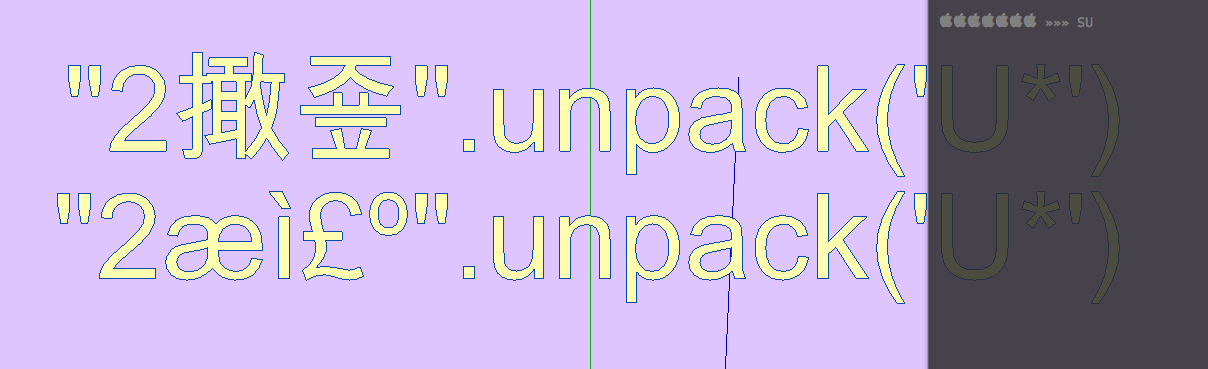
SU Top again
WD bottom
look familiar -
@thomthom said:
Where are these numbers from?
http://codereview.stackexchange.com/questions/3569/pack-and-unpack-bytes-to-strings
-
@driven said:
@thomthom said:
Where are these numbers from?
http://codereview.stackexchange.com/questions/3569/pack-and-unpack-bytes-to-strings
That's from a questions that doesn't really make sense.
Also:
@unknownuser said:
Seeing as JavaScript has 16-bit strings, I packed two bytes per character.
Two byte per character isn't UTF-8.
-
I was looking for test code and only grabbed the example, I got there from the Stackoverflow 'fix' that referred back.
Do these work as 3D Text on the PC...
I ran the full gamete of unpack().pack() scenario's in console and a mismatch is the only way to get the same results as the straight input.
john -
@thomthom said:
fonts.sort! %(#008000)[# (!) Not UTF-8 compatible! But better than nothing.](1) Since this will run only on Mac, which is Unicode aware, can't you pass the list to a command shell and use the shell's built-in sort filter ??
For instance on WIN, in DOS command shell, you can filter output by piping it through the sort filter, thus:
doc_list = %x(dir "~/documents/myproject" | sort)
or similar.You'd need to build a plain text list from the array, each element being a line, separated by "
\n"(2) Alternative ... build an array copy using pack, sort it, then & unpack back to strings.
I think I'm late posting this... you guys are posting machines!
-
If there is such a command then I'd guess that would work. But I'm not familiar with OSX terminal. Maybe John knows?
I can also use JS to sort it - since I'm displaying the list in a WebDialog.
-
@thomthom said:
But I'm not familiar with OSX terminal.
Shell Scripting Primer: Command Line Primer
Filename substitution
If a word contains any of the characters
*`',?', `` [' or{`' or begins with the character~`' it is a candidate for filename substitution, also known asglobbing''. This word is then regarded as a pattern (glob-pattern''), and replaced with an alphabetically sorted list of file names which match the pattern.- Also do a Find on "
ls-F", it is a built-in and supposed to be faster than "ls -F"
OS X Manual Page: ls command Reference

- Also do a Find on "
-
This is probably my last effort on this.... circles,
but, I finally figured outfindin Ruby Console, escapes, escapes, escapes...THE THIRD WAY... no Font Book... no fc-list... just plain old find >> mdls... not the fastest, but not too bad.
inculed is Dan's tester, these all created 3D text from console, only Font Book and usr/local/bin/fc-list do that out of the can.a=(`find /System/Library/Fonts\ /Library/Fonts\ ~/Library/Fonts\ \\( -name "*.ttf" -o -name "*.otf" \\) -type f`).split("\n").map! { |f| f.gsub(" ", "\\ ")} #need this or something to catch spaces in filenames b=(a.collect{|x| `mdls -name com_apple_ats_name_family -raw #{x}`}).map! { |f| f.split(",")[0]} #the other items in each array are unicode strings for other languages, if you want those use Font Book c=b.map { |f| f[/[("\s]+([^"\n]+)[)"\s]+/m,1] }.uniq!.sort![2..-1] #[0] is empty, [1] is a dot file, could remove them macFonts = c chunksize = 1 chunk = 1 limit = macFonts.length model = Sketchup.active_model fsize = 1.0 linespacing = 1.2 bold = false italic = false thick = 0.05 filled = true quality = 0.0 i = 0 while i < limit begin # model.start_operation("3D Fontnames (#{chunk})") # chunksize.times do |n| # break if i == limit # item = macFonts[i] grp = model.entities.add_group() grp.entities.add_3d_text( "#{item}", TextAlignCenter, "#{item}", bold, italic, fsize, quality, 0.0, filled, thick ) grp.name= item grp.move!( Geom;;Transformation.new(Geom;;Vector3d.new(0,-(i*linespacing),0)) ) # i += 1 # end # chunk # model.commit_operation() # rescue Exception => e puts("\n*** macFonts group Error! ***") puts(" i = #{i}") puts(" chunk = #{chunk}") puts(" font = #{macFonts[i]}\n") model.abort_operation() puts("Error #<#{e.class.name}; #{e.message}>") puts(e.backtrace) if $VERBOSE raise end chunk += 1 end # while


Hello! It looks like you're interested in this conversation, but you don't have an account yet.
Getting fed up of having to scroll through the same posts each visit? When you register for an account, you'll always come back to exactly where you were before, and choose to be notified of new replies (either via email, or push notification). You'll also be able to save bookmarks and upvote posts to show your appreciation to other community members.
With your input, this post could be even better 💗
Register Login


Advertisement