Hello & I did a mess with layers :(
-
Hello, I'm a motion designer, with a passion for sketchup: I find it the most intuitive 3D modelling application I ever used.
Now, I have a problem with layers. I was working on a project and I put some geometry in a layer and I "blinded" it. Now I'm no longer able to see/work that geometry even if I see the name of the geometry in the Outliner.
I'm using Sketchup free 8 on MacOSX, thanks in advance!
-
So you put some geometry on a layer and turned off the layer's visibility? Have you tried to turn the layer's visibility back on in the Layers dialog box (from the Window menu)?
Or did you hide the geometry instead of turning off the layer? If you make sure the layer is visible, can you see a mess sort of representation of the geometry if you go to View>Hidden Geometry?
Is the name of grayed out in the Outliner? If you right click on the name in the Outliner, can you choose Unhide?
Maybe post a screen shot of the Outliner, Layers dialog, etc. Or post the SKP file.
-
Assuming it is not hidden as mentioned above (which I would bet is the case) - do a save as so you can delete all the layers one by one.
Start deleting layers and be sure to move the geometry to the default layer when the prompt comes up.
At some point, assuming you have moved the geometry to a layer you cannot remember, you'll see it appear in your model.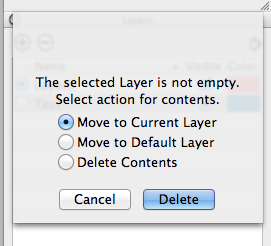
Note the last layer deleted. Go back to your original drawing. Turn that layer on. Or delete it and move the geometry to the default.


Hello! It looks like you're interested in this conversation, but you don't have an account yet.
Getting fed up of having to scroll through the same posts each visit? When you register for an account, you'll always come back to exactly where you were before, and choose to be notified of new replies (either via email, or push notification). You'll also be able to save bookmarks and upvote posts to show your appreciation to other community members.
With your input, this post could be even better 💗
Register Login


Advertisement