Add_face(edearray) not working?
-
add_face( edges )does work. I've used it lots of times. Even your sample code works.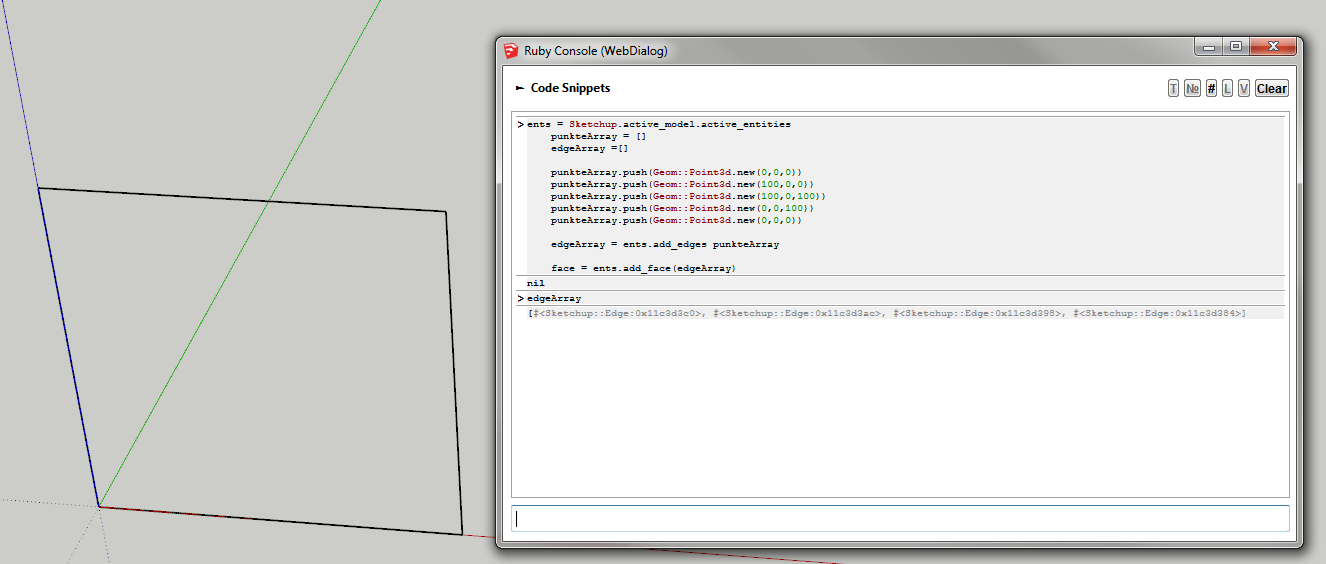
But...
@tafkab76 said:
but I was hoping to be able to create a face with a hole in it by passing an array with the outer and inner loop edegs to the add_face method, but not even passing a single loops seems to work.
You cannot create with a hole in one go. Create the face first - without outer loop. Then take your inner loops and create faces for each of them - you then erase the face created with the inner loops.
Btw -
entsdoes that refer tomodel.active_entities? Or did you usemodel.entities? -

I didn't notice the add_face command at the end (it was below the code fold) But I'm seeing the same thing. I don't understand what's going on there...

-
But I can´t see the face on your screen, only four edges?
Here ist what it looks like when I execute the code on my machine. Maybe it´s a difference, because I use Ruby Code Editor?
[xxl-img:xg9qtt3f]http://www.steffenblome.de/add_face.jpg[/xxl-img:xg9qtt3f]
as you can see I used
ent = mod.entitiesbut I just tried
ent = mod.active_entitieswith the same results.
And thanks for that advice on how to create a face with a hole, I´m going to use that.
-
Ah!
When you created a set of edges with
add_edgesit didn't merge the start and end vertex.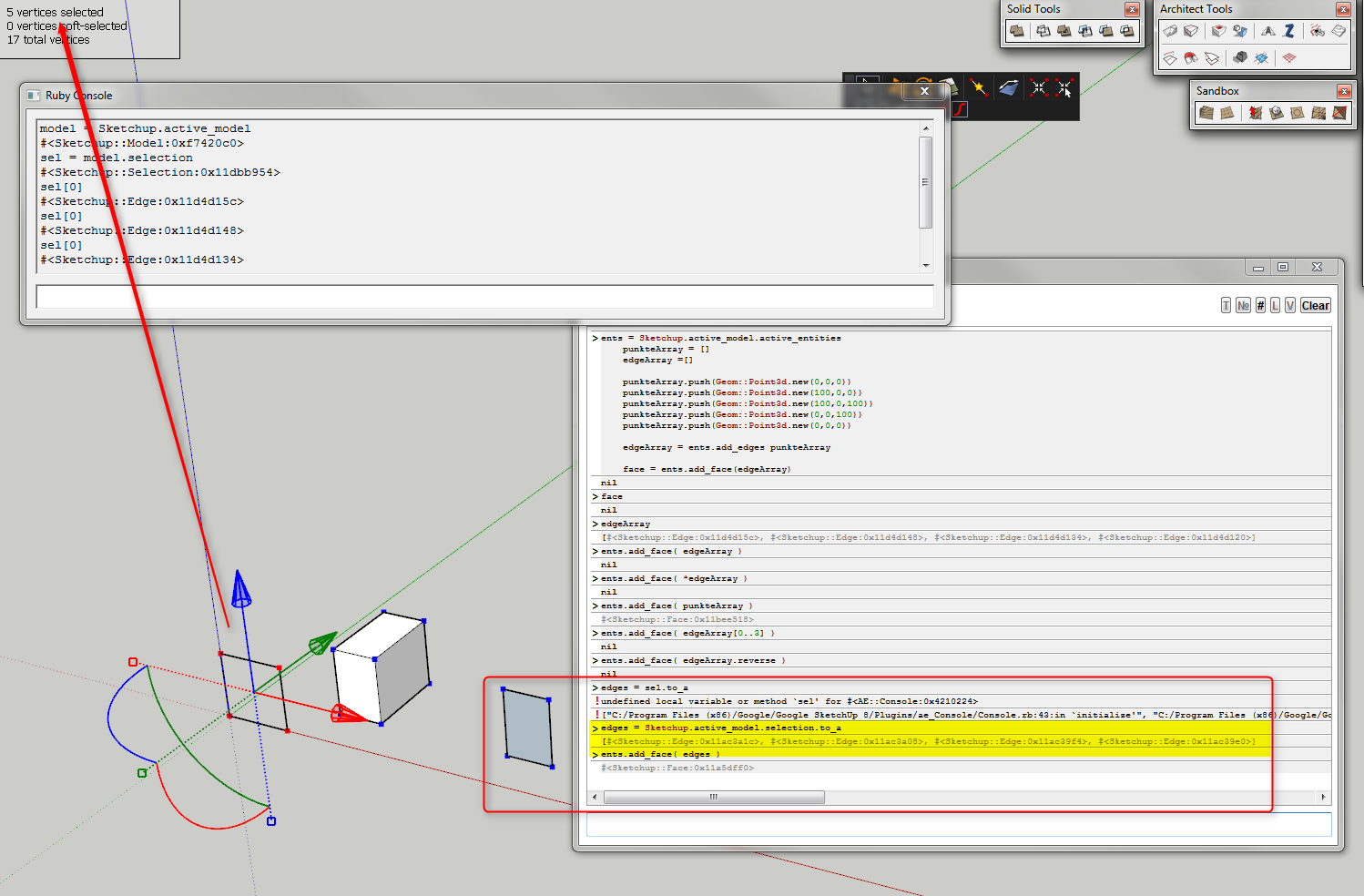
That prevented it from creating the face because it wasn't a closed loop.
When I created a set of edges separately which where merged it did work.
So the failure of
add_faceis a result ofadd_edgesnot merging crossing vertices. -
Ok, I see. That also explains why
find_facesdidn´t work on neither of the edges.
So add_face(edgearray) doesn´t work on API created egdes? Or is there a command that forces edges to merge to loops if possible? -
@tafkab76 said:
So add_face(edgearray) doesn´t work on API created egdes?
It works if the edges are a closed loop.
I think if you create each face individually withadd_edgeit will work. Alternatively you can try to intersect the created edges with themselves. -
But - in your case where you say:
@tafkab76 said:
but I was hoping to be able to create a face with a hole in it by passing an array with the outer and inner loop edegs to the add_face method, but not even passing a single loops seems to work.
You cannot create a face with holes in one operation.
@thomthom said:
You cannot create with a hole in one go. Create the face first - with the outer loop points. Then take your inner loop points and create faces for each of them - you then erase the face created with the inner loops.
-
Yes, I got that.
Thx!
-
@tafkab76 said:
Yes, I got that.
Thx!
You must use selection like this:
<span class="syntaxdefault">selection </span><span class="syntaxkeyword">= </span><span class="syntaxdefault">model</span><span class="syntaxkeyword">.</span><span class="syntaxdefault">selection<br />status </span><span class="syntaxkeyword">= </span><span class="syntaxdefault">selection</span><span class="syntaxkeyword">.</span><span class="syntaxdefault">add edges<br /> <br /></span><span class="syntaxcomment"># Get an Array of all of the selected Edges<br /></span><span class="syntaxdefault">edges </span><span class="syntaxkeyword">= </span><span class="syntaxdefault">selection</span><span class="syntaxkeyword">.</span><span class="syntaxdefault">find_all </span><span class="syntaxkeyword">{ |</span><span class="syntaxdefault">e</span><span class="syntaxkeyword">| </span><span class="syntaxdefault">e</span><span class="syntaxkeyword">.</span><span class="syntaxdefault">kind_of</span><span class="syntaxkeyword">?(</span><span class="syntaxdefault">Sketchup</span><span class="syntaxkeyword">;;</span><span class="syntaxdefault">Edge</span><span class="syntaxkeyword">)}<br /> <br /></span><span class="syntaxcomment"># Try to create a Face from the Edges in the active component<br /></span><span class="syntaxdefault">face </span><span class="syntaxkeyword">= </span><span class="syntaxdefault">nil<br />begin<br /> face </span><span class="syntaxkeyword">= </span><span class="syntaxdefault">Sketchup</span><span class="syntaxkeyword">.</span><span class="syntaxdefault">active_model</span><span class="syntaxkeyword">.</span><span class="syntaxdefault">active_entities</span><span class="syntaxkeyword">.</span><span class="syntaxdefault">add_face edges<br />rescue<br />end</span> -
You can get a type of entity faster by using
grep. (See this thread: http://sketchucation.com/forums/viewtopic.php?f=180&t=48885 )<span class="syntaxdefault"></span><span class="syntaxcomment"># Get an Array of all of the selected Edges<br /></span><span class="syntaxdefault">edges </span><span class="syntaxkeyword">= </span><span class="syntaxdefault">selection</span><span class="syntaxkeyword">.</span><span class="syntaxdefault">grep</span><span class="syntaxkeyword">(</span><span class="syntaxdefault">Sketchup</span><span class="syntaxkeyword">;;</span><span class="syntaxdefault">Edge</span><span class="syntaxkeyword">) </span><span class="syntaxdefault"></span>

Hello! It looks like you're interested in this conversation, but you don't have an account yet.
Getting fed up of having to scroll through the same posts each visit? When you register for an account, you'll always come back to exactly where you were before, and choose to be notified of new replies (either via email, or push notification). You'll also be able to save bookmarks and upvote posts to show your appreciation to other community members.
With your input, this post could be even better 💗
Register Login


Advertisement