sketchucation logo sketchucation
    • Login
    Oops, your profile's looking a bit empty! To help us tailor your experience, please fill in key details like your SketchUp version, skill level, operating system, and more. Update and save your info on your profile page today!
    ⚠️ Important | Libfredo 15.6b introduces important bugfixes for Fredo's Extensions Update

    Fog Obscuring Ground

    Scheduled Pinned Locked Moved SketchUp Discussions
    sketchup
    13 Posts 5 Posters 354 Views 5 Watching
    Loading More Posts
    • Oldest to Newest
    • Newest to Oldest
    • Most Votes
    Reply
    • Reply as topic
    Log in to reply
    This topic has been deleted. Only users with topic management privileges can see it.
    • mitcorbM Offline
      mitcorb
      last edited by

      Ok, I was just hoping a few amateur questions might rattle loose a possible solution. πŸ˜„

      I take the slow, deliberate approach in my aimless wandering.

      1 Reply Last reply Reply Quote 0
      • Dave RD Offline
        Dave R
        last edited by

        Tim, those lines on the marquee that disappear look to me as if they aren't actually drawn on the surface. That seems to be common in the models I've seen that Joel has made. Perhaps it's part of his working style. You know, the look he's trying to achieve.

        Joel, do you just have ground turned on and its color set to black? Try setting the Transparency slider all the way to the left. That will probably help some. You'll also need to play with the fog sliders.

        Etaoin Shrdlu

        %

        (THERE'S NO PLACE LIKE)

        G28 X0.0 Y0.0 Z0.0

        M30

        %

        1 Reply Last reply Reply Quote 0
        • GaieusG Offline
          Gaieus
          last edited by

          No, this really looks like a bug. I have turned on ground in my style, turned on fog under the view menu and the ground plane disappeared completely.

          Gai...

          1 Reply Last reply Reply Quote 0
          • Dave RD Offline
            Dave R
            last edited by


            http://farm9.staticflickr.com/8041/7955823096_a61986f8b0.jpg

            Fog off


            http://farm9.staticflickr.com/8313/7955823354_cfbdc321a3.jpg

            Fog on

            the fog does cover the ground a little bit but it doesn't eliminate it. I did as I said above and set Transparency to the left.

            Etaoin Shrdlu

            %

            (THERE'S NO PLACE LIKE)

            G28 X0.0 Y0.0 Z0.0

            M30

            %

            1 Reply Last reply Reply Quote 0
            • GaieusG Offline
              Gaieus
              last edited by

              Yeah, with transparency to the left, it displays. πŸ‘

              Gai...

              1 Reply Last reply Reply Quote 0
              • Dave RD Offline
                Dave R
                last edited by

                Which is what I wrote before. πŸ˜‰

                Etaoin Shrdlu

                %

                (THERE'S NO PLACE LIKE)

                G28 X0.0 Y0.0 Z0.0

                M30

                %

                1 Reply Last reply Reply Quote 0
                • GaieusG Offline
                  Gaieus
                  last edited by

                  Yes, I know. Just misunderstood the thing. πŸ˜›

                  Gai...

                  1 Reply Last reply Reply Quote 0
                  • Dave RD Offline
                    Dave R
                    last edited by

                    Language barrier. πŸ˜›

                    Etaoin Shrdlu

                    %

                    (THERE'S NO PLACE LIKE)

                    G28 X0.0 Y0.0 Z0.0

                    M30

                    %

                    1 Reply Last reply Reply Quote 0
                    • JoelM3DMJ Offline
                      JoelM3DM
                      last edited by

                      Oops, I'm wrong. It has nothing to do with the animation export. JPG export gets the same weird result. It depends on whether fog is turned on.

                      The ground vanishes when I export the image (whether jpg or avi). The exported image is different than what I see on screen.

                      This is what I see in the model. The exported image (avi or jpg) with fog off looks the same. With fog on, the street vanishes.

                      So I still have a question. Why is the exported image very different than the model I see? I guess this is a bug?
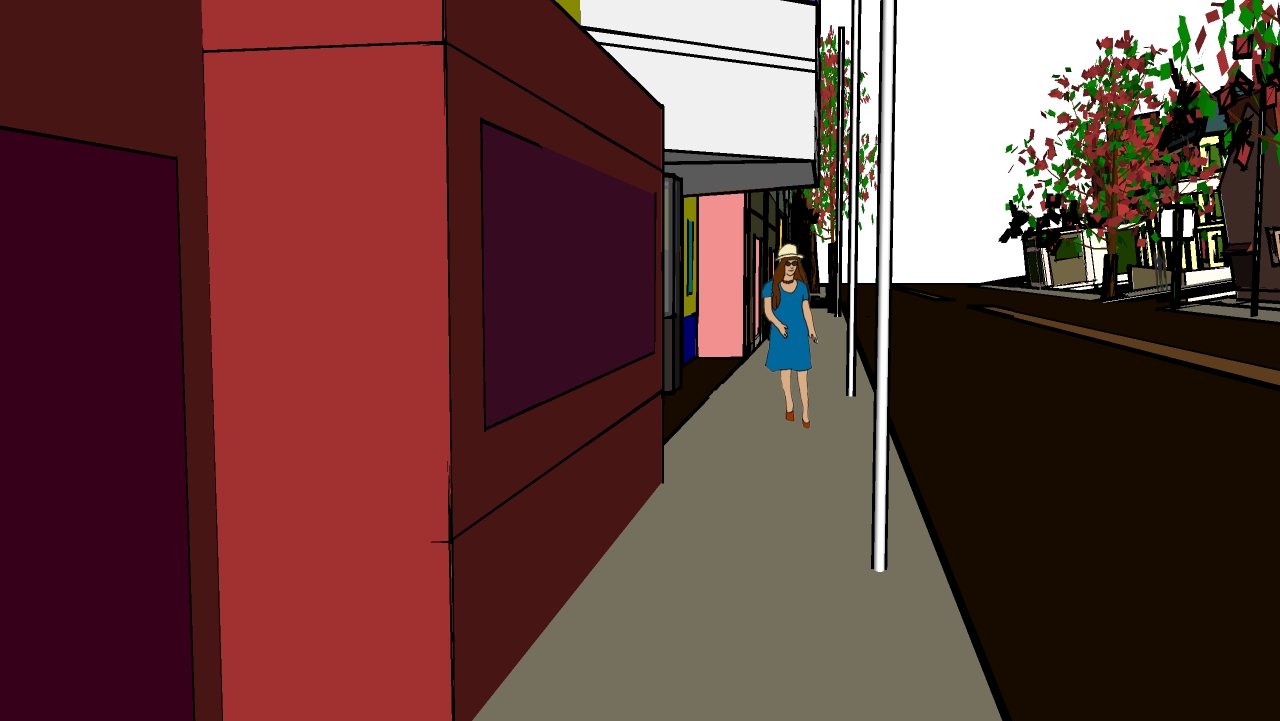
                      WHAT I SEE IN THE MODEL

                      || Joel Metzger 3D Modeling
                      || story-shorts.net - Animation with SU

                      1 Reply Last reply Reply Quote 0
                      • kachuppK Offline
                        kachupp
                        last edited by

                        😲 I can't get FOG dialog box to display 😞

                        Ignore found an answer in another thread by TIG thanks for the insight ... snappyfogdlg registry x was on the moon


                        1 Reply Last reply Reply Quote 0
                        • 1 / 1
                        • First post
                          Last post
                        Buy SketchPlus
                        Buy SUbD
                        Buy WrapR
                        Buy eBook
                        Buy Modelur
                        Buy Vertex Tools
                        Buy SketchCuisine
                        Buy FormFonts

                        Advertisement
