Random lines/faces - dwg import
-
hi.
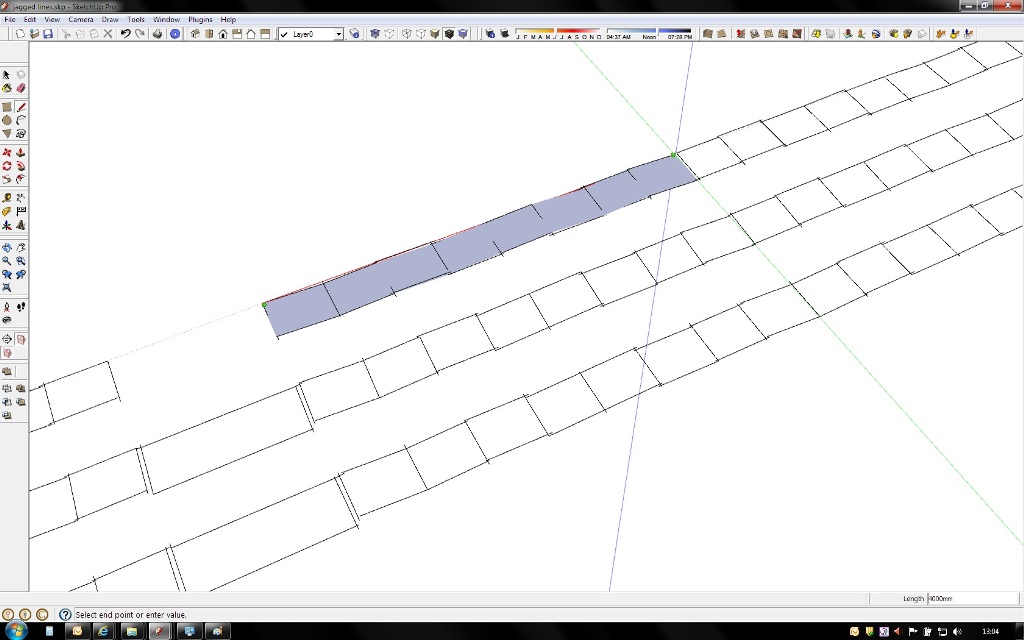
I have been having an occasional problem when importing dwg files into sketchup. Visually the lines don't join up and appear to skew off. I have changed the style so only edges are shown and have looked open gl settings but with no change. I have also looked at the sketchup file on other computers in my office with the same result.
sketchup 8 pro
windows 7 x64 sp1
i5 2500k CPU 3.3GHz
quadro 2000the other computers in the office are the same except the graphics which is a quadro 600.
any help would be great.
-
Your lines are 380km !!! away from ORIGIN.
SketchUp doesn't handle such large lengths. Import the model and untick "Preserve drawing origin" in the import options.
-
thomthom
Thanks for the answer and quick reply. The dwg was part of a measured survey hence the distance from the origin, preserve drawing origin was on. one little tick!
thanks
-
@thomthom said:
Your lines are 380km !!! away from ORIGIN.
SketchUp doesn't handle such large lengths. Import the model and untick "Preserve drawing origin" in the import options.



Hello! It looks like you're interested in this conversation, but you don't have an account yet.
Getting fed up of having to scroll through the same posts each visit? When you register for an account, you'll always come back to exactly where you were before, and choose to be notified of new replies (either via email, or push notification). You'll also be able to save bookmarks and upvote posts to show your appreciation to other community members.
With your input, this post could be even better 💗
Register Login


Advertisement