sketchucation logo sketchucation
    • Login
    Oops, your profile's looking a bit empty! To help us tailor your experience, please fill in key details like your SketchUp version, skill level, operating system, and more. Update and save your info on your profile page today!
    โš ๏ธ Important | Libfredo 15.6b introduces important bugfixes for Fredo's Extensions Update

    Organic and curvy facade

    Scheduled Pinned Locked Moved Organic Modelling
    17 Posts 5 Posters 12.5k Views 5 Watching
    Loading More Posts
    • Oldest to Newest
    • Newest to Oldest
    • Most Votes
    Reply
    • Reply as topic
    Log in to reply
    This topic has been deleted. Only users with topic management privileges can see it.
    • DareDevilD Offline
      DareDevil
      last edited by

      Hello,
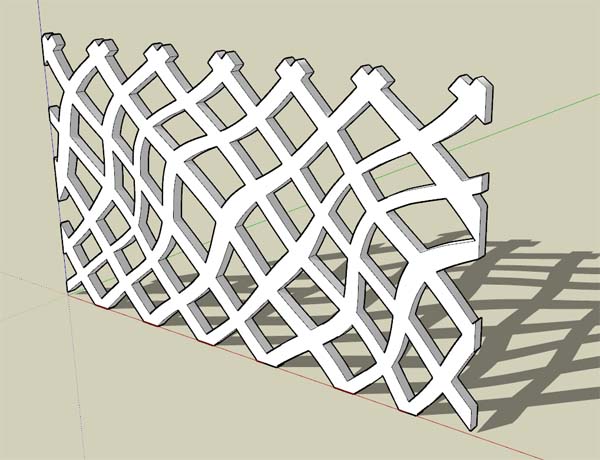
      This facade is flat with curvy lines... My way to produce this kind of net will use Illustrator before SU.
      In Illustrator, make a regular weaving and distort it. Export it in DXF or DWG and import in SU. Then just extrude it.
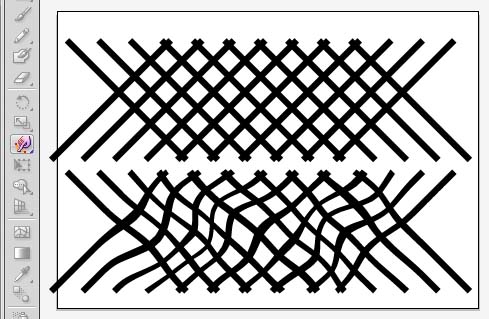
      Illustrator.jpg
      SketchUp.jpg

      1 Reply Last reply Reply Quote 0
      • pilouP Offline
        pilou
        last edited by

        Illustrator if you have some money ๐Ÿ’š
        Seems Inskcape for that can make the same for free ๐Ÿ˜‰

        And if you want the best ergonomy in 2D take Moment of Inspiration! โ˜€
        The demo infinite (without save) is sufficient here
        Make a snapshot of the screen as PNG with transparence! ๐Ÿ˜‰
        And use the tricky plugin of TIG Trimer image for pushpull the image! ๐Ÿ˜‰

        Frenchy Pilou
        Is beautiful that please without concept!
        My Little site :)

        1 Reply Last reply Reply Quote 0
        • brookefoxB Offline
          brookefox
          last edited by

          Not going the image way, how to do this (in a way appropriate to this thread, that is)? How to distort a grid of faces and edges, before or after extrusion?
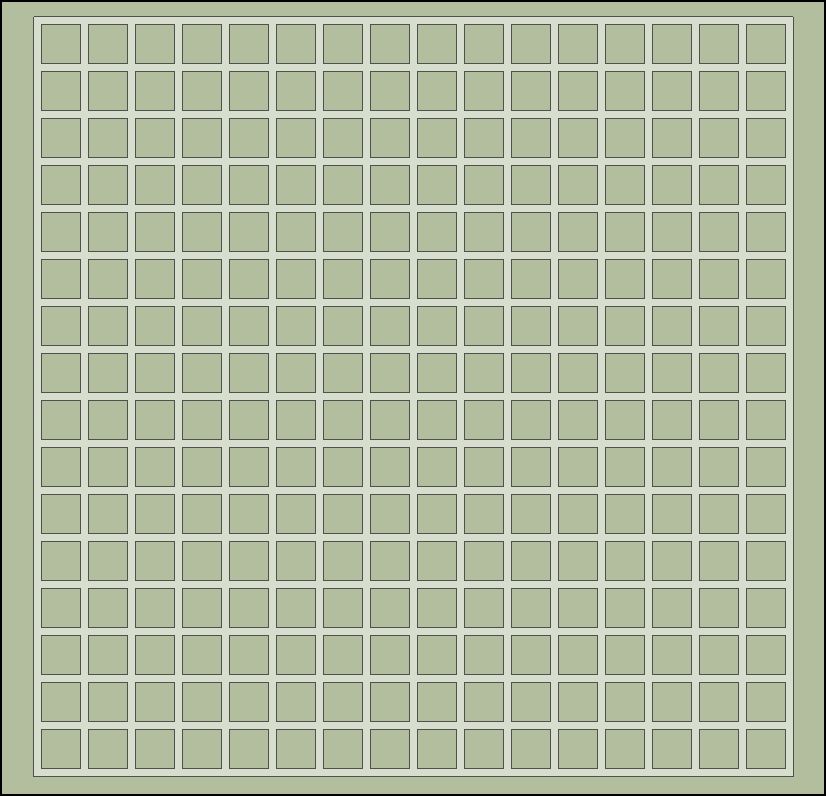

          faced grid.skp


          faced grid-1.JPG

          ~ Brooke

          1 Reply Last reply Reply Quote 0
          • pilouP Offline
            pilou
            last edited by

            Look the gride, it's a funny optic effect!
            See at each intersection : a point appears and disapears successivelly! โ˜€

            Frenchy Pilou
            Is beautiful that please without concept!
            My Little site :)

            1 Reply Last reply Reply Quote 0
            • brookefoxB Offline
              brookefox
              last edited by

              @brookefox said:

              Not going the image way, how to do this (in a way appropriate to this thread, that is)? How to distort a grid of faces and edges, before or after extrusion?

              Lay a smaller grid on it, intersect and warp with what tool?

              ~ Brooke

              1 Reply Last reply Reply Quote 0
              • pbacotP Offline
                pbacot
                last edited by

                You have to "do the warp" in illustrator or another application. IDK if there's a feasible way in SU.

                Actually I ran a test with a Gimp png image and TIG's Image trimmer. Not sure if it can be made smooth enough (either by the plugin's simplification or more detailed import). Perhaps multiple images must be imported and trimmed. If this is a ramen bar, mine looked like crispy noodles.

                MacOSX MojaveSketchUp Pro v19 Twilight v2 Thea v3 PowerCADD

                1 Reply Last reply Reply Quote 0
                • DareDevilD Offline
                  DareDevil
                  last edited by

                  @brookefox said:

                  Not going the image way, how to do this (in a way appropriate to this thread, that is)? How to distort a grid of faces and edges, before or after extrusion?

                  You can use SketchyFFD (Free Form Deformation). I tried it first for this question, but it's too much for my computer... The Illustrator way is very very lighter !

                  1 Reply Last reply Reply Quote 0
                  • pbacotP Offline
                    pbacot
                    last edited by

                    I think it is more appropriate to draw the mesh and not necessarily warp it. It doesn't need to be processed by the computer. The artist can draw the shapes required. It would be better in a freehand application, rather than SU with its omnipresent inferencing. The only issue I find is you have to do the nasty DXF or DWG import and make all the faces behave. I drew it in my CAD, created polygons of all the holes and imported that. I think the OP implies the lattice-like facade is also deformed perpendicular to the building perimeter. IDK.

                    I attempted with bezier curves and Lattice Maker and did not succeed. LM placed the offsets every which way and never completed. So if you do it all natively in SU how would you make the offsets?

                    MacOSX MojaveSketchUp Pro v19 Twilight v2 Thea v3 PowerCADD

                    1 Reply Last reply Reply Quote 0
                    • pbacotP Offline
                      pbacot
                      last edited by

                      ๐Ÿ‘ A tool I've never used ๐Ÿ˜ณ Looks great! ๐Ÿ‘

                      MacOSX MojaveSketchUp Pro v19 Twilight v2 Thea v3 PowerCADD

                      1 Reply Last reply Reply Quote 0
                      • pilouP Offline
                        pilou
                        last edited by

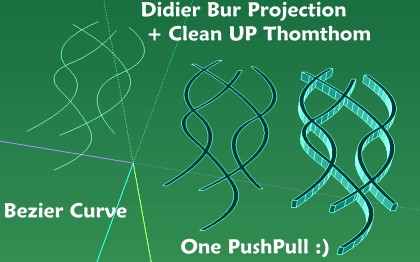
                        Bezier Curves By Fredo6

                        Use the Didier Bur Projection Tools
                        The last tool permits to make a sort of "Flat Offset" with Vector direction

                        Make 2 CleanUP for the Intersections ๐Ÿค“

                        Projection.jpg

                        If you want some crazzy no orthogonal sections use successivelly "Projection" with Vector direction
                        and draw the last segment on the first! โ˜€

                        Frenchy Pilou
                        Is beautiful that please without concept!
                        My Little site :)

                        1 Reply Last reply Reply Quote 0
                        • pilouP Offline
                          pilou
                          last edited by

                          Another possibilities ๐Ÿ˜„

                          Lattice-izer by Tig

                          http://forums.sketchucation.com/download/file.php?id=28261&t=1

                          http://forums.sketchucation.com/download/file.php?id=28262&mode=view

                          "City Steet generator" by Thomthom

                          http://forums.sketchucation.com/download/file.php?id=42058&t=1

                          http://forums.sketchucation.com/download/file.php?id=42039

                          Frenchy Pilou
                          Is beautiful that please without concept!
                          My Little site :)

                          1 Reply Last reply Reply Quote 0
                          • pilouP Offline
                            pilou
                            last edited by

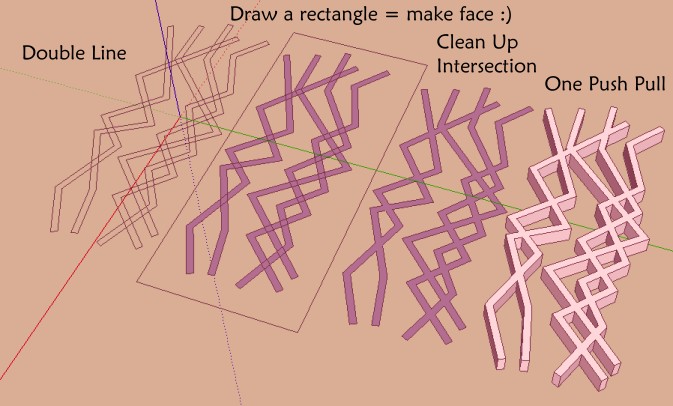
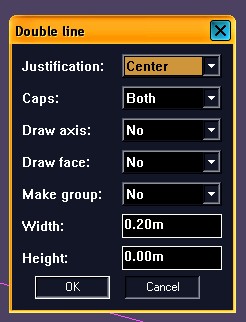
                            You have also Doubleline again by Didier Bur โ˜€
                            Advantage extremities are perpendicular with the last segment! ๐Ÿค“

                            Clean Up by Thomthom

                            doubleline1.jpg
                            doubleline2.jpg

                            Frenchy Pilou
                            Is beautiful that please without concept!
                            My Little site :)

                            1 Reply Last reply Reply Quote 0
                            • brookefoxB Offline
                              brookefox
                              last edited by

                              Looking good to me. Very nice, Pilou. I'm going to take the opportunity to encourage someone to get in touch with Sketchy FFD, as per daredevil's rec... It seemingly would allow manipulation so that the grid remained more faithful to the original, rather than being really a non-grid.

                              Well, I tried it on the simple grid and crashed twice, which is enough for me.

                              ~ Brooke

                              1 Reply Last reply Reply Quote 0
                              • C Offline
                                ccs1987
                                last edited by

                                Hi Guys, let's say that when you look at the plan of the building. The wall i wanted to be curvy. from the picture it might seem to be a straight wall just with pattern on the wall

                                Sketchup 8 pro
                                Vray

                                Intel Xeon W3520 2.67Ghz
                                12Gb Ram
                                Nvdia Quadro FX 1800

                                1 Reply Last reply Reply Quote 0
                                • pilouP Offline
                                  pilou
                                  last edited by

                                  @unknownuser said:

                                  The wall i wanted to be curvy

                                  You can curve it!
                                  With Shape Bender by Chris Fullmer or Fredo Scale by Fredo6 ๐Ÿ˜‰

                                  Here Shape Bender : Arc can be any curve
                                  The straight line must be parallal to the red Axis!
                                  Wall must be a group or component
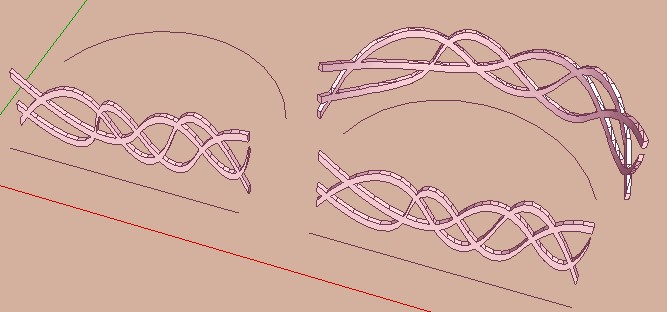
                                  shapeB.jpg

                                  and then twisted with Fredo Scale ๐Ÿ˜‰
                                  etc...

                                  twisted.jpg

                                  Frenchy Pilou
                                  Is beautiful that please without concept!
                                  My Little site :)

                                  1 Reply Last reply Reply Quote 0
                                  • C Offline
                                    ccs1987
                                    last edited by

                                    simply amazing...

                                    Sketchup 8 pro
                                    Vray

                                    Intel Xeon W3520 2.67Ghz
                                    12Gb Ram
                                    Nvdia Quadro FX 1800

                                    1 Reply Last reply Reply Quote 0
                                    • 1 / 1
                                    • First post
                                      Last post
                                    Buy SketchPlus
                                    Buy SUbD
                                    Buy WrapR
                                    Buy eBook
                                    Buy Modelur
                                    Buy Vertex Tools
                                    Buy SketchCuisine
                                    Buy FormFonts

                                    Advertisement