Can't get print from LO to match model view
-
Hi,
I am trying to print a floor plan from Layout in black and white only, like a normal line drawing would appear in 2D. The floor plan view is set up as a scene in the model in ortho mode with hidden line style, which shows as black and white within SU. However in Layout and on the print the floor area of the room and area of the walls comes out shaded a light grey, which I do not want. Any ideas?Thanks
Nick
-
Try selecting the model in LO. Then in 'Sketchup Model' dialogue.. styles/select 'hidden line'
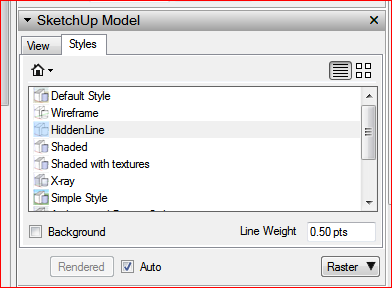
-
Thanks baz, I will try that, looks like I may have missed the obvious again.
-
I always save the required Style with the scene in SU. That way LO should always update correctly. I'm guessing you are familiar with the effects of "Raster/Hybrid/Vector" selection for scenes in LO?
-
Yes I saved the style with the scene but I am still new to Layout. I will test out the render methods on Saturday when I am back at work- I don't have SU Pro at home
Thanks
-
Here's what we consider a rendering bug in LayOut:
If you export a 2D png in SketchUp, your raster-rendered model in LayOut should match.
If you export PDF in SketchUp, your vector or hybrid-rendered model in LayOut should match.But it sounds like you're describing an unsaved style in a a scene that isn't updated. Save the style first, then save the scene.
b
ps - whenever I say that, it reminds me of the TV show Heroes: "Save the Cheerleader, Save the World".

Hello! It looks like you're interested in this conversation, but you don't have an account yet.
Getting fed up of having to scroll through the same posts each visit? When you register for an account, you'll always come back to exactly where you were before, and choose to be notified of new replies (either via email, or push notification). You'll also be able to save bookmarks and upvote posts to show your appreciation to other community members.
With your input, this post could be even better 💗
Register Login


Advertisement