Matchphoto Swap
-
Probably not understanding exactly what you mean, but surely all you do is move the view of the model to line up with the new image then get your axis in the right place and carry on where you left off as there is no limit to how many matched photos you use.
-
you're absolutely right - the fact is that when you import an image with match photo - that image cannot be changed anymore.
situations might not be very common: say you have a night and a day shot, you photomatch and model - then you could just swap the images without tinkering with the axis.
-
How about after you have done the photomatch, you duplicate the scene (Add) and add your other image as a watermark?
-
yes, but you cannot have it as background instead of the photomatched one - unless i'm missing something (usually the case
 ) the only way is to swap the image
in fact that is exactly what i'd like - same axis but different image..
-
You can have as many photomatched pictures as you like. Just keep adding them as image imports (photomatched). If you wanted you could mess about with the pictures in photoshop or similar program to give the illusion of darkness etc etc save as new files and insert them as photomatched
-
@kingsi said:
You can have as many photomatched pictures as you like. Just keep adding them as image imports (photomatched). If you wanted you could mess about with the pictures in photoshop or similar program to give the illusion of darkness etc etc save as new files and insert them as photomatched
I think you missed the point. The question is to replace a photo in a photomatch that's already set up. I'd be curious if there's a way to do that too. Photomatch is so damn fiddly, it's next to impossible to get the same view twice.
-
I have had a go at replacing a photomatched image but does not seem possible. Sorry
-
Match Photo sets up a view based on your approximation of what you perceive in a photograph. Unless the camera is in the same place exactly, you'd have to make another approximation anyway. It's not exact but if you want something like the existing view (or very close if you actually have an exact tripod setup), you just have to import and set it up again. How often would this need to be done?
I think it has been pointed out that even using an exact repeat shot as background in a duplicate scene, the (SU) camera view changes slightly so you can't get the same alignment. I haven't tested that yet.
I think it's fiddly by the very nature of the task (eyeballing lines on screen) and trying to accommodate great variation of photographic conditions. I've put different matched photos in the same model. Works OK for what it is. (It's a feature some of the pros here would never bother with.)
I can't see how MP would ever be more, unless it's newly coded in that advanced content-aware 3d photograph software others have posted about.
-
Max, Can you show more of the problem? I have no experience with MP only replacing images in a model via right click, which of course in easy if they are the same size.
-
there is no problem to show, it's just a wish to be able to swap the source photomatch image for another, after it has been aligned and modelled.
i don't even think it possible at present because the image seems almost embedded in the file and i'm not hopeful that ruby can access it..
-
Hmmm... I retried my idea and it seems to work for me.
First Photomatch the first photo. Then right click the scene tab and choose Add.
Then uncheck show forground and background photo.
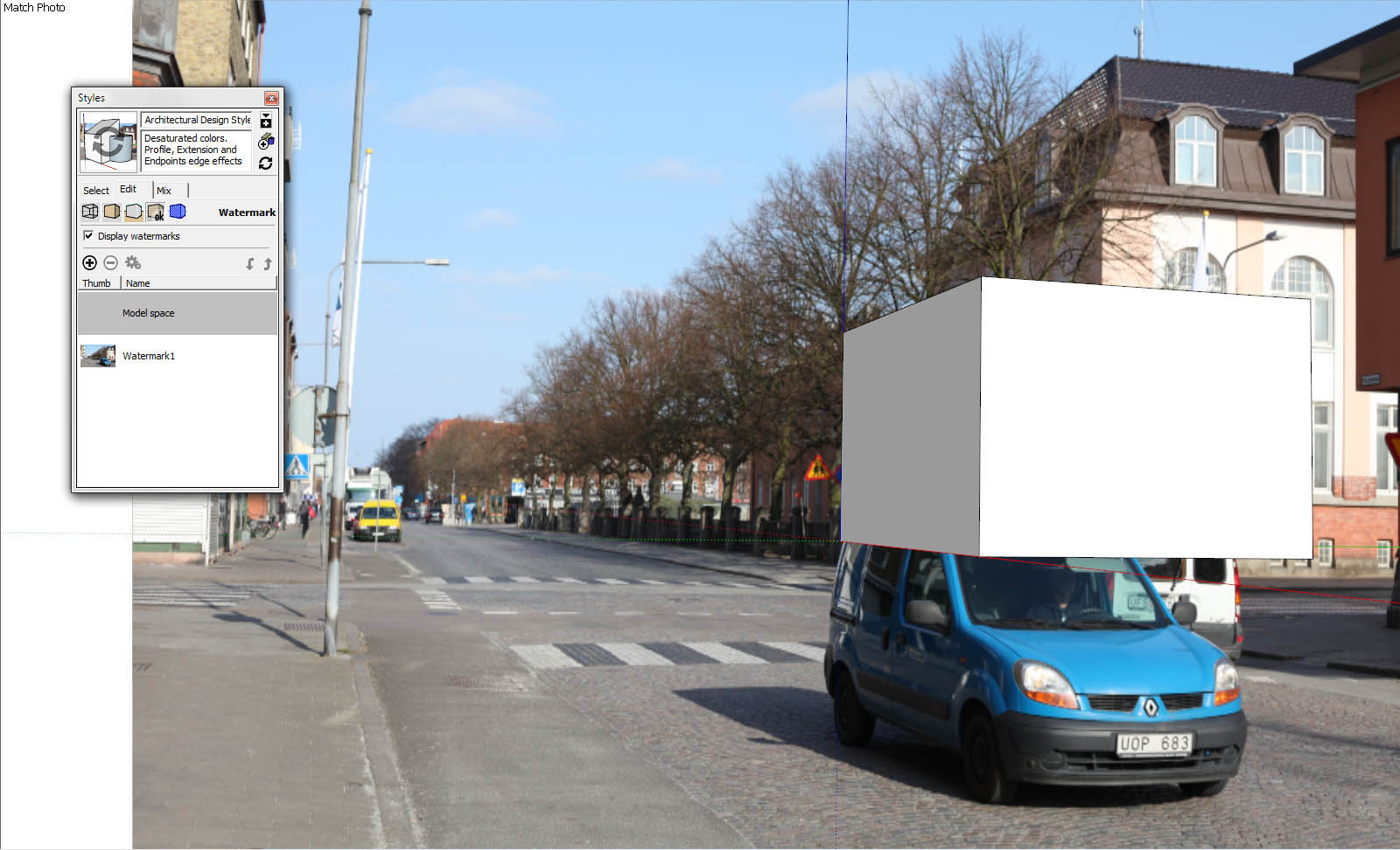
Add the second image as watermark.
Update scene.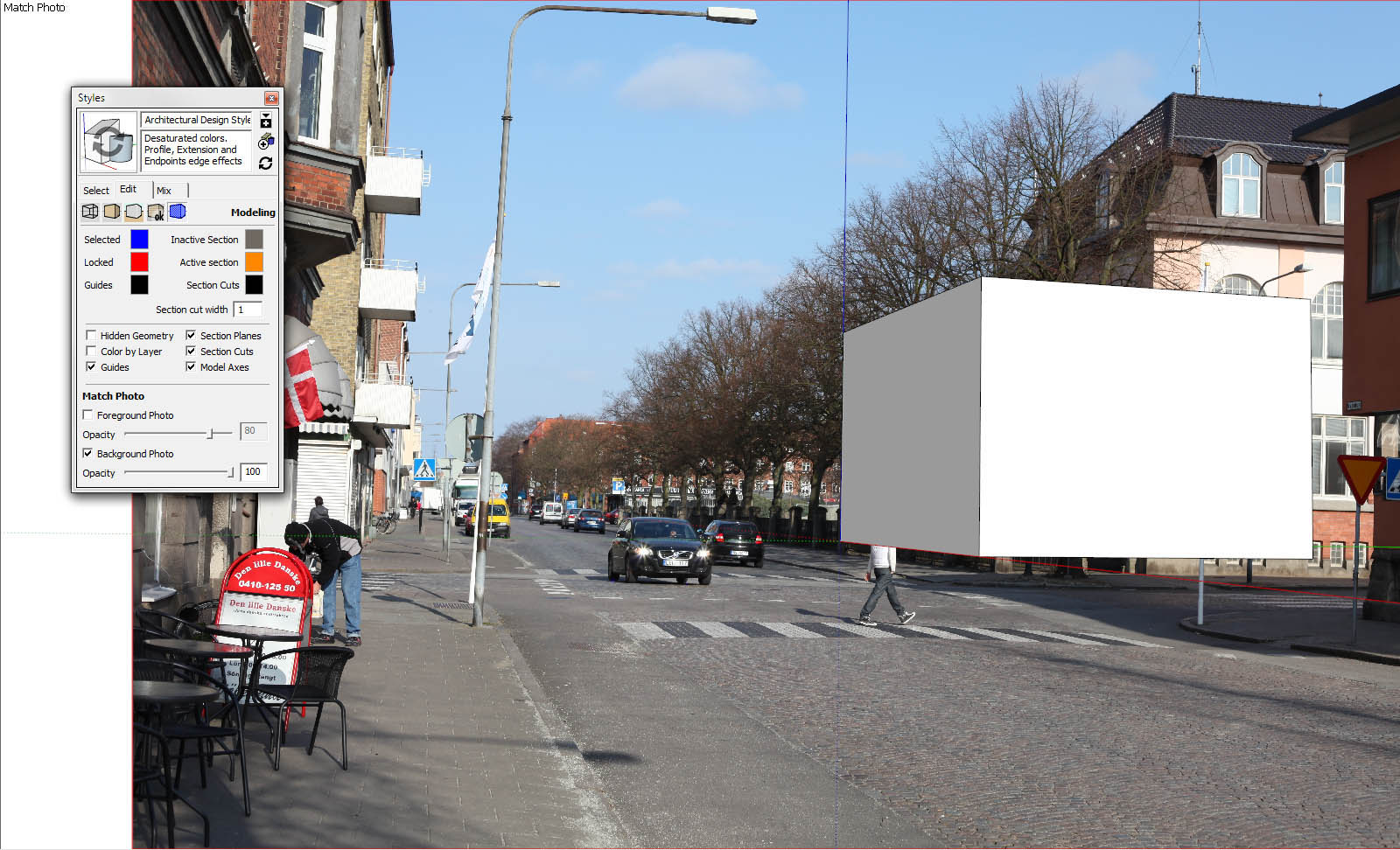
-
Thank you Pixero - that helped a lot because as i went back to play i found out what was driving mad... (really i had given up on this!
 )
)when you add the second scene, it doesn't save these, (since it duplicates the photo-matched)
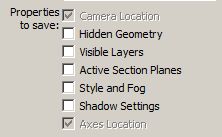
switching these on, i can move through different scenes and keep the axis put...!


might do a small tutorial later today if i have time..






Hello! It looks like you're interested in this conversation, but you don't have an account yet.
Getting fed up of having to scroll through the same posts each visit? When you register for an account, you'll always come back to exactly where you were before, and choose to be notified of new replies (either via email, or push notification). You'll also be able to save bookmarks and upvote posts to show your appreciation to other community members.
With your input, this post could be even better 💗
Register Login


Advertisement