[Plugin] [CityGen] - Street Generator [WIP] (0.5.2a)
-
Parameters accept but do not generate 'feet', as far as I can tell. It would be nice if the model units were enforced, if they cannot be specified otherwise, and that settings could be remembered. Sorry if that is too obvious and has been said before.
Any tips for this minor error in the street generated? I made sure the centerlines intersected. Green is the 60' ROW; gray is the 24' road itself, both generated from the blue centerline.

-
By somewhat selectively scattering and deleting, I got it to load.... Pretty unsavory process, and though I'll hang my hat on the opinion that the install instructions ain't much clearer than mud, most folks don't seem to have a problem so my problem may indeed be me.
Readme.txt from citygen modules subfolder:
This is the module and support folder for CityGen.
All .rb files in this folder is loaded by city_gen.rb.
Make a new folder for eah module, and place a loading .rb here. (Here where?)
Example:
Plugins\city_gen.rb <- Core CityGen file
Plugins\Gity_Gen\street_gen.rb <- Core Street Generator module file - loaded by city_gen.rb
Plugins\City_Gen\Street_Gen\ <- Street Generator's support folderIt loads and the parameters can be set but but it does not work... generate does not generate, except on the parameters screen.
Looks like I set params that were not workable. When I reopened TT's street model and used the default settings, streets were generated. When I tried the same on my curves the ruby console said generating but none were evident. I need to play with the params; too many segments probably that need to be dealt with by the plugin. I'll try to set to a large angle or no rounding, maybe weld the segments. Oops... it was working: I just had to click away. This was because the streets are created on layer '0' and I was on layer 'street centerlines' with other layers hidden when group editing. Perfectly reasonable.

Ruby console:
Error: #<NoMethodError: private methodsplit' called for nil:NilClass> C:/Program Files (x86)/Google/Google SketchUp 8/Plugins/citygen/modules/street_gen.rb:536:instring_to_hash'
C:/Program Files (x86)/Google/Google SketchUp 8/Plugins/citygen/modules/street_gen.rb:118 -
The project was made quite some time ago. I, we, where rather newish to SketchUp plugins. The project was in early stages - still is because we've not had time to work on it. Information is not the best, as it was intended more for developers than users.
The CityGen thread points to where the modules should be installed:
@unknownuser said:
Core and Installation Check
This is the main file that centralise information and load the other modules.
Modules are located in Plugins\CityGen\modules.So the Streetgen modules should go into that folder.
I've been wishing to update this project, but it's been too far down on my priority list.

-
@thomthom said:
The CityGen thread points to where the modules should be installed:
@unknownuser said:
Core and Installation Check
This is the main file that centralise information and load the other modules.
Modules are located in Plugins\CityGen\modules.So the Streetgen modules should go into that folder.
Literally, like: Plugins\CityGen\modules\street_gen
or like: Plugins\CityGen\street_gen\I tried both and am not sure why it is now working... I surely have it mucked up a bit with unnecessary dupes but it is working well enough, and understandably no one has the time to help figure it out.
Thanks for checking in and replying and for sharing the thing in the first place.
Oh, I see over at the City Gen thread you already clarified:
@unknownuser said:You're missing the full path. Observe: Plugins\CityGen*modules*\
-
Yes, the instructions are a bit confusing - I know. we where changing many things very quickly when we where actively developing. That's why some notes might be somewhat inconsistent.
hmm... Maybe it'd be worth re-packaging as RBZ...
-
Well, I'm all for it. I find the parameter setting applet to be clear and concise and quite elegant. An irrelevant benefit to running the routine is that errant entities are made obvious owning to how they generate more obvious 'errants'.
-
I used it to draw braided streams for planning purposes. Perhaps the street gen focus is limiting it's real applicability. (I seemed to be getting erroneous non-co-planar error msgs in the ruby console, but enough of that.) These were no done carefully and have not been cleaned up, either.


-
What is you don't do corner rounding?
-
Sorry I missed your post. I was working with curves, so there were no corners to be rounded.
-
@brookefox said:
Sorry I missed your post. I was working with curves, so there were no corners to be rounded.
Doesn't matter - it doesn't see Curves. So when you set the rounding to 360 you will get odd results. It wasn't meant to accept such value. Just hasn't been implemented a limit check.
-
If you don't want rounding you should set it to 0.
-
Oh wait... I might have confused myself.
ugh... it's been so long since I worked on this project...
I think you might be right...

-
So I thought did not need the rounding and set it to 360 so as to avoid (further, excessive) rounding, you are saying to set it lower, say 359, because the routine does not like 360?
-
is this project completely dead? or did Modelur take its place?? cheers
-
It is ... very very dormant ...

-
Can you please add road signs in the UK in this plug-in?
-
@jermboy27 said:
Can you please add road signs in the UK in this plug-in?
That's a bit vague request. Add road sign - how, and by what rules?
Or are you looking for a library of components? -
@thomthom said:
@jermboy27 said:
Can you please add road signs in the UK in this plug-in?
That's a bit vague request. Add road sign - how, and by what rules?
Or are you looking for a library of components?By the Sketch-up road sign plug-in rules in any country you choose.
-
@jermboy27 said:
@thomthom said:
@jermboy27 said:
Can you please add road signs in the UK in this plug-in?
That's a bit vague request. Add road sign - how, and by what rules?
Or are you looking for a library of components?By the Sketch-up road sign plug-in rules in any country you choose.
This is still too vague. What rules are these?
In any case - creating the signs for all the signs in the world - even just one is a bit of a task. But if you wan't to suggest it as a plugin you really need to be more spesific to what it would be used for and how it is supposed to work. -
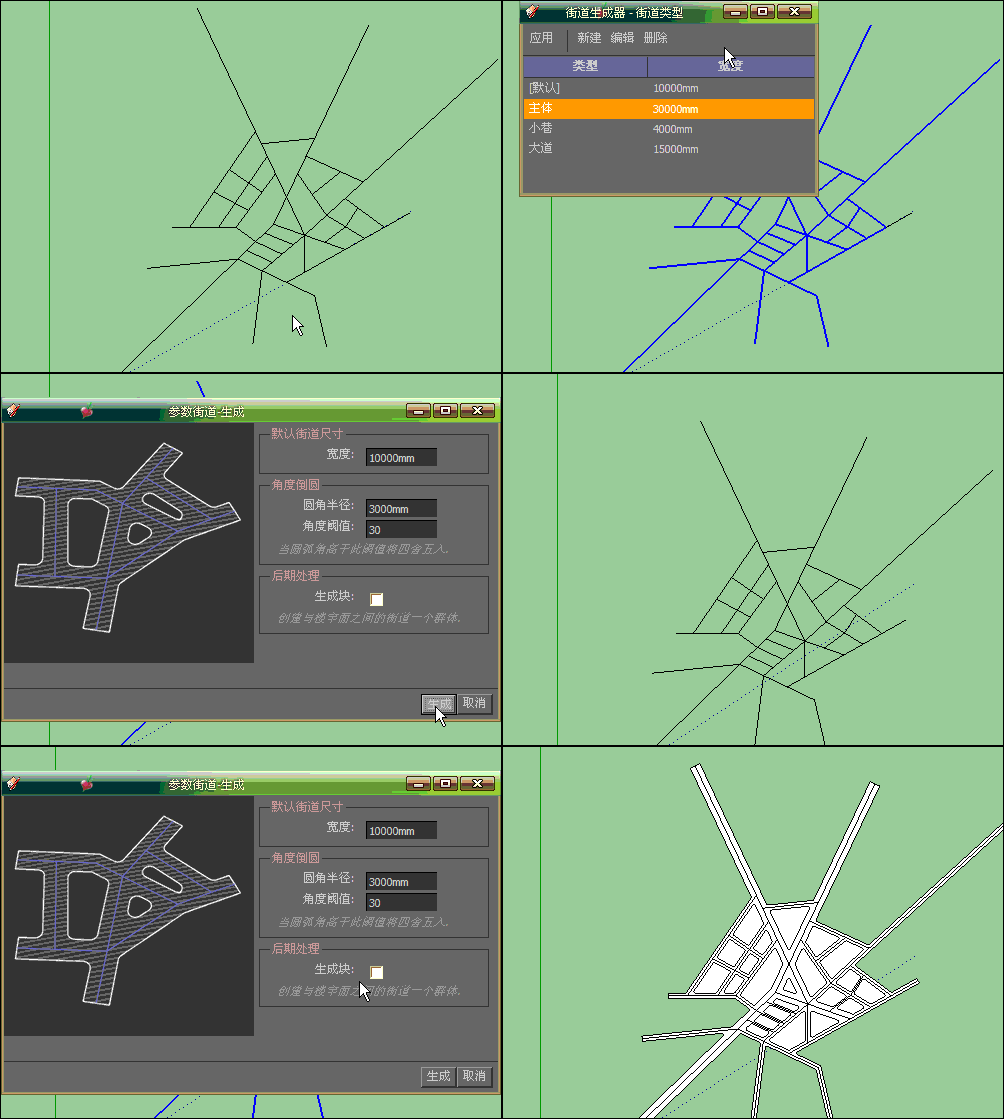
Good tool to do the planning useful, there is a problem, you can not change the road style



Hello! It looks like you're interested in this conversation, but you don't have an account yet.
Getting fed up of having to scroll through the same posts each visit? When you register for an account, you'll always come back to exactly where you were before, and choose to be notified of new replies (either via email, or push notification). You'll also be able to save bookmarks and upvote posts to show your appreciation to other community members.
With your input, this post could be even better 💗
Register Login


Advertisement