Shortcut Assignment Problem
-
Shortcut issues,
OS: Mac OSX Lion
Sketchup 8 ProI cannot find the shortcut.plist file on my Mac, does this even exist? I looked all over the place including, Library/Application Support/Google Sketchup 8/Sketchup...
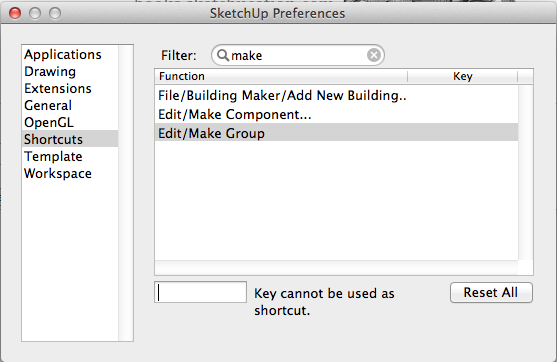
When I try to assign shortcuts I repeatedly get the warning that the desired key cannot be assigned. I seem to be able to overwrite my Sketchup.dat file with one that has settings that I like, but if I ever want to change a shortcut assignment I get the same error. Sometimes it lets me reassign a used letter. For example, if P is used for Push I can reassign it to Perspective, but after that change I cannot reassign P to Push (and get the same error message). Once I reassign a letter it becomes unusable for future changes. If I reset all my shortcuts, I cannot assign shortcuts to anything...and get the same error message.
I have no idea what is going on, but it is incredibly annoying.
Any help would be appreciated.
Thanks,
-
Just a guess. Are you hitting Enter/Return after typing the keyboard shortcut you want to assign? If so, don't. You'll get this if you do hit Enter/Return because that key can't be used as a keyboard shortcut.
-
In my case, when I see that message it seems to be because I have a system-wide shortcut already assigned to the key - check through the shortcuts in system preferences>keyboard to see if something is already assigned there. Also if you have any other shortcut managers running (eg keyboard maestro etc.) then these might affect things.
-
...wow I feel kinda embarrassed. Thank you Dave, I kept hitting enter or tab to set the shortcut like you said. It's funny how something so obvious was completely unclear at the time.
Thanks,
-
@abdsinc said:
...wow I feel kinda embarrassed. Thank you Dave, I kept hitting enter or tab to set the shortcut like you said. It's funny how something so obvious was completely unclear at the time.
Thanks,
You're welcome. I did it a couple of times while setting shortcuts early on with my Mac so I have first hand knowledge of the issue.
 It's not as intuitive as on the PC.

Hello! It looks like you're interested in this conversation, but you don't have an account yet.
Getting fed up of having to scroll through the same posts each visit? When you register for an account, you'll always come back to exactly where you were before, and choose to be notified of new replies (either via email, or push notification). You'll also be able to save bookmarks and upvote posts to show your appreciation to other community members.
With your input, this post could be even better 💗
Register Login


Advertisement