Toolbars that never go away (mac)
-
I know this topic has been discussed before: I have searched it but could not find any thread that presented a solution to this problem.
what happens is that even though I close a toolbar (either by pressing the close button on it or through the menu) it comes back when I open sketchup again. it is like what happens in terror movies: the monster always comes back!

is there a way to keep a toolbar shut until I want it back?
-
Yes, it is possible but it involves coding. What tool (plugin)?
If the plugin has been scrambled, there is nothing that can be done but inform the author and hope it will be corrected. If not the ruby can be changed.
There is no generic solution as it is not a bug from SU but rather a different behavior between Mac and PCs. When people program toolbars for PC and use one certain way instead of another, it does that on Macs. I assume that on PC either method works but I don't know.
-
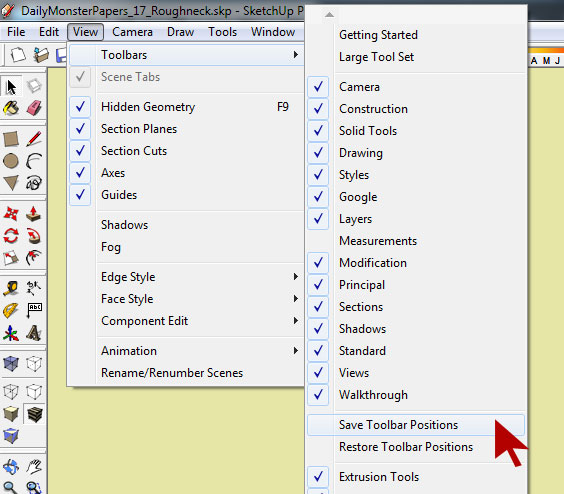
Do you not have this option on the Mac?
-
They do not get them messed first of all. This is PC only I think...
-
@unknownuser said:
Do you not have this option on the Mac?
yes, I do. this is what I meant by closing it through the menu. but it does not work.
-
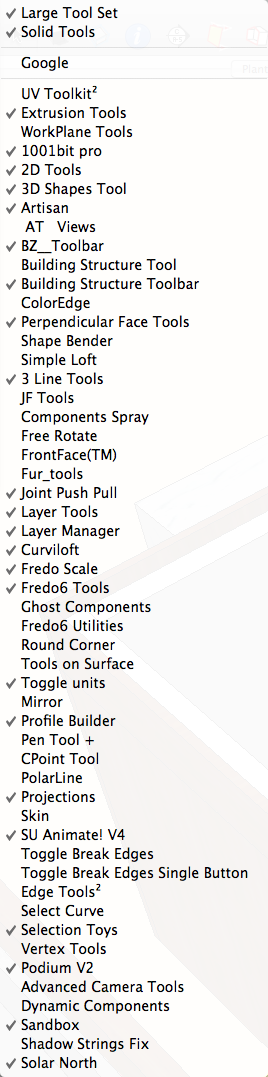
I have the same problem on my Mac. TIG made the comment that it was the code and you should inform the autor of the ruby for now I just put up with it.
-
We have the menu, but again it depends how the ruby was written.
The issue is that the toolbar will show on startup everytime, regardless of what you do in the menu, so you have to close it everytime (or open it everytime if the default is not show).
If worked out for Mac in the script, at startup it will only show once checked in the menu, or not if not checked, you don't have to redo it everytime you start sketchup. Most scripts are fine, some are not. It's not a bug, just an inconvenience.Other than asking the authors, which may or may not know or realize the problem and how to solve it if they are on PC, you can tell me which tool and I can look at it and maybe modify the script if not scrambled and if authorized.
I already put some modified scripts here (the one I use):
http://forums.sketchucation.com/viewtopic.php?f=323&t=42826And others for which I created a toolbar from scratch here ( I didn't created the tool, just added the toolbar and made sure it was working fine on Macs):
http://forums.sketchucation.com/viewtopic.php?f=323&t=42829 -
In the past I had a problem with hatch faces and perpendicular to face I'm not sure and would have to find author. Presently it is profile builder and artisan that opens up when I start SU. I've had worst problems in life but kinda annoying. do the authors of the scripts have to make two different ver. to work on a Mac
-
I get this with some tools like Profile Builder. Disabling in Preference works, IF it is controlled by Extensions Manager
-
Profile Builder is a sold script, nothing I can do, I cannot change it, and I presume it's scrambled anyway.
Same with artisan
-
@edson said:
I know this topic has been discussed before: I have searched it but could not find any thread that presented a solution to this problem.
what happens is that even though I close a toolbar (either by pressing the close button on it or through the menu) it comes back when I open sketchup again. it is like what happens in terror movies: the monster always comes back!
is there a way to keep a toolbar shut until I want it back?
Don't remember how anymore but I was able to tweak all except the scrambled ones( 3 checked ones).
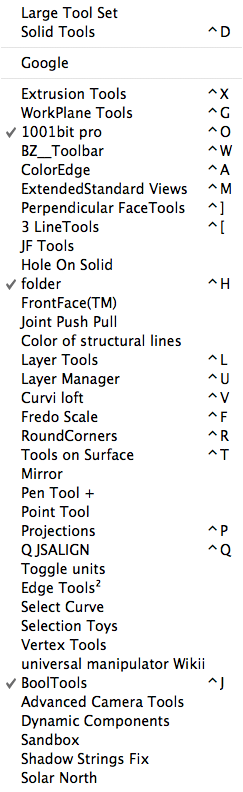
What I do for the scrambled ones and used to do for others that were problems; set up shortcuts in System Preferences all with the same modifier key so I can just hold the one key down and tap a few keys and those monsters vanish quickly or the toolbars reappear instantly.

-
Hatch faces and Perpendicular to face, done.
I'll check to make sure it works, and then work with the authors to see how to post the new scripts.
See that's the thing, I still don't know if they have to make two different versions just for that quirk. I know how it works on the Mac, and I presume the originals work fine on PC (although I'm not sure if they present the same quirk or not, which again is not a bug).
and I have no mean to test the modified one on PC to see if it still works just fine (or better). Thus I have scripts that work on mac for sure, but that's it.(and sometimes there are other issues, notably the modifer keys, popup menus, amongst others that make it that I think it's simpler to have two versions anyway)





Hello! It looks like you're interested in this conversation, but you don't have an account yet.
Getting fed up of having to scroll through the same posts each visit? When you register for an account, you'll always come back to exactly where you were before, and choose to be notified of new replies (either via email, or push notification). You'll also be able to save bookmarks and upvote posts to show your appreciation to other community members.
With your input, this post could be even better 💗
Register Login


Advertisement