Bevel top edge from an drill model
-
How i can bevel top edge for an drill like this http://sketchup.google.com/3dwarehouse/details?mid=c24cf584783ff76836f016fc66c4785.
I try'it roundCorners but leave a lot of empty surfaces. -
Well, sometimes good, old manual stitching of missing edges can do wonders. Unfortunately the plugin occasionally fails with some weird shapes.
-
For small details like that, scale the model up by a factor of 100 or 1000. This will help prevent the missing faces.
Another approach to putting the bevels on would be to draw a cone at the sharpening angle and intersect it with the drill.
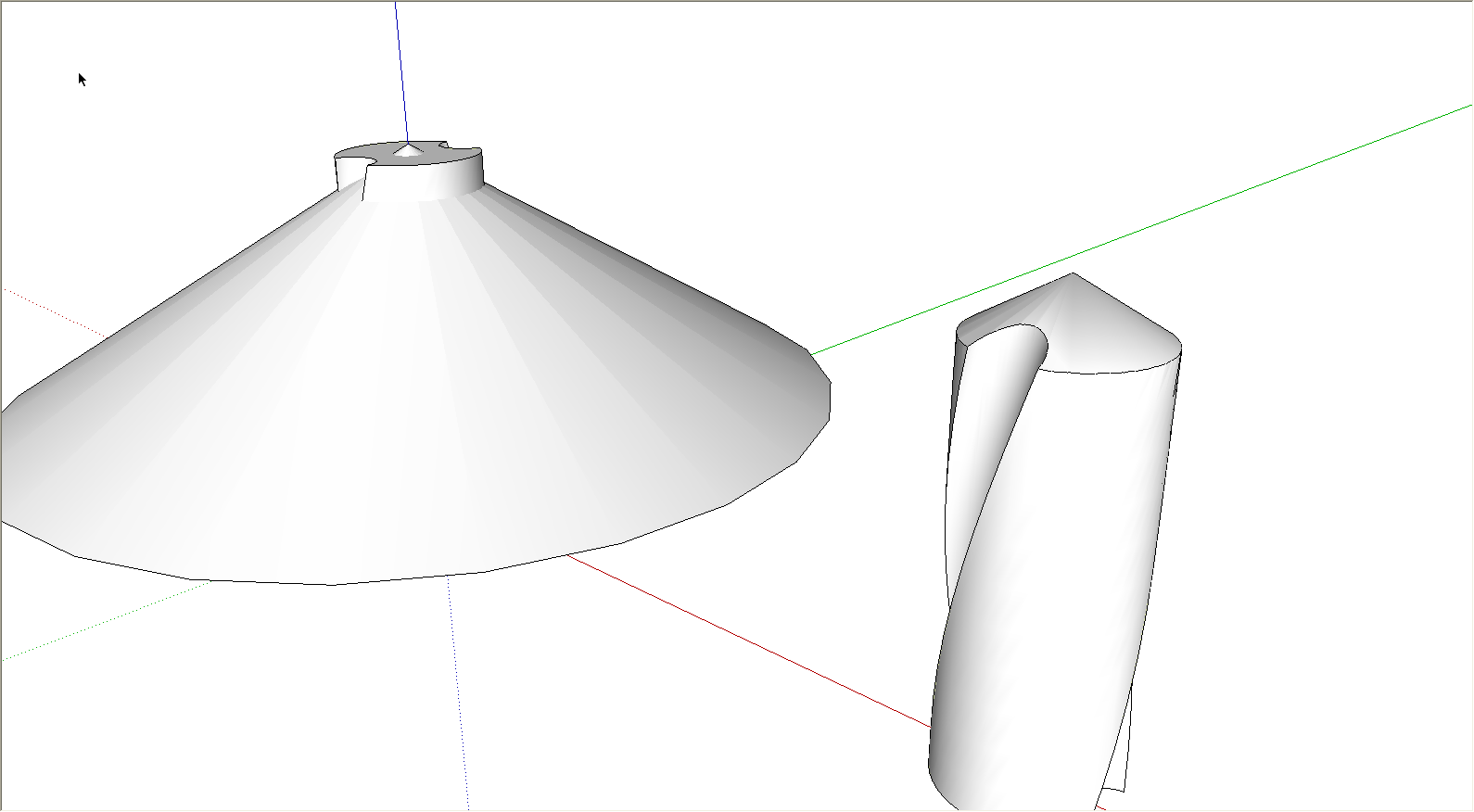
For something like this model, I find it helpful to think in terms of how the bevel would be put on the real object. For a drill you would do that with a grinder and rotate the drill rod. The surface of the cone represents the contact line between the wheel and the drill.


Hello! It looks like you're interested in this conversation, but you don't have an account yet.
Getting fed up of having to scroll through the same posts each visit? When you register for an account, you'll always come back to exactly where you were before, and choose to be notified of new replies (either via email, or push notification). You'll also be able to save bookmarks and upvote posts to show your appreciation to other community members.
With your input, this post could be even better 💗
Register Login


Advertisement