How to divide complex curve in equal segments?
-
I don't know if I should put this on Plugins section.
Is there any method/plugin to divide a curve in equal segments?
I need to make a chain-like component and I'm planning to use Component Stringer for that. But, as the shape is not a simple arc, but rather a bezier curve combined with lines (and maybe arcs), I need that to be divided in segments of same length.Thank you
-
Hi dereeei!
No problem

You need Fredo_BezierSpline and RickWilson_Weld.rb but I guess you already have them installed.1)select the entire path: curve+arc+straight lignes and weld them together (a shortcut like Alt+W is very time saving) Then you have a unique curve.
2)select this new curve, context clic and choose "convert in", submenu polyline divider or polyline segmentor. that's it

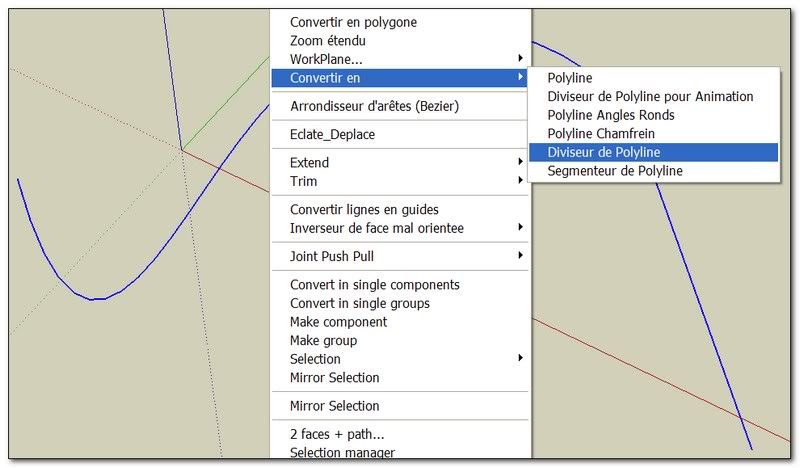
(if you want a progressive subdivision you can use polyline divider for animation)
or if you want make your own: take a look hereAbout Chris Component Stringer, I have made a bunch of studies around this one
Cheers, simon.
-
Thank you, simon le bon, I'm glad that I can do what I need wit the tools I already have.
-
A remark:
Don't forget to copy/save your path before convert it in a polyline. Because depending of your division, its aspect is going to be broken (as a polyline ) simon


Hello! It looks like you're interested in this conversation, but you don't have an account yet.
Getting fed up of having to scroll through the same posts each visit? When you register for an account, you'll always come back to exactly where you were before, and choose to be notified of new replies (either via email, or push notification). You'll also be able to save bookmarks and upvote posts to show your appreciation to other community members.
With your input, this post could be even better 💗
Register Login


Advertisement