Objects translucent on zoom out
-
I have a few objects that when I zoom out I can see through the objects. For example I can see the sides of each step in a staircase through the side boards. I'm not talking about z-fighting, and the material is not set to be translucent. I am using the default style for Sketchup 8. There is plenty of space between the outside of the object, and the piece I can see through it. Does anybody know what causes this, and is there a way to fix it? Thank you for any help you can offer.
-
It's probably edges bleeding through the faces from a certain distance. See a longer discussion about it here:
http://forums.sketchucation.com/viewtopic.php?f=15&t=33136 -
You can see what I am referring to in the circled portions.
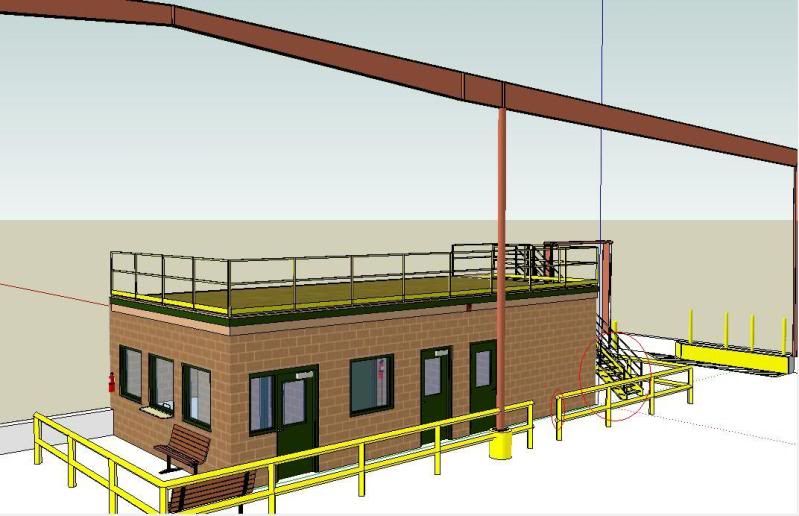
-
Although quite small picture, it seems to be what I was referring to. After my last post with the roofs in the other post, there is a suggestion to hide those edges.
You can somewhat control this if you export in larger scale and later resize the image.
-
Thank you Gaieus. The Shift + Eraser Tool trick helped to hide most of it.

Hello! It looks like you're interested in this conversation, but you don't have an account yet.
Getting fed up of having to scroll through the same posts each visit? When you register for an account, you'll always come back to exactly where you were before, and choose to be notified of new replies (either via email, or push notification). You'll also be able to save bookmarks and upvote posts to show your appreciation to other community members.
With your input, this post could be even better 💗
Register Login


Advertisement