Getting rid of text and dimensions
-
Working on someone else's model which has hundred of dimensions and text, all unfortunately on layer0.
I need to get rid of all of them. Is there a fast way to select them all and put them on another layer. It's a PITA to do it one by one.
Hoping there is a fast simple way :O)
Thanks as always
-
thomthom's selction toys will do it..
bascially, once it's installed, select all then right-click->select only.. choose text then delete.. do the same thing for dimensions.
[or if you're in a hurry, PM the model to me and i'll do it quick then send it back]
-
The model-info window Dimensions tab, and Text tab have buttons that allow you to select all dimensions and text.
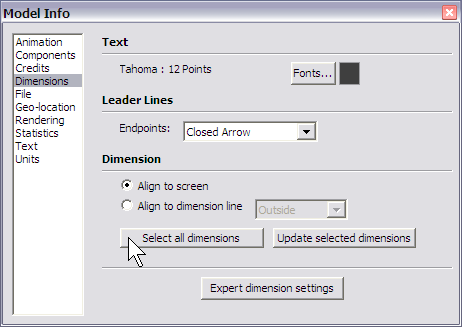
-
Thanks Jim for saving me some time. That worked real quick - once I entered each group or component- two clicks and all moved to another layer
I knew there had to be a fast way. Sketucation once more to my rescue :O)
I will have a look at Thomthom's selection tools too- Thanks for the tip Jeff.

Hello! It looks like you're interested in this conversation, but you don't have an account yet.
Getting fed up of having to scroll through the same posts each visit? When you register for an account, you'll always come back to exactly where you were before, and choose to be notified of new replies (either via email, or push notification). You'll also be able to save bookmarks and upvote posts to show your appreciation to other community members.
With your input, this post could be even better 💗
Register Login


Advertisement