COLOR is not in my MODEL INFO panel. What to do?
-
I'm using vers 7.08 pro. COLOR seems to be missing from my MODEL INFO panel. Is it a glitch in my installation or is there another method of changing the background colors?
-
colours are under Styles, go - select - in model - edit - then click the third buttom, background settings
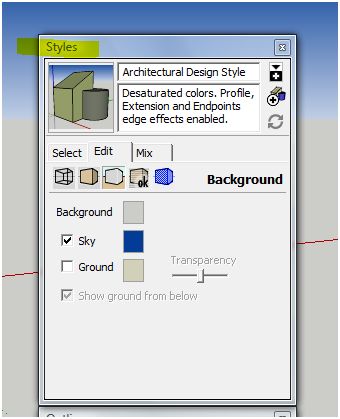
-
thank you very much. When I googled "sketchup background color" I arrived at this page...
http://download.sketchup.com/OnlineDoc/gsu_mac/F-Model_Settings_and_Managers/Settings-ModelInfo.htmApparrantly instructions for MAC. Where should I have searched for this info?
-
@frascati said:
thank you very much. When I googled "sketchup background color" I arrived at this page...
http://download.sketchup.com/OnlineDoc/gsu_mac/F-Model_Settings_and_Managers/Settings-ModelInfo.htmApparrantly instructions for MAC. Where should I have searched for this info?
hm... you stumbled across some very old help info there.
The up to date help is reached when you in SketchUp click in Help > Help Center. Which brings you to this URL: http://sketchup.google.com/support/?hl=en


Hello! It looks like you're interested in this conversation, but you don't have an account yet.
Getting fed up of having to scroll through the same posts each visit? When you register for an account, you'll always come back to exactly where you were before, and choose to be notified of new replies (either via email, or push notification). You'll also be able to save bookmarks and upvote posts to show your appreciation to other community members.
With your input, this post could be even better 💗
Register Login


Advertisement