Lines appear on sanbox terrain
-
Hi all -
This has happened a few times now. Here's what happens.
- I create terrain from contours using sandbox.
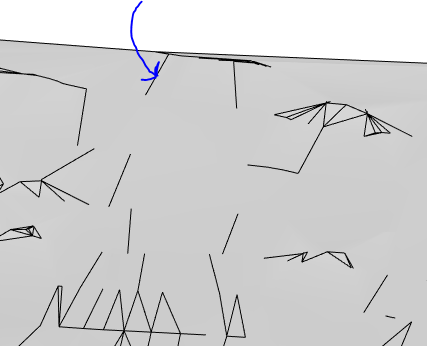
- The terrain initially has all the internal lines hidden (the outside border of the terrain is visisble).
- Sometime after I've continued editing, a random smattering of lines across the terrain become unhidden (noted by the blue arrow on screeshot). The lines are actually part of the terrain group. Is there any way to prevent this from happening?
-
Try turning up the soft/smooth level in the smoothing window. If that doesn't work you can try a search for ThomThom's Selection Toys plugin and select the whole mesh, right click and then choose Select Only > Edges. Then in the entity info box click on soft and smooth. Should get rid of them.
It happens to me a lot to. Not sure why, but that's how I fix it.
-
Hmmm.
What I don't get, is why the lines appear in the first place?
In my case, I haven't edited the terrain (or even opened the group for editing), and the lines still appear.
-
Did you minimize the SU window while having the terrain selected?
...yea - it's an odd little wicked SU bug...


Hello! It looks like you're interested in this conversation, but you don't have an account yet.
Getting fed up of having to scroll through the same posts each visit? When you register for an account, you'll always come back to exactly where you were before, and choose to be notified of new replies (either via email, or push notification). You'll also be able to save bookmarks and upvote posts to show your appreciation to other community members.
With your input, this post could be even better 💗
Register Login


Advertisement