Drawing a Shaft with Rectangular Key-Ways
-
I know this is probably relatively simple to do, but I seem to be too stupid to figure it out.
I want to put rectangular key-ways through a round shaft. I have no problem putting round key-ways through the shaft. How do I put rectangular key-ways into and through a round shaft?
Al
-
Something like this?
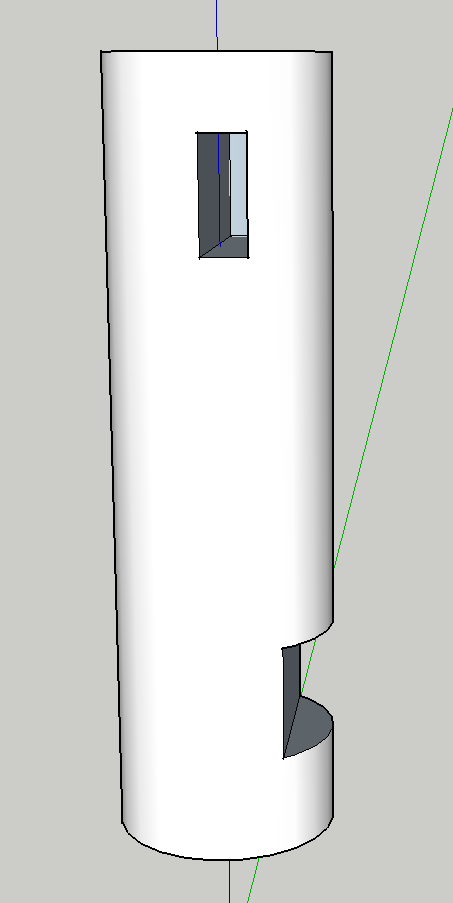
-
bmike:
That is exactly what I need. How do I do that?
-
Draw cylinder. Make it a component.
Draw keys, make them longer than you need. Make component.Copy these where you need them.
Explode keys.
Edit cylinder component. Select all by triple clicking.
Right click>Intersect with modelClose component.
Triple click your key(s).
Right click>Intersect with model.
Delete the 'extra' bit of the key(s).Explode your cylinder component.
Delete out the curved rectangle where the key entered the cylinder.
You should now have the remnant of the key inside the cylinder.
Remake into component. -
bmike:
Perfect, thanks again.
Al

Hello! It looks like you're interested in this conversation, but you don't have an account yet.
Getting fed up of having to scroll through the same posts each visit? When you register for an account, you'll always come back to exactly where you were before, and choose to be notified of new replies (either via email, or push notification). You'll also be able to save bookmarks and upvote posts to show your appreciation to other community members.
With your input, this post could be even better 💗
Register Login


Advertisement