Grey areas
-
Hi
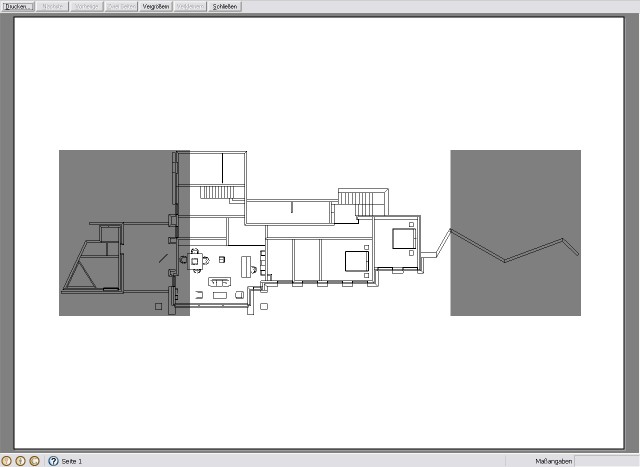
I asked this allready on german forum but i get not an answer i think it was right. See the grey areas left and right. Sometimes when i like to print out scale 1.50 or similar i have those grey areas in the image. Why?
-
You have used some ruby for a custom view?
At ruby console:
Sketchup.active_model.active_view.camera.aspect_ratio = 0.0
...should help. -
Hi notareal
You are really a master! It works! I have no idea what is going on with this script but who cares The view is just a default top view not a special custom view. Do i have to let this script in SU all the times or is it just in this File? Thanks a lot!!
 -
No credits for me about that. Give them to Jim, Tomasz and so... The issue seems to be common after a plug-in changes view aspect ratio. So prepare to use it time to time (until plug-in writers have solved this issue).
-
@notareal said:
(until plug-in writers have solved this issue).
Solve? In what way? it's a feature - to set safe-frames in Sketchup's viewport. I wrote into V-Ray Toys a means of adjusting the safe frame aspect ratio so I could visually see what would be rendered when I did not render in the space aspect ratio of SU's viewport.
It's just too bad that SU hasn't got a built-in UI for this - as it's a very useful feature only exposed to the API.
-
@thomthom said:
@notareal said:
(until plug-in writers have solved this issue).
Solve? In what way? it's a feature - to set safe-frames in Sketchup's viewport. I wrote into V-Ray Toys a means of adjusting the safe frame aspect ratio so I could visually see what would be rendered when I did not render in the space aspect ratio of SU's viewport.
It's just too bad that SU hasn't got a built-in UI for this - as it's a very useful feature only exposed to the API.
True it's a feature (and really useful one), but result seems to be unexpected for some users. Maybe just a better work flow should be offered by ruby that do use the method. Maybe a warning or a way to reset the view.
-
What plugins set this?
I've only set the aspect ratio explicitly, using either my own plugin or the old @last camera plugin.
I can see the confusing if it's set implicitly. -
I thought Thea renderer was causing problems currently. Setting it without telling people. But maybe I'm remembering incorrectly.
Chris
-
@thomthom said:
@notareal said:
(until plug-in writers have solved this issue).
Solve? In what way? it's a feature - to set safe-frames in Sketchup's viewport...
It's a great feature, but there seems to be a bug where Sketchup renders it incorrectly when printing or saving 2D images. In other words, while the gray bars appear correct in the viewport, the saved/printed image ends up with awkwardly placed gray rectangles over it.
Seems to me more like something Google needs to fix in its renderer.
-
One have to set aspect ratio explicitly in SU2Thea and it has a option to revert back to SU default view. But true it wont notify about side effect if one tries to print while aspect ratio is changed.


Hello! It looks like you're interested in this conversation, but you don't have an account yet.
Getting fed up of having to scroll through the same posts each visit? When you register for an account, you'll always come back to exactly where you were before, and choose to be notified of new replies (either via email, or push notification). You'll also be able to save bookmarks and upvote posts to show your appreciation to other community members.
With your input, this post could be even better 💗
Register Login


Advertisement