Lock a layer
-
Any one know how to lock a whole layer? I only see in the API ability to lock groups and components and I also don't see a way to easily move entities into a group/component. Perhaps there is an efficient way to "copy, paste and delete" a list of entities or even copy from one group to another preferably based on selection or layer?
-
@xiobus said:
... I also don't see a way to easily move entities into a group/component.
Tutorial, Chapter 13:
def all()
    model = Sketchup.active_model()
    model.selection().clear()
    ents = []
    for e in model.entities()
        ents.push( e ) if e.layer().visible?()
    end
    model.selection().add( ents )
end # of all()
Same source:
def make_component( entities, name )

=begin
Given an array of entities and a name, returns a named component
containing the entities.
=end

    ents = Sketchup.active_model().entities()

    g = ents.add_group( entities ) # group all entities
    inst = g.to_component() # convert group to component instance
    inst.definition().name = name

    return inst

end # of make_component()
After
allmodel.selection is an entities collection. This is the Ruby equivalent of pressing Ctrl+A and then keyboard G to make component. -
You can only 'Lock' Groups and Instances of Components.
Sketchup Layers are not like CAD Layers !
If you want to Lock everything on a particular SUp Layer you need to useGroup-Entities-by-Layer- there is a script out there on this Forum to do that - use Search......
Then you need to Lock that Group.
This will not Lock Entities on that Layer if they are inside a Definition [i.e. Groups and Components].. but you can useGroup-Definition-Entities-by-Layerand then Lock that Group - by iterating through themodel.definitions.entities.each{|e|...} -
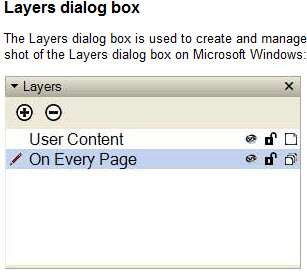
In the Help for SU7 it discusses three icons in the Layers Dialog Box:
Visibility Button
Lock Button
Share ButtonBut the Dialog Box displayed is not what you get in SU7
What am I missing?
-
Read the path to the help section - it's for Layout - where you can lock layers !
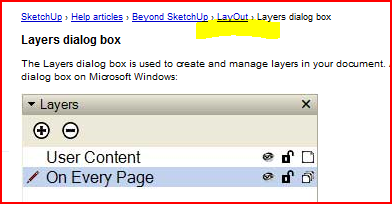 You can't do it in plain Sketchup !
 -



Hello! It looks like you're interested in this conversation, but you don't have an account yet.
Getting fed up of having to scroll through the same posts each visit? When you register for an account, you'll always come back to exactly where you were before, and choose to be notified of new replies (either via email, or push notification). You'll also be able to save bookmarks and upvote posts to show your appreciation to other community members.
With your input, this post could be even better 💗
Register Login


Advertisement